

Question

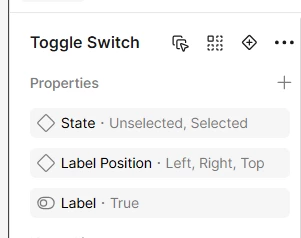
Unable to Reorder Boolean and Variant Properties

  • January 15, 2026
  • 5 replies
  • 73 views

CaliS

In my Toggle Switch component, I have a mix of properties (variants and booleans). I’m able to reorder the variants but it seems I cannot reorder the boolean. I want the order of my properties to be:

Variant - “State”

Boolean - “Label”

Variant - “Label Position”

Is this possible?


5 replies

Subham Saurabh

I'm also facing the same issue. It's very important for me and my organization 


SubhamSaurabh

I am currently unable to reorder or change the position of Variants and Properties in the property panel in Figma. This issue is critical for our organization as it disrupts our Design System and hinders the relationship between dependent properties. We would appreciate a prompt resolution to this problem.


AskDave
Figmate
  • Figmate
  • April 8, 2026

Hi, Dave here from Community Support at Figma 👋


Thanks for raising this, I’m currently checking this internally with the team to confirm what’s going on. I’ll come back to you as soon as I have a clear answer.


Thanks

Dave


SubhamSaurabh

Thanks for the update Dave, I appreciate your attention to this glitch!

I have a few other findings to share regarding recent bugs, so I’ll start a new thread for those once this is resolved. Looking forward to hearing back from you.

Thanks :)


AskDave
Figmate
  • Figmate
  • April 10, 2026

Hey ​@Subham Saurabh 


Thanks for your patience while I checked this with the team.


I’ve heard back from engineering and can confirm this is expected behaviour rather than a bug. Variant properties are designed to always sit at the top of the Properties panel in the right sidebar. You can reorder variant properties among themselves, but they can’t be placed between other property types like boolean, text, or instance swap. So in your case, having a boolean property between two variant properties isn’t something that’s currently supported.

I know that’s not ideal, especially if it impacts how your design system is structured, but hopefully that clears up what’s happening here.


More info: https://help.figma.com/hc/en-us/articles/5579474826519-Explore-component-properties#h_01HR82V7XN5KTWY6GYK6QBTWRT


Really appreciate you flagging it and sharing the context.


Thanks,
Dave