

Question

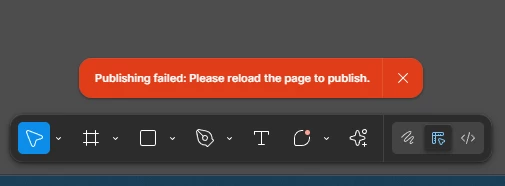
Unable to publish library changes
  • October 3, 2025
  • 5 replies
  • 40 views

Henry Ramos

I’m unable to publish changes to my library. I keep getting a message to reload the page to publish. After reloading, there’s a record that a component was indeed published; but there’s no updates available or any changes on the Figma files where I’m using this library. Any idea what I’m missing or is there an issue?

5 replies

  • Figmate
  • October 6, 2025

Hi ​@Henry Ramos,


I understand that you’re having trouble publishing changes to your team library.

Just to confirm — it sounds like the publishing process completes (you can see that a component was published), but in the files that are subscribed to this library, you don’t see the blue badge on the Libraries icon to review and accept updates. Is that correct?


To help us investigate further, could you please let us know:

  • Are you experiencing this in both the browser and desktop app?

  • Are you still seeing the “reload the page to publish” message, or has that stopped appearing?

  • Could you try connecting to Figma from a different network (for example, a mobile hotspot) and see if the issue persists?

This information will help us better understand what’s happening and find the best way to assist you.


Thanks,


Lauro Diniz Marques Guerra

Hello, i’m now experience this issue, any news about this? How to resolve?


djv
Figmate
  • Community Support
  • December 15, 2025

Hi ​@Lauro Diniz Marques Guerra, thanks for chiming in here! 

We never heard back from Henry, so he likely self-solved his issue. 

To help us help you, can you provide details, similar to what we’ve asked above?

  • Are you experiencing this in both the browser and desktop app?

  • Are you still seeing the same error message? “Publishing failed: reload the page to publish.”

  • Can you try connecting to Figma from a different network (for example, a mobile hotspot) and see if the issue persists?

  • Are you trying to publish a large number of changes, or publish a new library file with a large number of Components and Styles?


With these details, we can better pinpoint what may be causing this issue. 


Mustafa Mahdi

It seems like a syncing issue. Try manually checking for library updates or republishing after a small change; logging out and back in can also help.


Lauro Diniz Marques Guerra

One day after my complaint, the publication started working again. Unfortunately, yesterday afternoon it presented the same error again, and it continues today.


  • Are you experiencing this in both the browser and desktop app?

Yes. Both applications.

  • Are you still seeing the same error message? “Publishing failed: reload the page to publish.”

Yes.

  • Can you try connecting to Figma from a different network (for example, a mobile hotspot) and see if the issue persists?

Yes, more than one differente wifi network and mobile hotspot

  • Are you trying to publish a large number of changes, or publish a new library file with a large number of Components and Styles?

Maybe, but nothing different from what I've been doing and what was working.