

TheCommonTiger
January 25, 2025
Question

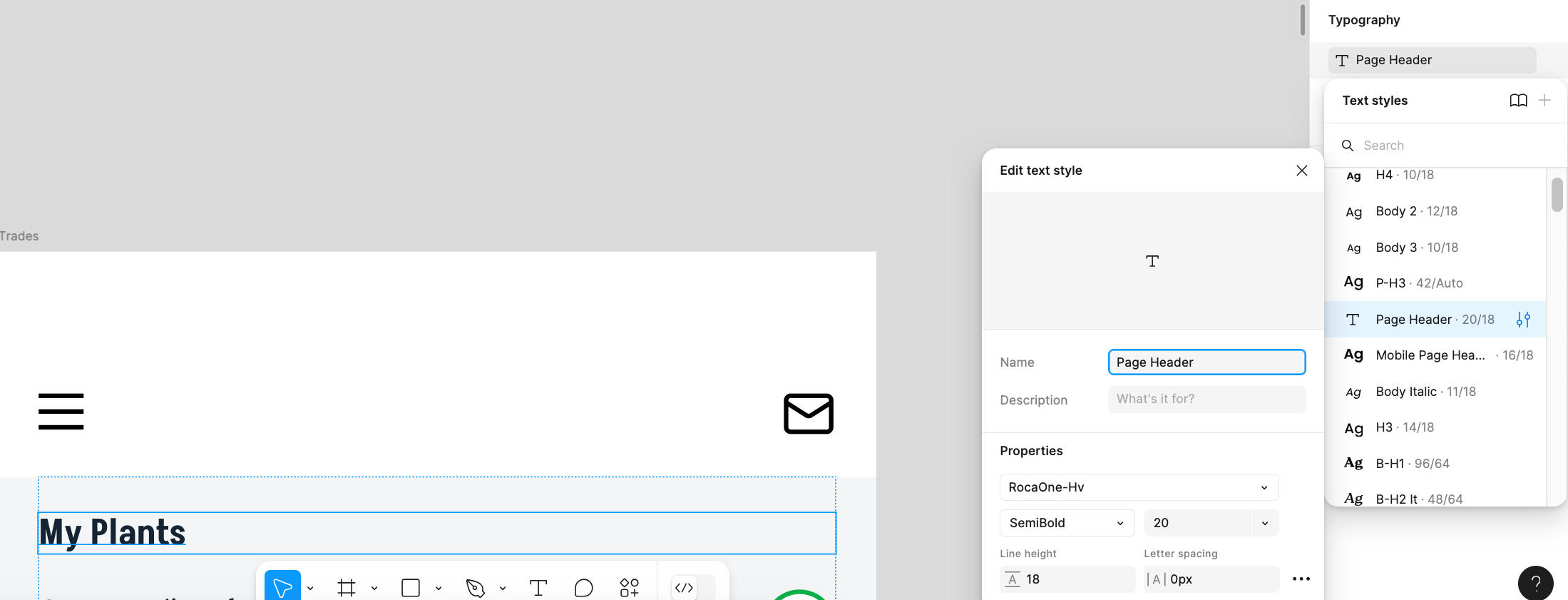
Unable to edit font styles

  • January 25, 2025
  • 4 replies
  • 257 views

I’ve been trying to edit a font style in Figma and the changes are not applying.  How can I get it to work?

I’ve edited the font multiple times, and don’t see the change reflected in my selected instance or other instances. I’ve tried quitting and restarting. I’ve also tried applying a different text style, but the font doesn’t change then either.


    This topic has been closed for replies.

    4 replies

    Avokadomos
    Active Member
    January 25, 2025

    You’re not using a standard font. Does it work with other fonts?

    TheCommonTiger
    January 25, 2025

    I tried applying Arial and Helvetica manually, and they applied. I also tried applying this same non-standard RocaOne-Hv font manually, and it applied. I also tried applying other font styles, and they applied. However, when I go back to applying the “Page Header” type style, it fails to apply. Something is wrong with that style, and one other in my collection.

    Avokadomos
    Active Member
    January 25, 2025

    I managet to get the same state as well. I’m trying to apply the text style, but it stays with the previously selected.

    When the text style has that T icon, it indicates that it can’t render the font for some reason. In my case, it was because the style was set to bold even though the font itself doesn’t support that weight. Try opening the weight dropdown and select anything that’s available.

    TheCommonTiger
    January 28, 2025

    I ended up deleting the broken font style and using my others that work, but I’ll try it if I get that problem again. Thanks for the feedback!