

Sean_Tubridy
February 24, 2024
Question

Unable to apply variables to radius, border, etc

  • February 24, 2024
  • 16 replies
  • 931 views

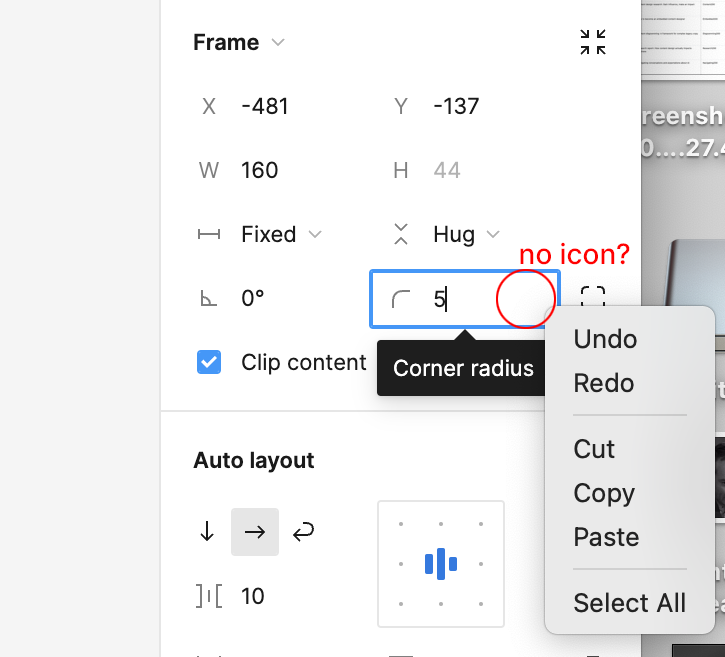
I’m unable to see the variables icon in any of the fields where they are supposed to appear. Right clicking on the field doesn’t provide the option in the dropdown either. I’m on a pro plan using the latest version of the desktop app.
This topic has been closed for replies.

16 replies

Marian_Quevedo
New Member
March 31, 2025

Hello ​@Gayani_S , I’m having the same problem here. I’ve tried clearing cache both the browser and desktop app and nothing happend 🙁

I discovered that it only happens with new files in my professional account. In older files I can still use variables without problem. Since when does this happen? I don’t know 🤔


GraphiXe
New Member
May 27, 2025

I had the same issue, I can apply variables to paddings but not to corner radius. It appeared to be from the scope of the variable, mine was not checked for corner radius so it was the problem.

Peter Michaels Allen
New Member
June 16, 2025

I’m having this problem now as well 🤦🏽

Did anyone find a solution??

Arslan_Khalid
New Member
September 15, 2025

Facing the same issue on macOS. 


Arslan_Khalid
New Member
September 15, 2025

Actually got it fixed by changing the scope of variable.

Eli Coretti
New Member
November 18, 2025

Hi I’m having the same issue. I have cleared the cache and attempted on the desktop but still cannot add a variable to corners. Is there a solution besides deleting and reinstalling?


Thank you!