

Solved

Text changes when switching variants

  • May 21, 2026
  • 1 reply
  • 10 views

bld_design

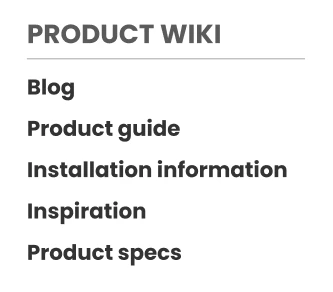
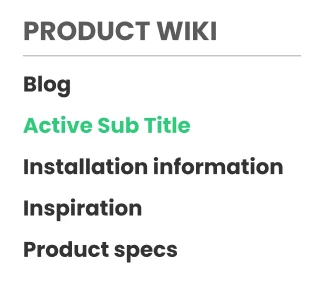
Hey everyone! I have a question about component variant switching and text strings. I’m trying to build a link sidebar, I made component variants for it (title, subtitle, active subtitle). When I use this components in my design and fill in appropriate link names, then switch a single link to an active variant, it switched the text to component’s text, not the one I entered.

How can I go about it to prevent it from switching?

Creative text variables is not really viable because that’d be a lot and not useful imo.


Here is the example:

Before
After:
 

Best answer by bld_design

Well looks like I already found a solution, leaving it here in case anyone else needs it.

You need to put the same text string in original component variants.

For example my text strings were “main title”, “subtitle”, “active subtitle”. Changing the component string to “title” for all variants preserves the text in variant change in component instances.

1 reply

bld_design
  • Author
  • New Member
  • Answer
  • May 21, 2026

Well looks like I already found a solution, leaving it here in case anyone else needs it.

You need to put the same text string in original component variants.

For example my text strings were “main title”, “subtitle”, “active subtitle”. Changing the component string to “title” for all variants preserves the text in variant change in component instances.