
gregoiregautier
New Member
Jan 5, 2024 10:15 AM UTC
Solved

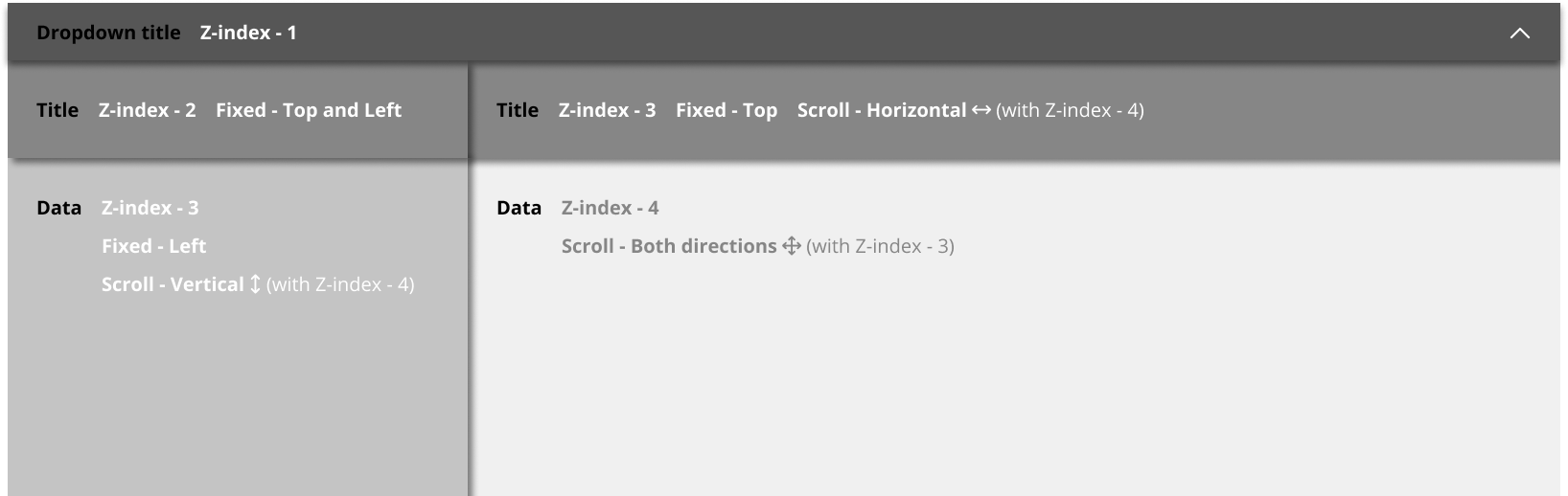
Table in Figma - Different scroll behaviours connected between them in different frames - Same functionality than Freeze panes to lock rows and columns like in Excel or Google Sheet

Hi everyone 👋

I think it’s impossible to do that now but maybe in the future.

Anyway, I try to ask this community to maybe find someone who succeed to do what I want to do 🙂

I want to have different scroll behaviours in different frames connected between them to make a table with the same functionality than « Freeze panes to lock rows and columns » like in Excel or Google Sheet.

Did someone succeed to do that ?

Thanks in advance for your future answer 😉

This topic has been closed for replies.
y_toku
y_tokuSolution
Community Support
Jan 9, 2024 2:22 AM UTC

Hi there,

Thanks for the post. Unfortunately, it’s not possible at this moment. There was a discussion on this, so this post could help you: https://forum.figma.com/t/interactive-table-sticky-column-sticky-row/26283/8.

I know this isn’t the best solution for you, but I hope this helps!

Thanks,
Toku

2 replies

y_toku
Figmate
y_tokuSolution
Community Support
Jan 9, 2024 2:22 AM UTC

Hi there,

Thanks for the post. Unfortunately, it’s not possible at this moment. There was a discussion on this, so this post could help you: https://forum.figma.com/t/interactive-table-sticky-column-sticky-row/26283/8.

I know this isn’t the best solution for you, but I hope this helps!

Thanks,
Toku

Jul 8, 2024 1:26 PM UTC

Create two copys of the same frame and on first create table scroll vertical without first row and second frame table horizontal float without first left column and on hover on any left column change frame with float vertical. If hover first row switch to horizontl scroll