
Jun 9, 2023 8:44 AM UTC
Question

Stroke error on text 'O' or donut shaped text
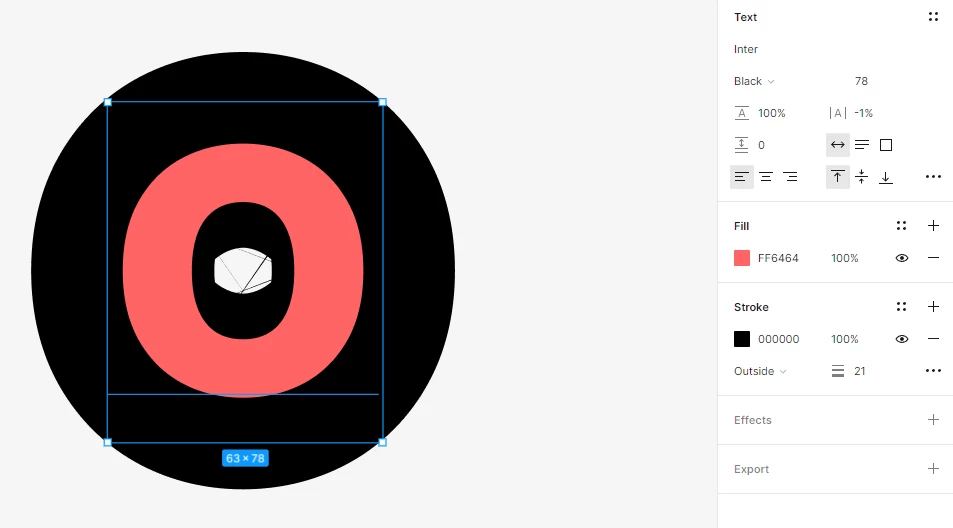
hi, there is a porblem when i add stroke on ‘O’ or donut shaped text.

when stroke width is thinner than the inside circle, it has no problem,
but the stroke width goes thicker than the inside circle, the shape of the inside stroke absolutely break down.

does anyone know how to fix it? thanks

This topic has been closed for replies.

6 replies

Armin_Rouhanian
Active Member
Jun 9, 2023 9:09 PM UTC

Hey there.

The image does not show enough detail. Can you turn on the wireframe mode by pressing “Shift + O” and take another screenshot?

Armin The Riverman
JunhaAuthor
Jun 11, 2023 11:55 PM UTC

hi
here is the screenshot of wireframe mode
thanks for your help

Gleb
Power Member
Jun 12, 2023 1:47 AM UTC

This is an ancient well known bug. The only workaround is to use something other than a stroke to achieve the effect you need.

JunhaAuthor
Jun 12, 2023 2:32 AM UTC

thanks for your hlep!

Patrick-Plaggenborg
Active Member
Feb 24, 2025 3:34 PM UTC

I have the same issue when adding Strokes to characters with circles or dots, like when using characters such as . ! : etc.

So this is a rendering bug in Figma?


djv
Figmate
Community Support
Feb 24, 2025 10:52 PM UTC

Hi ​@Patrick-Plaggenborg, thanks for following up! 

Yes, as Gleb mentioned above, this is a long-standing bug that is as old as Figma itself. While the team is aware of this issue, we don’t have an exact timeline to share on a fix.