Aminadav_Glickshtein
New Participant
June 11, 2025
Solved

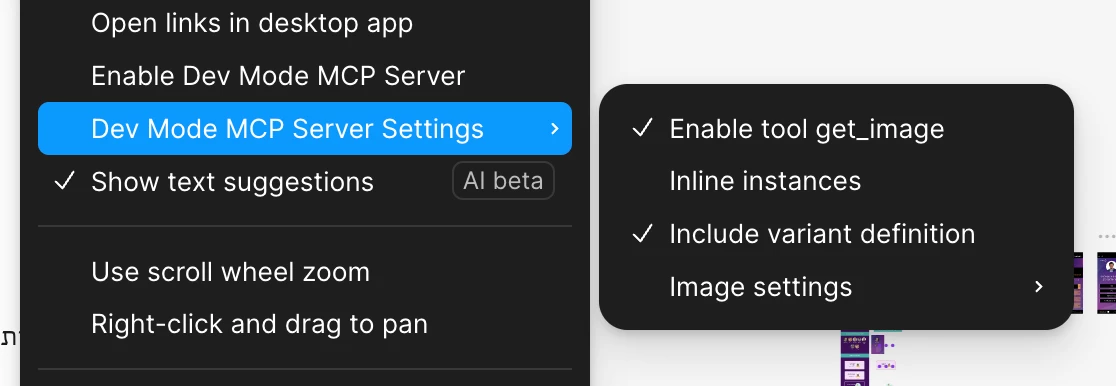
Someone can explain me the MCP settings? There is no help docs

  • June 11, 2025
  • 1 reply
  • 466 views


What is “inlince instances”, what is “Enable tool get_image” what is ‘Image settings”, and what included exactly  in “Variant definition”

This topic has been closed for replies.
Best answer by Celine_

 Hi ​@Aminadav_Glickshtein ! Celine here, from the Community Support team at Figma.
 I’ve checked internally and I can confirm that we’ll be publishing full docs for these settings soon, but here’s a quick explanation in the meantime:

  • Enable tool get_image - lets the agent take a screenshot of your selection to preserve layout more accurately. It's usually best to keep this on (only turn it off if you're running into context/token issues). We may rename this tool in the future to  get_screenshot .
  • Enable Code Connect – Extracts Code Connect data along with the generated code, so the model can reuse your actual components when mappings are available
  • Image settings -  controls how image assets are handled:
    • Use placeholders: Skips image extraction and adds generic placeholders instead - helpful if you prefer swapping them manually in code.
    • Use local images: adds a localhost link to the returned markup, allowing you to use the actual image asset wherever your file is rendered.
  • Inline instances / Inline settings – These will be removed soon.

    Heads up! During the open beta, we’ll be making changes to these settings and the tools available to the MCP server. Expect some of these to change! Thanks for your understanding 🙏🏼

1 reply

Celine_
Figmate
Celine_Solution
Community Support
June 19, 2025

 Hi ​@Aminadav_Glickshtein ! Celine here, from the Community Support team at Figma.
 I’ve checked internally and I can confirm that we’ll be publishing full docs for these settings soon, but here’s a quick explanation in the meantime:

  • Enable tool get_image - lets the agent take a screenshot of your selection to preserve layout more accurately. It's usually best to keep this on (only turn it off if you're running into context/token issues). We may rename this tool in the future to  get_screenshot .
  • Enable Code Connect – Extracts Code Connect data along with the generated code, so the model can reuse your actual components when mappings are available
  • Image settings -  controls how image assets are handled:
    • Use placeholders: Skips image extraction and adds generic placeholders instead - helpful if you prefer swapping them manually in code.
    • Use local images: adds a localhost link to the returned markup, allowing you to use the actual image asset wherever your file is rendered.
  • Inline instances / Inline settings – These will be removed soon.

    Heads up! During the open beta, we’ll be making changes to these settings and the tools available to the MCP server. Expect some of these to change! Thanks for your understanding 🙏🏼