pierrelord
New Participant
September 6, 2024
Solved

SOLVED: How to duplicate variable-based text styles at scale?

  • September 6, 2024
  • 14 replies
  • 790 views
  • I manage a large-scale multi-brand design system
  • The setup is pretty large - albeit standard IMHO
  • 1000+ text styles - where all text style properties are variable-based.

Duplicating styles individually/manually is straightforward, however, at this scale, it is prohibitive.

There are a few methods (cut/paste to another file) and plugins to help workflow in duplicating text styles without variables, but they don’t support/maintain variables.

Any thoughts on how to do this with Variable-based text styles?

Use case:
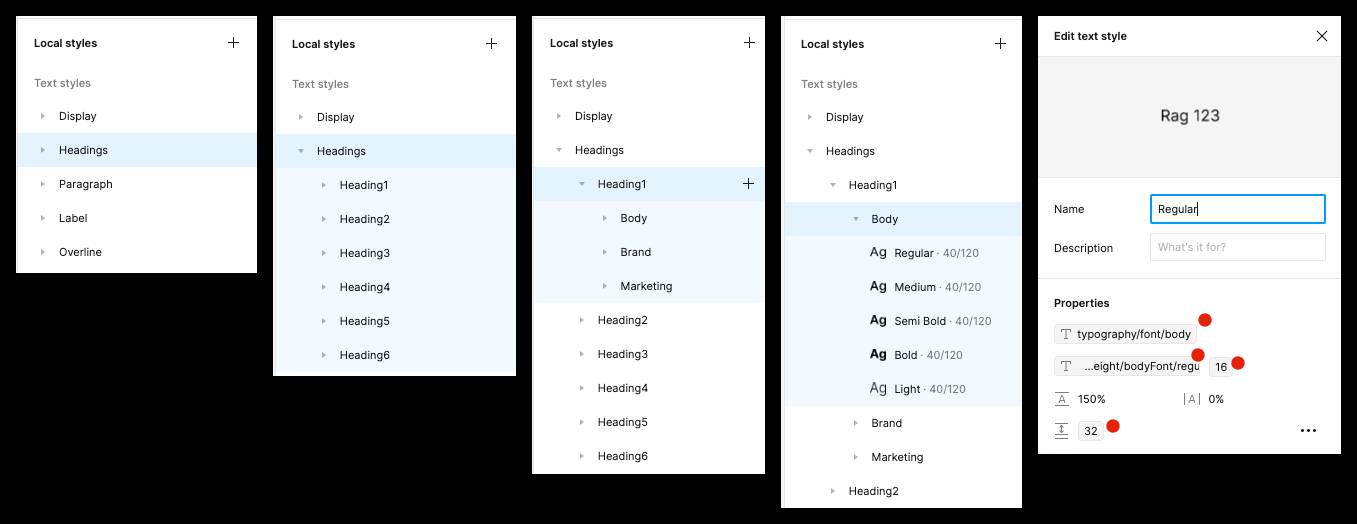
We already have 3 font variables per brand: “Body”, “Brand”, “Marketing”.
We want to add a “Serif” font (in variables) for each brand, by cloning (for example) the “Brand” version/tree of the text styles across all sizes/styles and applying “Serif” font variables.

Any thoughts/help appreciated.
Thanks.

Pierre


For anyone wondering about the sanity/validity of 1000+ text styles, I’d love to hear how to address the following requirements without such an approach.

Architecture of text-styles:

  • 4 style types addressing 15 sizes ranging from 60px down to 9px (in variables)
    • 3x display (Large, medium, small)
    • 6x headings (h1, h2, h3, h4, h5, h6)
    • 6x Paragraph (LG, MD, SM, XS, MI, NA)
    • 3x overline (LG, MD, SM)
  • Each brand (mode) has 3 fonts (Body, Brand, Marketing) (declared in variables)
  • Each font has 5 Font weights available (Light, regular, medium, semi-bold, bold) (in variables)
  • It therefore has over 1000+ styles

This topic has been closed for replies.
Best answer by pierrelord

Thought I’d close the loop here on how this was successfully achieved.

I was successfully able to duplicate hundreds of text styles (with bound variables) programatically in a few hours, saving days of menial work. Very grateful for the plugin and time spent by Pavel adding a few features to his plugin to get this to work.

As described by @Pavel_Kiselev in this thread:

  1. Run the Source Foundation plugin (which does a lot more powerful stuff than just the simple token export/import feature needed here) https://www.figma.com/community/plugin/1297031341980383999/source-foundation
  2. Export your tokens to a text file
  3. Manipulate your tokens offline (clone/rename/edit your text-style tokens)
  4. Import your tokens back into your file. (Make sure to uncheck “Text Styles” and “Effects” from the Import tokens / “Add styles and effect from Foundation” prompts)
  5. You newly created/renamed text-styles will appear, ready for use.

This process will surface issues with your variables, forcing you to clean up any inconsistencies and bugs… Ex:

  • Variables referring to deleted variables will be flagged by the plugin with an alert - and fail import. You’ll want to clean those up.
  • String variables (for example: for “FontWeight”) need to match EXACTLY the name of the font weight used in the font. Ex: Some fonts use “Semi Bold” whereas others use “SemiBold”. While this will not cause the import to fail, you need to get this right.
  • The import process can take some time - 6000 variables took about 20 minutes for the plugin to process/import back in before spitting out new text-styles.

Hope this helps someone else.
Thanks again Pavel.

14 replies

pierrelord
New Participant
September 17, 2024

@Pavel_Kiselev PMd you video of workflow.

pierrelord
pierrelordAuthorAnswer
New Participant
September 22, 2024

Thought I’d close the loop here on how this was successfully achieved.

I was successfully able to duplicate hundreds of text styles (with bound variables) programatically in a few hours, saving days of menial work. Very grateful for the plugin and time spent by Pavel adding a few features to his plugin to get this to work.

As described by @Pavel_Kiselev in this thread:

  1. Run the Source Foundation plugin (which does a lot more powerful stuff than just the simple token export/import feature needed here) https://www.figma.com/community/plugin/1297031341980383999/source-foundation
  2. Export your tokens to a text file
  3. Manipulate your tokens offline (clone/rename/edit your text-style tokens)
  4. Import your tokens back into your file. (Make sure to uncheck “Text Styles” and “Effects” from the Import tokens / “Add styles and effect from Foundation” prompts)
  5. You newly created/renamed text-styles will appear, ready for use.

This process will surface issues with your variables, forcing you to clean up any inconsistencies and bugs… Ex:

  • Variables referring to deleted variables will be flagged by the plugin with an alert - and fail import. You’ll want to clean those up.
  • String variables (for example: for “FontWeight”) need to match EXACTLY the name of the font weight used in the font. Ex: Some fonts use “Semi Bold” whereas others use “SemiBold”. While this will not cause the import to fail, you need to get this right.
  • The import process can take some time - 6000 variables took about 20 minutes for the plugin to process/import back in before spitting out new text-styles.

Hope this helps someone else.
Thanks again Pavel.

Joanna_Jakab
New Member
January 31, 2025

Hi, I have an issue that the text styles don’t have the variables connected to them if I copy variables using the SF plugin to an existing page with some design in it. It works well if I copy the variables with styles to an empty / new file. I also don’t see the checkboxes described here:

“Import your tokens back into your file. (Make sure to uncheck “Text Styles” and “Effects” from the Import tokens / “Add styles and effect from Foundation” prompts)” if I’m copying just tokens. 

Is there a way, that this plugin would work also while copying to existing designs keeping the asignd=ed variables in text styles? That would be amazing!
 

Wirkkarl
Active Member
April 29, 2025
  • I manage a large-scale multi-brand design system
  • The setup is pretty large - albeit standard IMHO
  • 1000+ text styles - where all text style properties are variable-based.

Duplicating styles individually/manually is straightforward, however, at this scale, it is prohibitive.

There are a few methods (cut/paste to another file) and plugins to help workflow in duplicating text styles without variables, but they don’t support/maintain variables.

Any thoughts on how to do this with Variable-based text styles?

Use case:
We already have 3 font variables per brand: “Body”, “Brand”, “Marketing”.
We want to add a “Serif” font (in variables) for each brand, by cloning (for example) the “Brand” version/tree of the text styles across all sizes/styles and applying “Serif” font variables.

Any thoughts/help appreciated.
Thanks.

Pierre

For anyone wondering about the sanity/validity of 1000+ text styles, I’d love to hear how to address the following requirements without such an approach.

Architecture of text-styles:

  • 4 style types addressing 15 sizes ranging from 60px down to 9px (in variables)
    • 3x display (Large, medium, small)
    • 6x headings (h1, h2, h3, h4, h5, h6)
    • 6x Paragraph (LG, MD, SM, XS, MI, NA)
    • 3x overline (LG, MD, SM)
  • Each brand (mode) has 3 fonts (Body, Brand, Marketing) (declared in variables)
  • Each font has 5 Font weights available (Light, regular, medium, semi-bold, bold) (in variables)
  • It therefore has over 1000+ styles


That’s a really interesting challenge, Pierre. I’ve run into similar scaling issues before, and maintaining variable links across duplicates can be tricky. I’d love to see Figma or a plugin support bulk duplication while preserving variable bindings—it would be a huge time-saver. For now, maybe scripting via the Figma Plugin API could be a workaround? Curious if others have cracked this!