

Yuval_Dikerman
February 19, 2021
Question

Solved? - CTRL + ALT + C doesn't copy properties/style data anymore

  • February 19, 2021
  • 25 replies
  • 18951 views

Previously discussed in the old channel figma confuses CTRL + ALT + C - Making it function as Add/Show Comments instead of Copy Properties.
The solution I found was switching to a US Keyboard instead of an International English Keyboard →
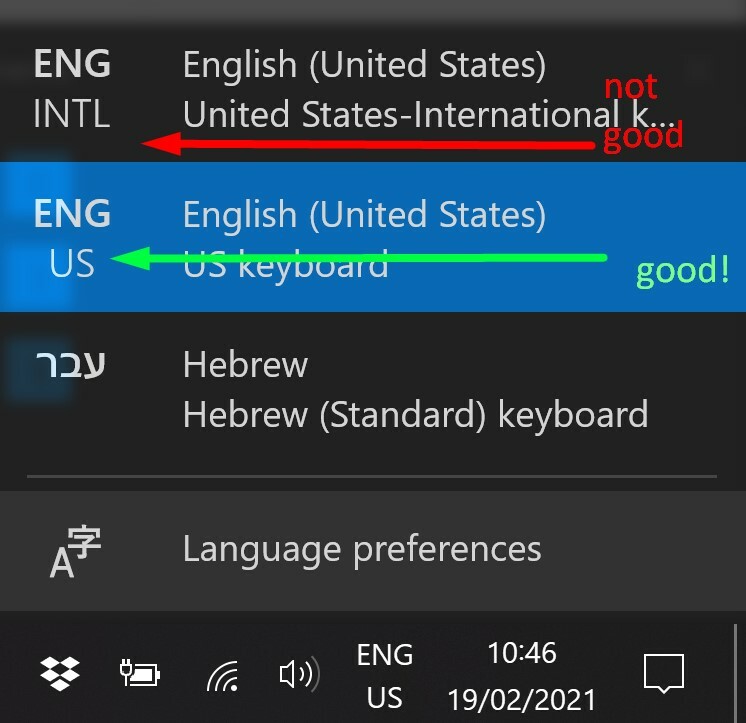
This topic has been closed for replies.

25 replies

Serhii_Mudrak
February 1, 2022

MAN I LOVE YOU ❤️❤️❤️SO MUCH TROUBLE AND SUCH A SIMPLE SOLUTION XDDD
How you figure that out?

Kristof_Aczel
February 4, 2022

Jesus Christ, it does work!!! NumLock needs to be enabled! Oh man, how on earth did you figure it out??? You are the MAN!!

Andrew_A
February 16, 2022

Probably another software is blocking the same shortcut. In my case it was Evernote. It used Ctrl+Alt+V shortcut for pasting.

Andras
New Member
February 26, 2022

I’m also having this issue with both the browser and Windows app version of Figma. Ctrl+Alt+C and Ctrl+Alt+V only work if I change to the English keyboard layout.

What about those who don’t have NumLock? Unfortunately I don’t have one on my laptop.

Alwyn_Balingit
New Participant
February 28, 2022

I still think that CTRL+ALT+C should invoke “Copy Properties” instead of “Comments” regardless if the following are on or off:

  • EN-INTL vs EN-US Keyboards
  • Num Lock State

The bug started when they double-mapped Ctrl+Alt+C to “Comments Mode”, Not knowing that the keyboard shortcut is already assigned to “Copy Properties” as shown here for many years already:

image

Vlad_Loktionov
June 5, 2022

Hello. One good developer BladeMight just responded to my suggestion and offered his own workaround for INTL layouts (the best and trouble-free in my opinion) with Mahou app: at the time of typing Ctrl+Alt+ combinations, the keyboard layout will temporarily change to special one where the symbol mode doesn’t involve duplicating AltGr to Ctrl+Alt.

Just open Mahou “Layouts” tab and enter in “Temporary change layout on LCtrl+LAlt combination” field: 67699721 (English US code), then click on “Apply” button.

You can freely specify any other (desired) keyboard layout (without AltGr) code for a temporary change (but it made no difference).

Download (x64): https://github.com/BladeMight/Mahou/releases/download/latest-commit/Release_x64.zip

Other builds: Release latest commit release ([417879a] build #1242) · BladeMight/Mahou · GitHub

Here are my settings: https://i.imgur.com/Auh6xHu.png

Vinicius_Blembeel
June 6, 2022

So… still no official fix for this? I sent a support ticket a while ago and the only thing they responded to me was that was basically a one-off bug. Thought it was just me.

What would be solution for those who don’t have numlock on their keyboards and don’t have the language bar available (even if I had, my keyboard is ABNT2 (PT-BR Keyboard))?

I’m aware of @Rubem_Pechansky 's script solution but I’m not familiar enough with scripts to install it and would preffer avoid using if possible since it could lead to several other unforeseen complications.

Mushba_Said
July 30, 2022

Hi everyone,
TL;DR: if keyboard changes aren’t working for you and you have Loom installed, quit Loom.

Long story: I found this forum because I was facing the same issue. I tried the keyboard changes and it didn’t work. Then I googled the shortcut for confetti to make sure my switches weren’t causing an issue (i have a mech keyboard) and found this: Did I just find an easter egg in Figma? · Figma

Sadly this is an issue if you run Loom and Figma together -_-

Posting this here in case it helps anyone!

Niaw
September 2, 2022

Same here. I discovered that Loom was causing the problem by closing tray applications one by one until the Ctrl + Alt +C shortcut worked. Then I checked Loom preferences and found the shortcut conflict.

Anton_Yakovlev
September 26, 2022

You can use “On-Screen Keyboard” for it (shortcut is hidden in Start → “Windows Ease of Access” folder)