

Solved

Site Preview does not play video in text

  • May 8, 2026
  • 2 replies
  • 40 views

EmberN

I created a banner using Figma Site with a video background and a text with a video fill as well. 

It would look like this: (don’t mind the CTA buttons)

 

Problems:

  1. the video in the text would not start, it would just be a static image. while the video background would play in preview.
  2. if I added Inner Shadow that shadow would not register at all on preview.
  3. After some tinkering, the text would not even show up in the preview at all.

Video Settings are on default:

Autoplay - on
Loop - on
Show Playback controls - off
Mute - on

I’m stumped in trying to troubleshoot this. Anyone has an idea I can try? Also, I have paid account.
Best answer by adamsmasher

Hey, ​@EmberN!


The text looks pretty cool on the background with the fills you’ve added. It also looks you’ve done a fair amount of testing here, so I’m going to address each of the issues individually:

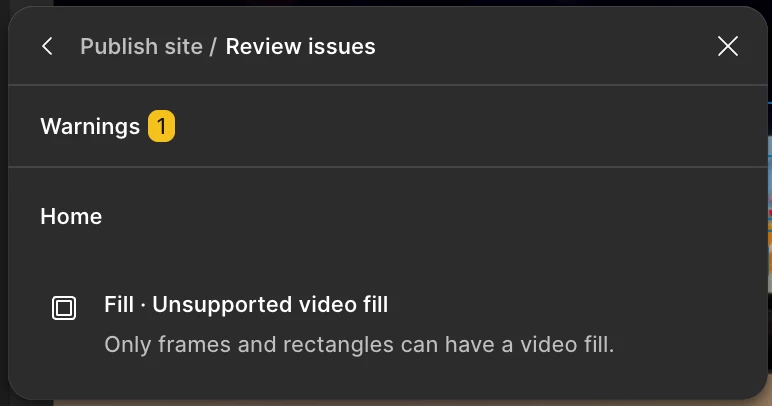
  1. Video text -  In Figma Sites, only frames and rectangles can have video fills. It’s unfortunate that it doesn’t inform you of this when editing the fill of text, but you’ll see a warning about this if you publish your site (see my screenshot below).
  2. Inner Shadow - The is the same situation as above; the Inner Shadow effect isn’t supported with text. There are other effects that are supported, though, such as Drop Shadow.
  3. Text not showing at all - When this happened, had you removed all text effects so it only had the video fill? That would explain why you didn’t see it in preview. 
Warning shown when actually publishing.


While I can’t speak to what features are coming to Figma Sites, hopefully this will be one of them at some point so you can take advantage of it! In the meantime, I’m going to share this as feedback to the team.


Edit: I received a couple recommendations from the team you can also try. The first is you could use a Code layer, and the second is you could use Figma Make as it should be able to create something like that for you.

2 replies

adamsmasher
Figmate
  • Figmate
  • Answer
  • May 9, 2026

Hey, ​@EmberN!


The text looks pretty cool on the background with the fills you’ve added. It also looks you’ve done a fair amount of testing here, so I’m going to address each of the issues individually:

  1. Video text -  In Figma Sites, only frames and rectangles can have video fills. It’s unfortunate that it doesn’t inform you of this when editing the fill of text, but you’ll see a warning about this if you publish your site (see my screenshot below).
  2. Inner Shadow - The is the same situation as above; the Inner Shadow effect isn’t supported with text. There are other effects that are supported, though, such as Drop Shadow.
  3. Text not showing at all - When this happened, had you removed all text effects so it only had the video fill? That would explain why you didn’t see it in preview. 
Warning shown when actually publishing.


While I can’t speak to what features are coming to Figma Sites, hopefully this will be one of them at some point so you can take advantage of it! In the meantime, I’m going to share this as feedback to the team.


Edit: I received a couple recommendations from the team you can also try. The first is you could use a Code layer, and the second is you could use Figma Make as it should be able to create something like that for you.


EmberN
  • Author
  • New Participant
  • May 9, 2026

i agree, when i tried publishing it the warning showed. which is very weird because it lead me to think there is a glitch instead of Figma saying not supposed to do that yet while i was working. 


yes, it would be better if there was a warning before or disabled areas to anticipate the features while still showing the user that it will be added maybe later on. this is a much better way to at the very least give a heads up and make us drool. 


yes, i have tested it all. also because Figma Design can do it flawlessly, i was hoping Figma Site was similar or even better because of the frames dedicated for flawless responsive design. 


i am encouraged to know the Figma team is still working towards a better product for users 🤌. that what sets Figma apart from the rest. 


thank you!