

Question

Sidebar expansion issue in prototype

  • August 2, 2026
  • 4 replies
  • 80 views

Mustafa Wahab

 I have a sidebar in my web application design, and I've created it as a component set with Expanded and Collapsed variants.
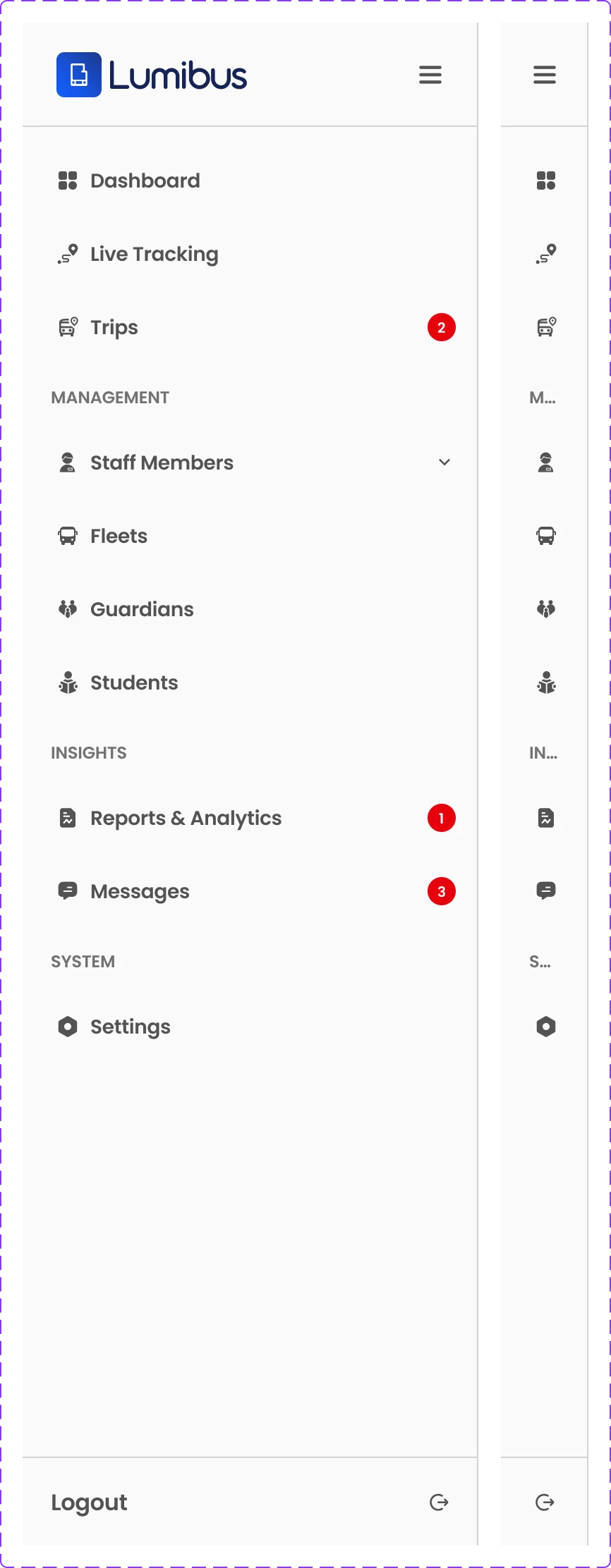


The issue I'm facing is that when I switch to the Collapsed variant in Prototype mode, it doesn't match the actual Collapsed variant defined in the component set.

If you look closely in the image below, you'll notice that the Dashboard label is still visible in the prototype, even though the Collapsed variant in the component set doesn't contain any text.

 

Am I missing a setting, or is this a bug? I've attached screenshots of both the component set and the prototype for reference.

4 replies

Mustafa Wahab
  • Author
  • New Participant
  • August 4, 2026

Bump


djv
Figmate
  • Community Support
  • August 4, 2026

Hi ​@Mustafa Wahab, thanks for reaching out! 

I completely understand how this must be disrupting your work. What you're describing lines up with a known issue where overrides on a nested instance (like your text label) don't carry over correctly when a variant swap happens in Prototype view, even though the canvas variant is correct. This is a longstanding limitation on our end rather than something you're missing in your setup. A couple of quick questions, so we can confirm it's the same thing and point you to the best temporary solution:

  1. Is your sidebar instance nested inside another component (e.g., wrapped in a frame that's then turned into its own component), rather than used directly on the canvas?
  2. Does the same mismatch happen if you drag the Collapsed variant onto the canvas directly (outside of Prototype/Preview mode)?

In the meantime, a couple of things worth trying:

  • If possible, avoid nesting the sidebar instance inside another component layer; apply the Expanded/Collapsed override directly on the top-level instance rather than a nested one.
  • Double-check there's no leftover interactive component state override on the label layer specifically (a reset on that layer sometimes clears it).

Let us know these details and what you find trying out the other two checks!


Mustafa Wahab
  • Author
  • New Participant
  • August 4, 2026

Hi ​@Mustafa Wahab, thanks for reaching out! 

I completely understand how this must be disrupting your work. What you're describing lines up with a known issue where overrides on a nested instance (like your text label) don't carry over correctly when a variant swap happens in Prototype view, even though the canvas variant is correct. This is a longstanding limitation on our end rather than something you're missing in your setup. A couple of quick questions, so we can confirm it's the same thing and point you to the best temporary solution:

  1. Is your sidebar instance nested inside another component (e.g., wrapped in a frame that's then turned into its own component), rather than used directly on the canvas?
  2. Does the same mismatch happen if you drag the Collapsed variant onto the canvas directly (outside of Prototype/Preview mode)?

In the meantime, a couple of things worth trying:

  • If possible, avoid nesting the sidebar instance inside another component layer; apply the Expanded/Collapsed override directly on the top-level instance rather than a nested one.
  • Double-check there's no leftover interactive component state override on the label layer specifically (a reset on that layer sometimes clears it).

Let us know these details and what you find trying out the other two checks!

Hi,


My answer to your questions:

  1. No, my component is not nested inside any other component as you can see the image in the OG post that the component set of sidebar only contains 2 instances one is expanded and the other is collapsed.
  1. Mismatch happens in both canvas when I manually open and close the sidebar and in the prototype.

djv
Figmate
  • Community Support
  • August 4, 2026

Thanks for checking those, ​@Mustafa Wahab!

Since it happens on canvas too (not just Prototype), this looks like Figma's override preservation working as designed, not a bug. Overrides carry over between variants when a layer with the same name exists in both, so if your Collapsed variant still has a layer named like your Dashboard label (even hidden/empty), an override can still slip through.

Quick test: right-click the instance → Reset all changes, then switch to Collapsed. Does the label disappear?

If it does: either delete that layer from the Collapsed variant entirely, or rename it differently than in Expanded. That stops Figma from linking the override across variants. Let us know what the reset test shows!