Karlyn
October 2, 2023
Solved

Share prototype without sharing whole design file

  • October 2, 2023
  • 15 replies
  • 5897 views

When I share a prototype with someone, they are able to view the prototype, AND can also view the whole design file if they go to the top menu dropdown and click “Open in Editor”.

Q: How do I share my prototype without user being able to open my design file? [there are prob ways to keep user from editing the file, but that’s not my concern, because I don’t want them able to view the design file it in the first place.

This topic has been closed for replies.
Best answer by djv

Hey All, sorry for the trouble and confusion!

We have recently changed the entry point for sharing prototypes with prototype only viewing access.

To share prototypes only, you will need to share from the “Share prototype” button while in the prototype viewer and not the Share button in the Editor view.

The steps to do this are:

  1. Open the file in Presentation Mode by pressing the Present button in the toolbar
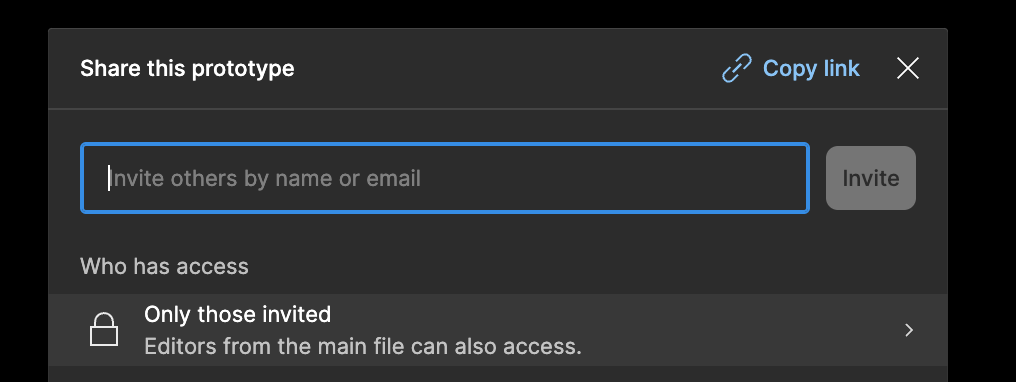
  2. Click the blue “Share prototype” button at the top right
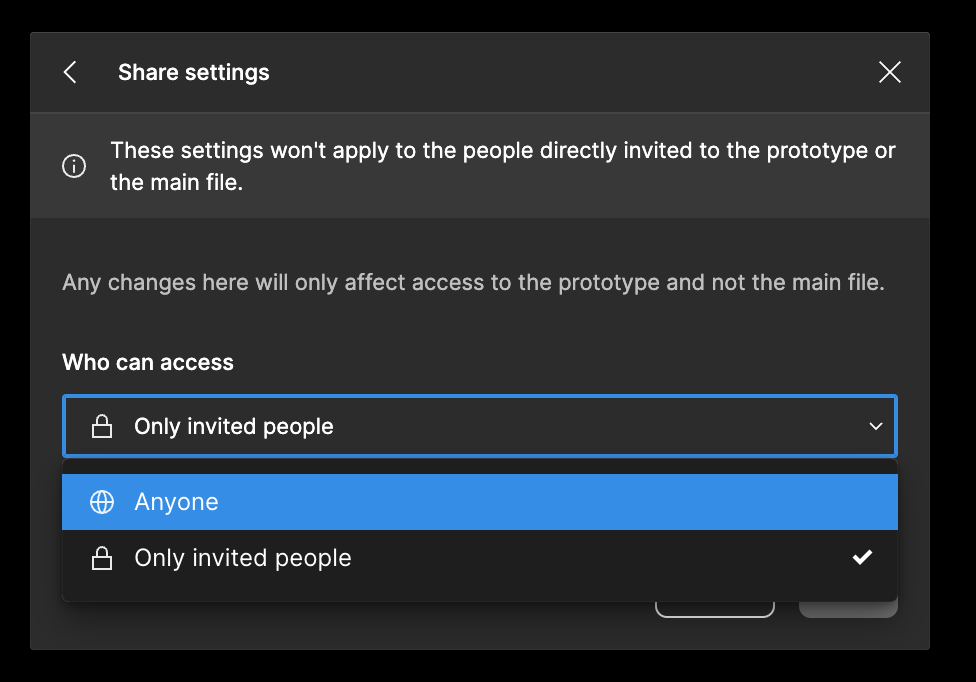
  3. Select Only those invited.
  4. Select Anyone and then save. This means anyone with the URL to the prototype will be able to see just the prototype.

After saving, copy and send the link to those that should have access to view.

For more information on the sharing options, you can also see: Share files and prototypes

15 replies

Michael_R
August 23, 2024

And then just to provide some further context.
It shows in the design file ‘share’ module that there are several collaborators in the file. These are the people that I invited through the ‘share prototype’ module only.

But in that same file, when I open the prototype and click the ‘share prototype’ module, they don’t show up at all? So I can’t tell (and am can only assume) that they are viewing the design file and not the prototype.

I know this is not the case because I’ve tested with another one of my personal emails, but just wondering what is going on here from a Figma point of view.

CleanShot 2024-08-23 at 17.12.27

djv
Figmate
djvSolution
Community Support
August 23, 2024

Hey All, sorry for the trouble and confusion!

We have recently changed the entry point for sharing prototypes with prototype only viewing access.

To share prototypes only, you will need to share from the “Share prototype” button while in the prototype viewer and not the Share button in the Editor view.

The steps to do this are:

  1. Open the file in Presentation Mode by pressing the Present button in the toolbar
  2. Click the blue “Share prototype” button at the top right
  3. Select Only those invited.
  4. Select Anyone and then save. This means anyone with the URL to the prototype will be able to see just the prototype.

After saving, copy and send the link to those that should have access to view.

For more information on the sharing options, you can also see: Share files and prototypes

Reber_Dennis_096
New Member
April 10, 2025

Hi ​@dvaliao . On Enterprise side, as an admin, is there an option where i can set for the whole tenant and workspaces that design file sharing to external is not allowed, but only prototypes?

djv
Figmate
Community Support
April 11, 2025

Hey ​@Reber_Dennis_096, thanks for reaching out! 

As an Admin, you can disable public links (or require a password/expiration on a file) or restrict or prevent guest access completely, but this will also apply for prototypes.

We don't currently have a way to restrict file sharing that still allows public prototype sharing. 

As a temporary solution, you can set individual share settings from within a file while in Design mode, and you can then set different share settings for the Prototype in Presentation mode. But this would need to be done on a file-by-file basis.

Spies Global
New Member
June 21, 2025

A whole Figma not having this feature bewilders me, wtf💔😬