Mansi Bhatia
New Member
January 16, 2025
Solved

Red backgroudn coming behind my design

Hello all, 


I am currently a student and have just started learning UX, as part of our project I have created a design but there seems to be a red background coming behind my frame. 


Could someone please help me understand how to remove that? 


I can share my design link, thank you!


Thanks 

Mansi

This topic has been closed for replies.
Nellya
NellyaSolution
Power Member
January 22, 2025

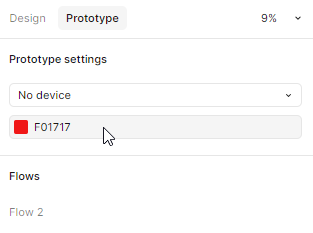
You can change background color of Prototype here ↓


6 replies

Nellya
Power Member
January 16, 2025

Hi. I’m sure someone can try to help you if you share the link or a full screenshots.

Mansi Bhatia
New Member
January 22, 2025

Hello Nellya and fellow Figma Community, 


Thank you so much for your response. I have included the link to the file, kindly bear with me as I am just a student at this stage, also if you have any suggestions for me in regards to the file, I am very much happy to hear them :)


https://www.figma.com/proto/vbpw36BRSLqTnukJMNNnfR/EmployAbility---Mansi?node-id=0-1&t=dNx0vCYmTStQjwjV-1

Nellya
NellyaSolution
Power Member
January 22, 2025

You can change background color of Prototype here ↓


Mansi Bhatia
New Member
January 22, 2025

Hi Nellya


Oh my God, cant believe it was as simple as that, thank you so much for helping me out :) 


thanks 

Mansi

Mansi Bhatia
New Member
January 22, 2025

Hi Nellya


Could I also ask, if i want to remove the background completely, how should i do that?


Thanks 

Mansi

Nellya
Power Member
January 23, 2025

Could I also ask, if i want to remove the background completely, how should i do that?

What do you mean by removing the background? If your frame is smaller than your screen, there will be a background anyway. You can make your frame bigger, and it will fill your screen, so no background will appear.


Or maybe I didn't quite understand the question.