
Jun 16, 2023 1:18 PM UTC
Question

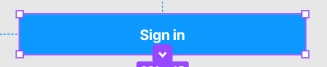
Purple outline, not letting me use prototype connector (plus sign not showing)
image
For some reason this has shown as an instance or something else but it’s inside the frame and I have no option to detach it. Could someone please tell me how to fix this?

This topic has been closed for replies.

5 replies

Aero512Author
Jun 16, 2023 1:20 PM UTC

image
Here is pic of the layers if that helps.

tank666
Jun 16, 2023 1:47 PM UTC

It’s not a component instance. This is a Shape with text—an object from FigJam.

UX/UI designer. Figma expert. Creator and developer of plugins and widgets for Figma and FigJam. Check out my resources in Figma Community: figma.com/@tank
Aero512Author
Jun 16, 2023 3:06 PM UTC

Is there a way for me to convert it or do I need to make a completely new one?

tank666
Jun 16, 2023 3:13 PM UTC

You can’t convert a FigJam object into a component or anything else (other than rasterize it). You need to create a new object in Figma using the necessary tools.

UX/UI designer. Figma expert. Creator and developer of plugins and widgets for Figma and FigJam. Check out my resources in Figma Community: figma.com/@tank
Aero512Author
Jun 16, 2023 3:14 PM UTC

Thank you!