
March 14, 2023
Solved

Presentation not like the prototype design
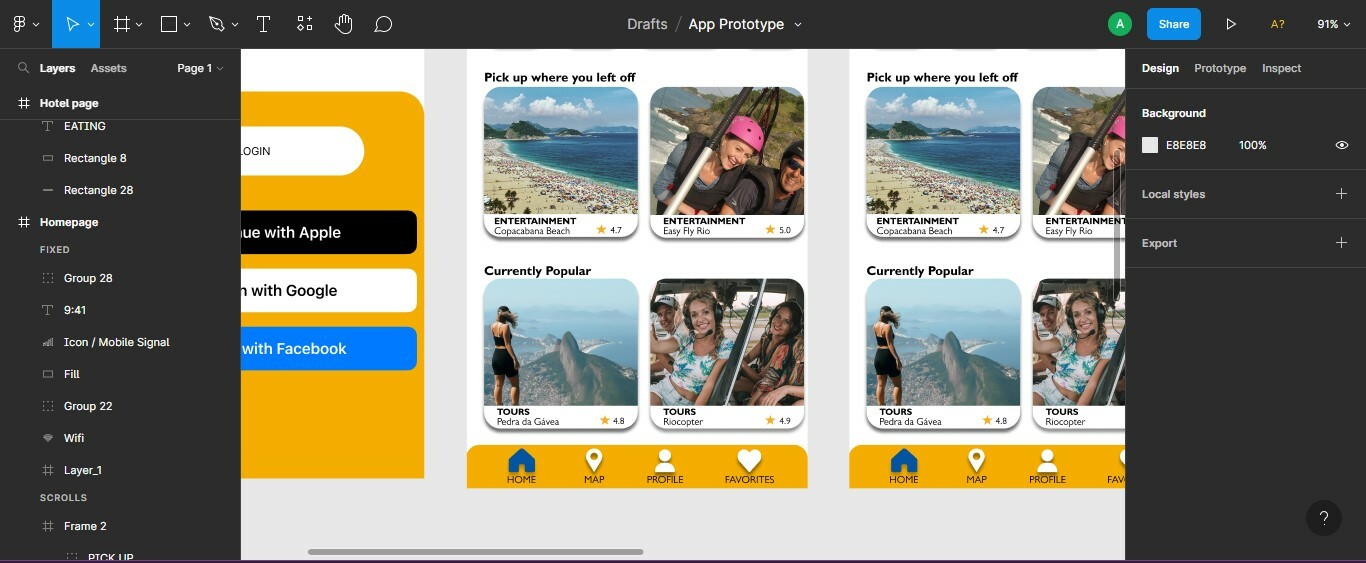
  • March 14, 2023
  • 2 replies
  • 469 views

As shown above in my design the bottom banner that I made looks perfectly normal but when in presentation mode it lowers itself. I’m not sure why it’s doing this because the banner is at the bottom in the frame. (New user so It wont let me show 2 screenshots)

This topic has been closed for replies.
Best answer by Gayani_S

Hi Ana, the most common reason for missing fixed-position elements in the presentation view is that the frame structure doesn’t follow the guides in Prototype scrolling with overflow behaviour, and these items are positioned so they’re not visible on other screens sizes or don’t have the constraints applied correctly.

Specifically, I’d suggest you make sure you’re using the correct frame height for the device you have selected in your prototype settings (as shown in Set prototype device and starting frame).

Hope this helps!

2 replies

Ana30Author
March 14, 2023


This is the presentation mode

Gayani_S
Figmate
Gayani_SAnswer
Community Support
March 15, 2023

Hi Ana, the most common reason for missing fixed-position elements in the presentation view is that the frame structure doesn’t follow the guides in Prototype scrolling with overflow behaviour, and these items are positioned so they’re not visible on other screens sizes or don’t have the constraints applied correctly.

Specifically, I’d suggest you make sure you’re using the correct frame height for the device you have selected in your prototype settings (as shown in Set prototype device and starting frame).

Hope this helps!