

freddelinan
New Member
September 17, 2026
Solved

Pasting problem! Please help
  • September 17, 2026
  • 5 replies
  • 120 views
Hi!

Hi!
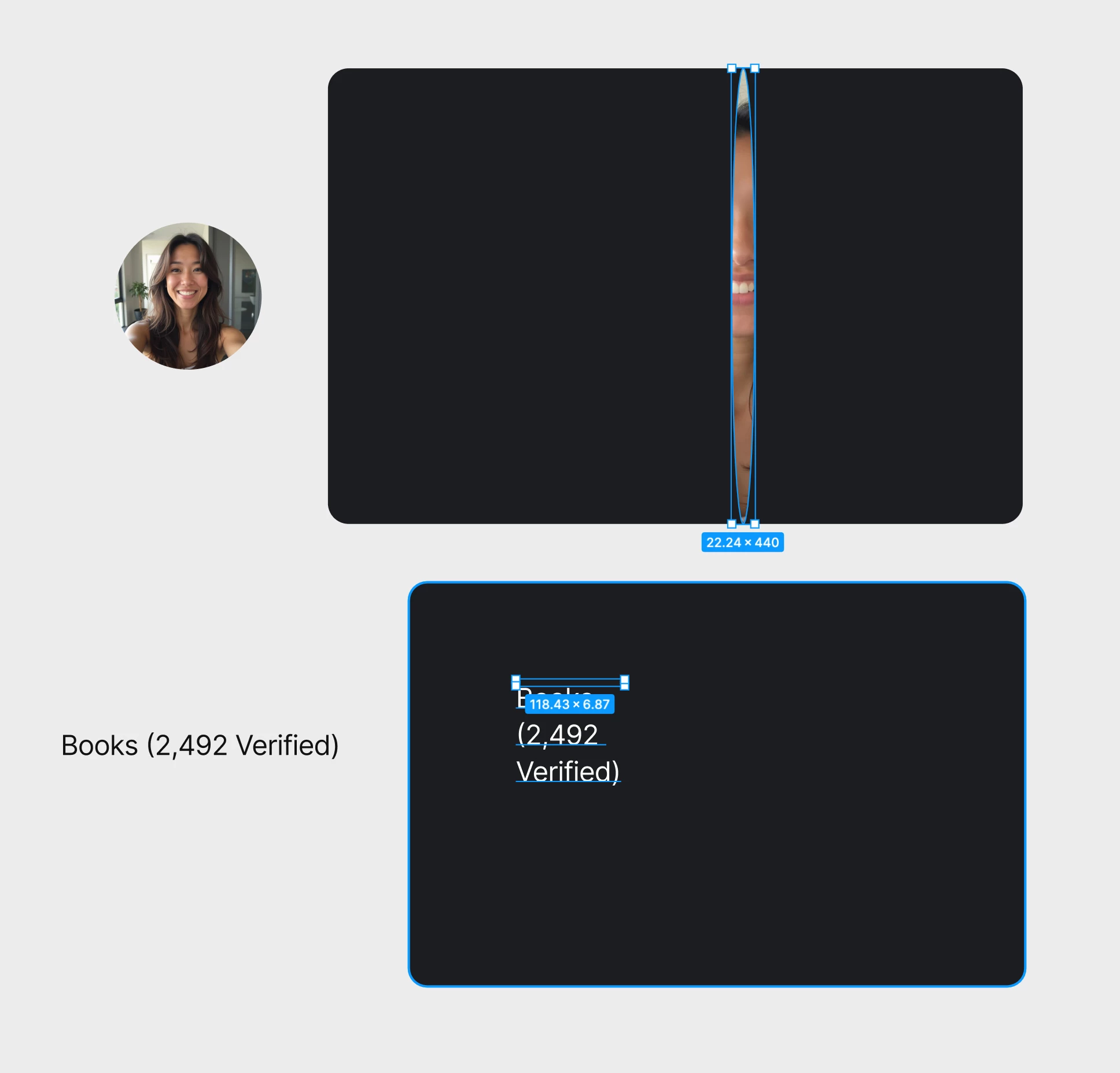
I just updated Figma (126.8.18) and now I have huge problems with simply copying and pasting objects, images, icons or text. When I copy and paste an object (on the left) in to a folder (see dark box on the right) it completely breaks the properties and decimal values. It stretches images and the auto width text feature breaks too and is set to Fixed size with a random / broken decimal value.

It happens across all Figma projects. I’ve reset Figma and restarted the application and Mac.
Help / Troubleshooting / Reset Figma and Restart

Can anyone help?
Thanx / F

    This topic has been closed for replies.
    Best answer by Celine_

    @freddelinan Hey again, I can see that one of our agents has replied to you directly there with more details via your support ticket, and have shared your feedback to our internal team.

    For anyone else following this thread, this has been resolved! Our team has rolled back the copy-paste behavior that was causing this issue. After fully reloading Figma -either by reloading the file or quitting and reopening the desktop app-  copy and paste should behave as expected again (with no rescaling and your auto-width text kept intact.)

    If you’re still seeing the issue after reloading, please continue the conversation through your existing support case so the team can investigate further.


    For others, if you’re experiencing this issue and don’t already have a support case, please submit a bug report through the Support Hub so our team can take a closer look at your specific setup and file.

    I’ll go ahead and close this thread here. Thanks everyone for flagging this!

    5 replies

    Jaycee Lewis
    Figmate
    Figmate
    September 18, 2026

    Hey, ​@freddelinan 👋 Thanks for posting. That definitely sounds unexpected. Are you able to share a not-zoomed-in screen recording of the issue happening start to finish? Thanks! — Jaycee

    CecilieKKRe
    New Member
    September 28, 2026

    I have the same issue! Did you find a solution?

    Celine_
    Figmate
    Community Support
    September 28, 2026

    Hey there, Celine from the Figma Community Support team here, working closely with ​@Jaycee Lewis ! Thanks for checking in!

    I can see the issue mentioned by freddelinan is still under investigation with our team via their support case. In the meantime, it would be really helpful if you could also submit a bug report so our support team can take a closer look at your specific case.
    To do that: Go to the Support Hub / Type “Report a bug, Contact an Agent” / Click Start a chat and select Enter and follow the prompts.

    When submitting the report, please include a link to a copy of the affected file and grant "Can View" access with support-share@figma.com ,and a screen recording showing the issue. This additional information will help the team investigate further. Thanks for helping us look into this!

    freddelinan
    New Member
    September 28, 2026

    Your latest update, that you pushed out, turns EVERY item inside a component and instance to "scale by scale" constraint! Meaning, when you select an image, icon, shape or text you're copying a "scale by scale object. When you paste that object, you'll have major problems.

    How on earth you could you release this and push this update??!!!!! We're talking about a massive number of templates that have been affected. Every item now has an automatic new "Constraints" as Scale by Scale. The default has always been Constraint "Left & Top". What’s the fix for this?