

Jeroen2
Active Member
May 13, 2024
Question

Nested component instance: how do I keep nested property values across "parent variants"?

  • May 13, 2024
  • 16 replies
  • 2636 views

Given a button component with some variants for color:

… and given a popover-button component with the button component nested into it:
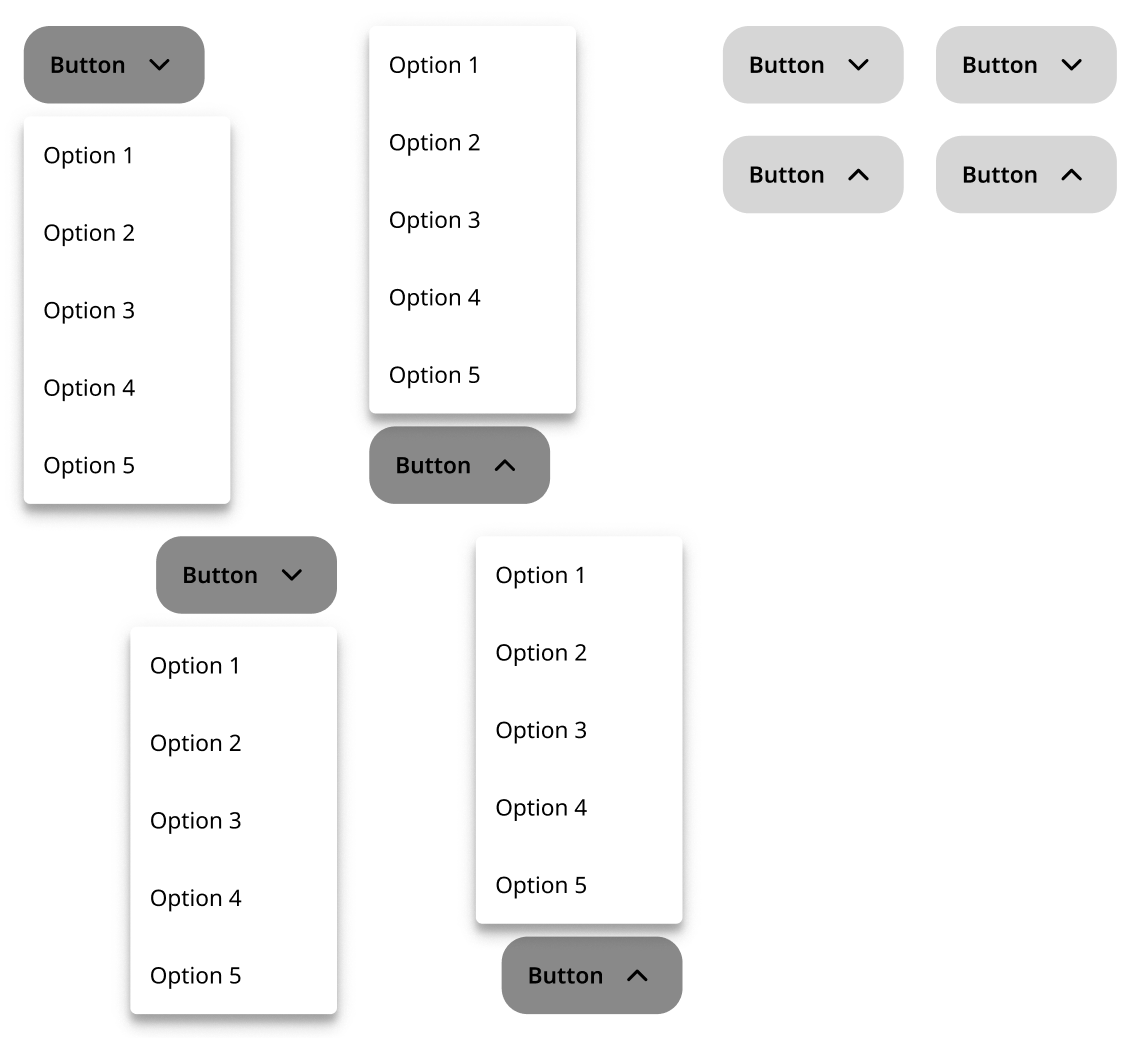
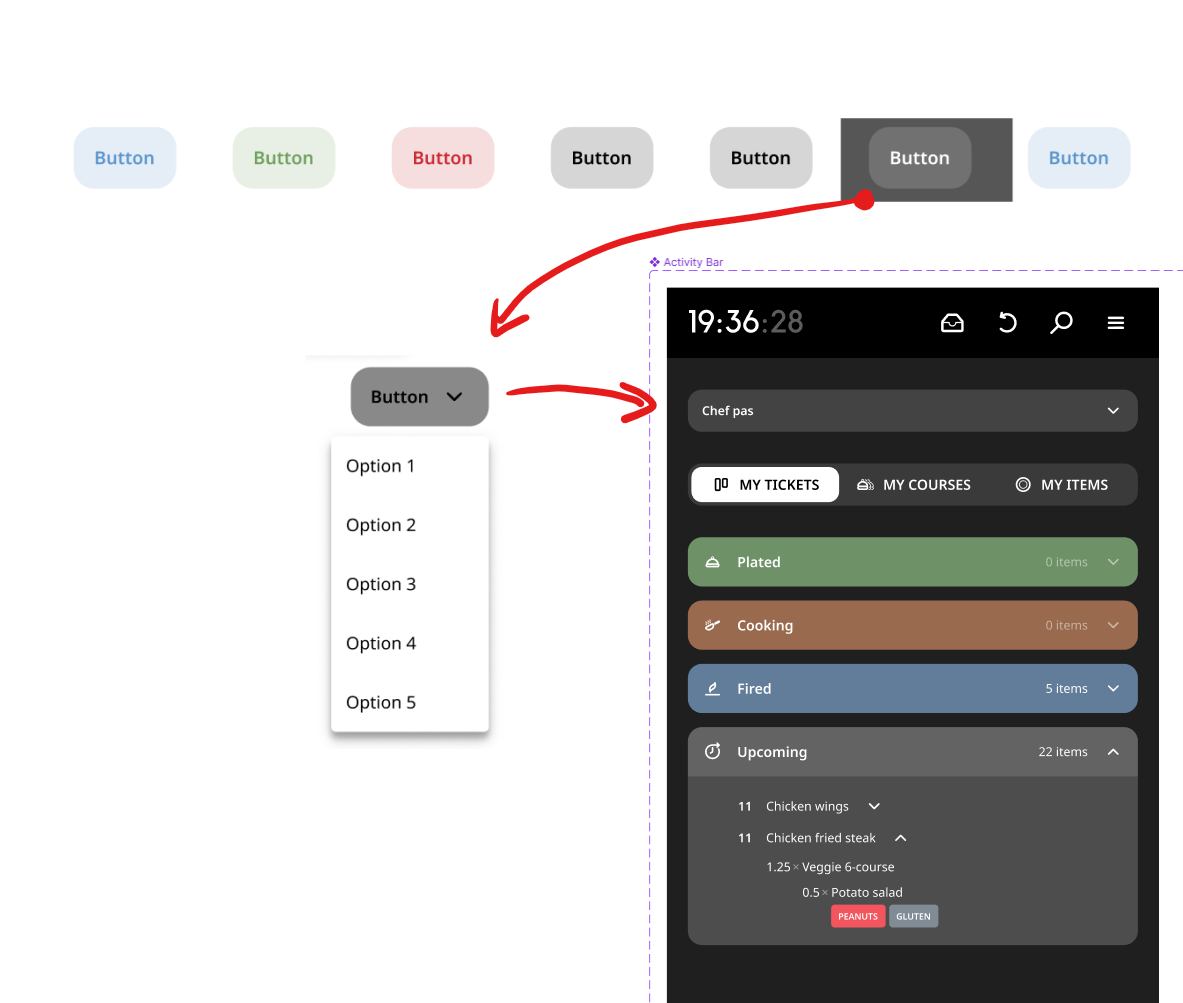
I have some instances of the popover-button, for which I would like to override the variant-property for color (in the main component, the variant-property is set to black).

For the current variant of the popover-button, this setup is fine.
However, when the variant property of the popover-button is switched, it reverts to the initial variant property value of the nested button-component, the way it is defined in the main component. My override for variant property value for this nested button-component is ignored.
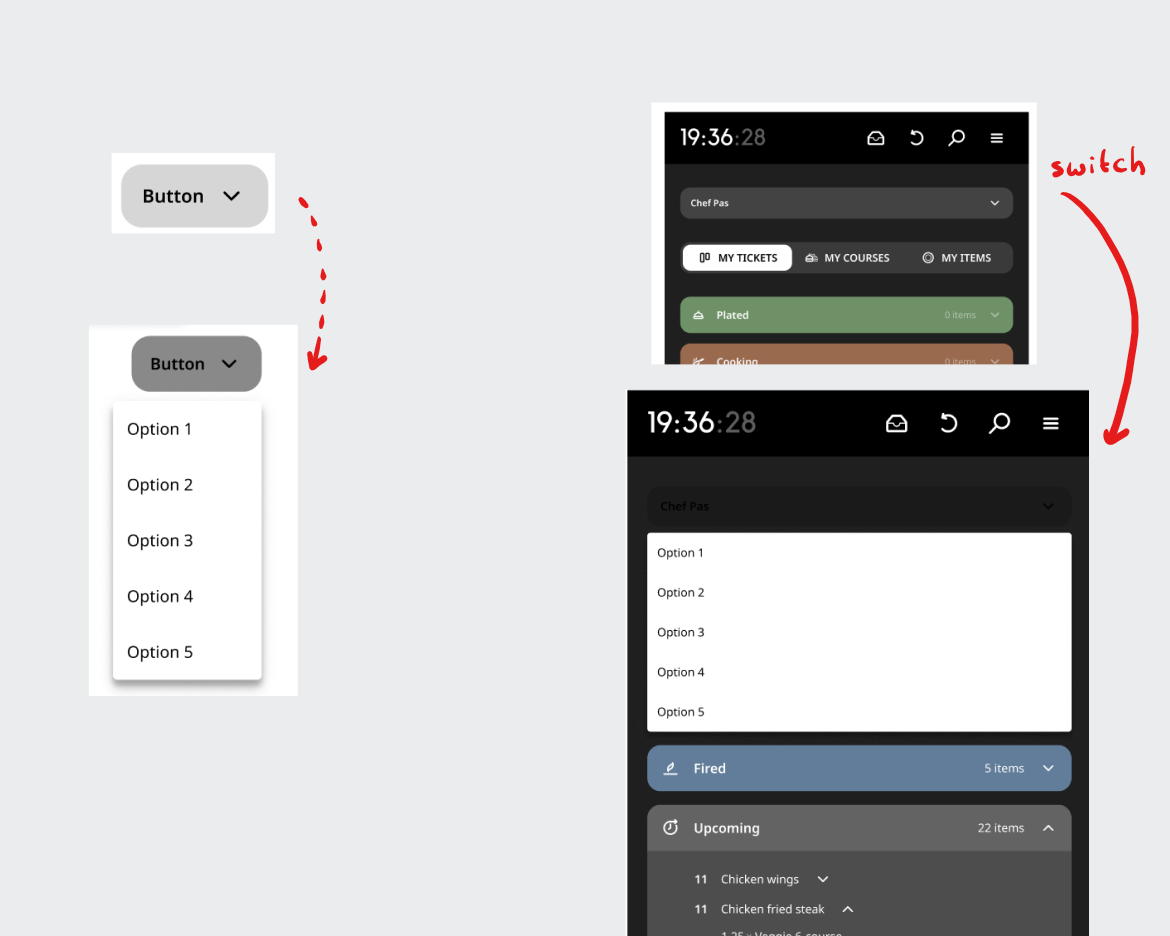
My question would be: how can I make sure that a component’s instance respects the overridden nested component instance’ variant property override across parent component instance variants?

An excerpt (copy) of my design system can be found here, so it is clear how I have set things up:

Figma – 13 May 24
This topic has been closed for replies.

16 replies

Stan5
New Participant
September 26, 2024

It never did. Figma’s whole rendering engine just isn’t performant enough.

Maybe if they had just reused HTML/CSS like PenPot instead of rebuilding everything themselves, they wouldn’t have such issues. But it’s too late for them.

Daniel_Alvenstrand
New Member
February 2, 2025

Any update on how this is going? Any fix in progress by Figma?


We need to have deep nesting in our libraries since we have very complex components and need to have “preconfigured” sets of instances that can be reused. E.g. our Card component is very modular since some basic features need to be shared, but it can be used in a lot of different ways. In order to reuse specific configs/variants of cards, we need to have nested variants - it’s just not working now because the instance overrides get reset when toggling different variants and booleans. 

Our users have already used these components throughout their files, there are hundreds of instances. We can’t rebuild the component and ask them to recreate everything everywhere. We just need deep nesting to work...

nikitapashinsky
New Member
February 17, 2025

Thank you for the detailed write up! I’m stuck on the same issue.

Jeroen2
Jeroen2Author
Active Member
February 17, 2025

Hi all! It is good to hear that I am not the only one. I guess the only way to put this high on the priority list, is to give feedback that can be passed to the engineering team. If you have difficult use cases or impossible use cases that would be enabled by complex nesting and variable overrides, pass it on to them. I did the following:

  1. Create a mockup file.
  2. Document the use case, expected/desired behavior.
  3. Document current behavior.
  4. Submit a request. If you don't know what to do, check the post from ​@Junko3 earlier in this thread.👇
  5. If you want, also document your findings/requirements in this thread.

Hi there, Thank you for providing those details. I truly appreciate you taking the time to share your setup and troubleshoot.

I recommend reaching out to our support team directly. They can closely examine your design file and provide direct support for each of your questions. Would you mind submitting a request from here?: https://help.figma.com/hc/en-us/requests/new
When contacting our support team, please make sure to provide the following information:

  • Please use your Figma account email address.
  • Share the direct links to the file in question and any related library files. Add support-share@figma.com as an Editor to those files (this won’t affect your billing)

Thank you for your assistance!


Figmashley
New Participant
March 11, 2025

At this point, it is regarded intended behavior. On a technical level, what it boils down to, is this:

The loss of overrides for nested instances occurs as Figma’s process to perform the instance swap on the top level applies a new higher priority override which is expected to remove any overrides from an earlier instance swap on a lower level on any nested instances.

Consequently, higher-level property overrides will result in changes on lower-level instances being discarded.


Figma, I don’t understand how it can be considered intended behaviour to remove changes to nested component properties when changing the “parent”’s properties?

Surely a far better option would be to retain changes, with the option to “Reset all changes” to revert to default by choice, as we would with changes to a standard component?

In addition, if this is intended behaviour then why are some of my nested instances able to be switched painlessly while keeping overrides, and others just reset (all with the same layer names/structure)?

Am I missing something? This seems like a really flawed part of component properties and is giving me a headache! ☹️

Jeroen2
Jeroen2Author
Active Member
March 11, 2025

At this point, it is regarded intended behavior. On a technical level, what it boils down to, is this:

The loss of overrides for nested instances occurs as Figma’s process to perform the instance swap on the top level applies a new higher priority override which is expected to remove any overrides from an earlier instance swap on a lower level on any nested instances.

Consequently, higher-level property overrides will result in changes on lower-level instances being discarded.


Figma, I don’t understand how it can be considered intended behaviour to remove changes to nested component properties when changing the “parent”’s properties?

Surely a far better option would be to retain changes, with the option to “Reset all changes” to revert to default by choice, as we would with changes to a standard component?

In addition, if this is intended behaviour then why are some of my nested instances able to be switched painlessly while keeping overrides, and others just reset (all with the same layer names/structure)?

Am I missing something? This seems like a really flawed part of component properties and is giving me a headache! ☹️


@Figmashley Good point, good questions. I agree with you! Do you have a specific use case? Any examples that you can share? Let's make our pain point very concrete. More voices is better. Also, consider following these steps:


Hi there, Thank you for providing those details. I truly appreciate you taking the time to share your setup and troubleshoot.

I recommend reaching out to our support team directly. They can closely examine your design file and provide direct support for each of your questions. Would you mind submitting a request from here?: https://help.figma.com/hc/en-us/requests/new
When contacting our support team, please make sure to provide the following information:

  • Please use your Figma account email address.
  • Share the direct links to the file in question and any related library files. Add support-share@figma.com as an Editor to those files (this won’t affect your billing)

Thank you for your assistance!