Matheus Santa Cruz
New Member
September 17, 2026
Solved

Need "full seat" to access design tools on MY OWN Figma Slides. Unable to edit.

I was making a Figma Slides presentation and, in order to add videos, I upgraded my free account to a Collab, the lowest tier, that was informed as being able to add playable videos to my slides.

Then, I added my files with ease, all working just fine, closed the presentation and opened it up again later, only to find that I'm not able to edit my slides with Figma's design tools any more. Not only this presentation, but new ones I create too. The design tool option is greyed out, unable to toggle.

What is going on? I need to work on this presentation ASAP being able to work on it with all the functions I had with the Free version PLUS what I had just purchased. This whole situation is becoming really frustrating, since I already paid for a whole year.


Thanks in advance!
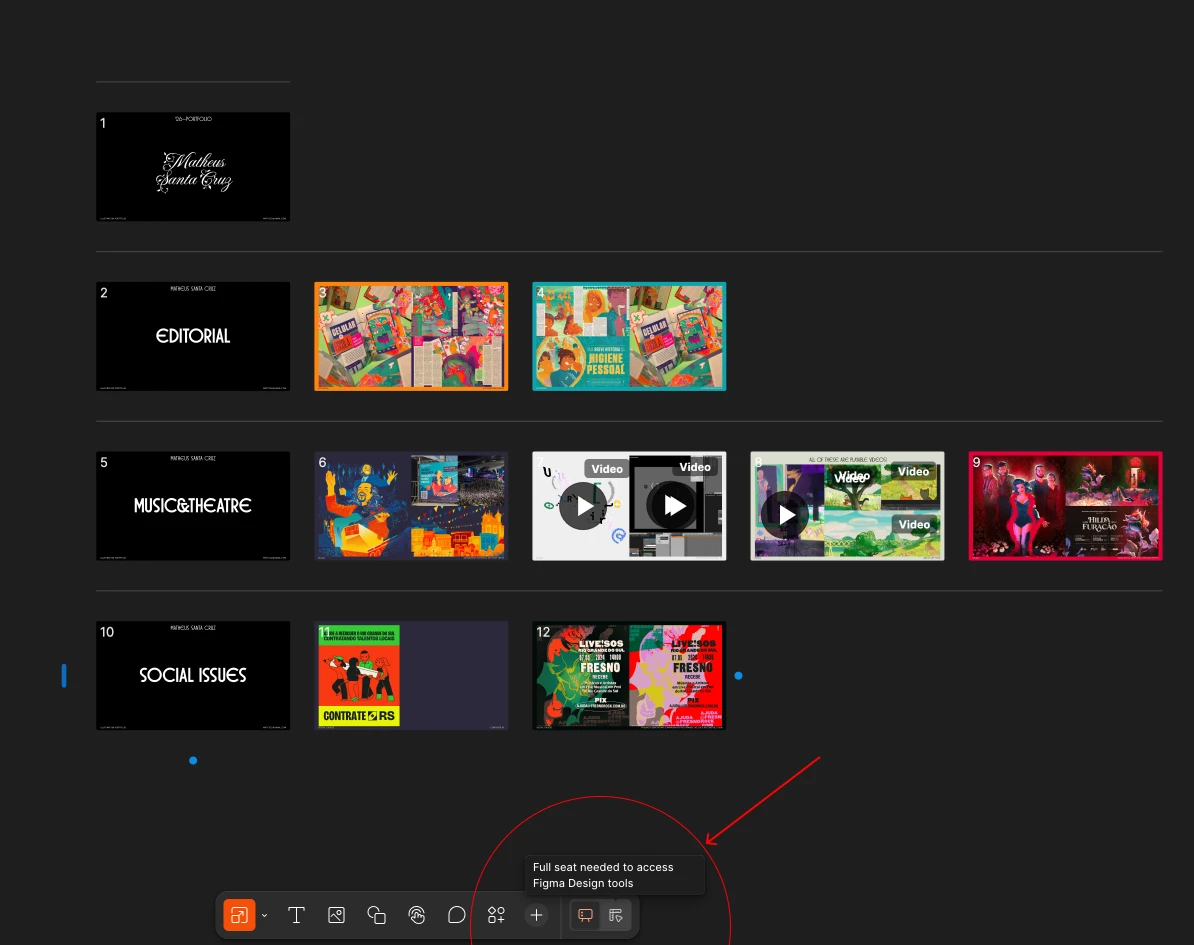
 

My Figma Slides presentation with Figma Design tools greyed out.
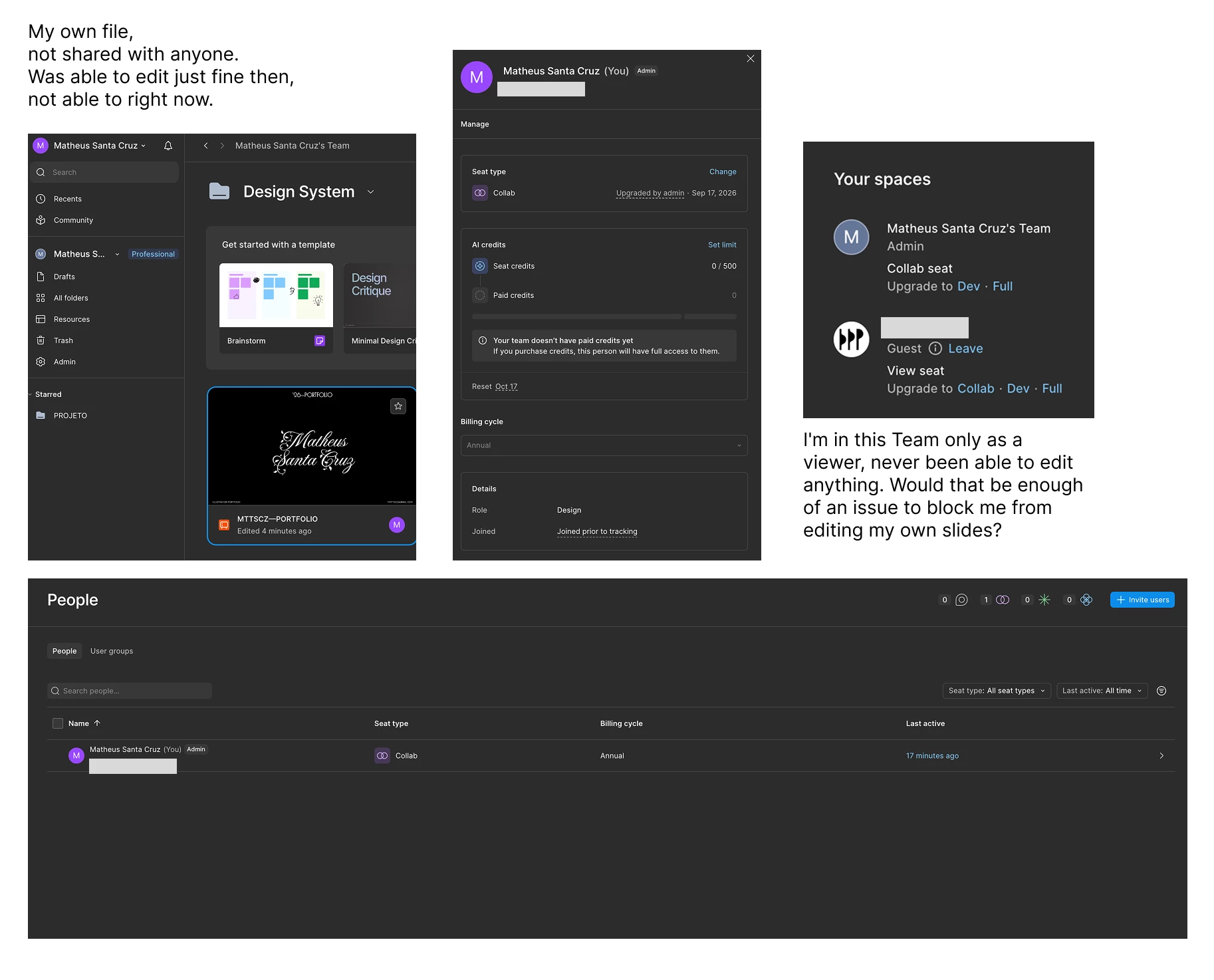
My Admin page to showcase what my subscription type is.


Gayani_S
Gayani_SSolution
Community Support
September 18, 2026

Hey ​@Matheus Santa Cruz, thanks for reaching out!

What you're seeing lines up with how the Collab seat works in Figma Slides. 

Figma Slides has two modes:

  • Slides mode (the default): lets you build decks with templates, text, shapes, images, and video. Everything you were doing when you first added your files.
  • Design mode: unlocks the deeper Figma Design toolset inside Slides, like auto layout, the layers panel, and advanced layer properties. This mode specifically requires a Full seat, which is exactly what that "Full seat needed to access Figma Design tools" tooltip is telling you.

A Collab seat gives full access to Figma Slides and FigJam for building and collaborating, but design mode sits outside that. So once your seat type was set to Collab, the toggle locked across your existing presentation and any new files too, since it's tied to your seat, not the individual file.

Being a Guest with a View seat on a separate team isn't related here. Each team or organization manages its own seats independently, so your Admin role and Collab seat on your own team have nothing to do with your access anywhere else. The tooltip is pointing at the real cause.

If you want that full design toolset back, you'd switch your seat type from Collab to Full under Admin > People, by clicking your current seat type in the Seat type column. If you mainly just need to keep building with templates, text, images, and video like before, slides mode already covers all of that without needing design mode at all.


More detail here: Use design mode in Figma Slides


Hope this helps!

1 reply

Gayani_S
Figmate
Gayani_SSolution
Community Support
September 18, 2026

Hey ​@Matheus Santa Cruz, thanks for reaching out!

What you're seeing lines up with how the Collab seat works in Figma Slides. 

Figma Slides has two modes:

  • Slides mode (the default): lets you build decks with templates, text, shapes, images, and video. Everything you were doing when you first added your files.
  • Design mode: unlocks the deeper Figma Design toolset inside Slides, like auto layout, the layers panel, and advanced layer properties. This mode specifically requires a Full seat, which is exactly what that "Full seat needed to access Figma Design tools" tooltip is telling you.

A Collab seat gives full access to Figma Slides and FigJam for building and collaborating, but design mode sits outside that. So once your seat type was set to Collab, the toggle locked across your existing presentation and any new files too, since it's tied to your seat, not the individual file.

Being a Guest with a View seat on a separate team isn't related here. Each team or organization manages its own seats independently, so your Admin role and Collab seat on your own team have nothing to do with your access anywhere else. The tooltip is pointing at the real cause.

If you want that full design toolset back, you'd switch your seat type from Collab to Full under Admin > People, by clicking your current seat type in the Seat type column. If you mainly just need to keep building with templates, text, images, and video like before, slides mode already covers all of that without needing design mode at all.


More detail here: Use design mode in Figma Slides


Hope this helps!