Mai_Phuong_Vu
November 17, 2023
Solved

Mouse leave vs. mouse move outside

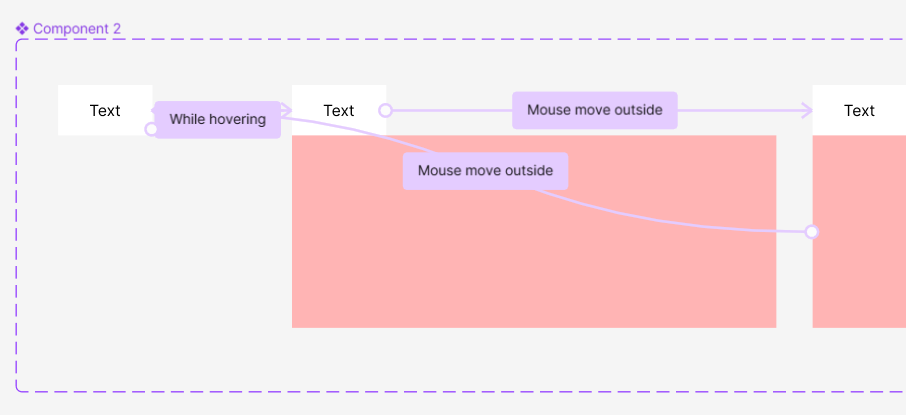
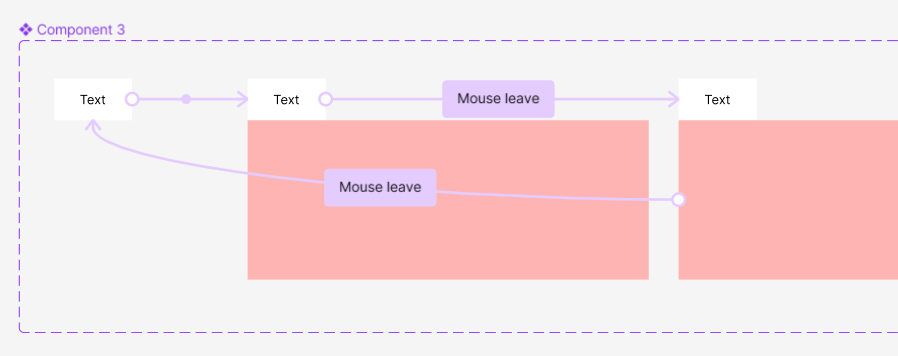
So I was trying to do some mouse leave prototyping, and I did use mouse leave for the interaction. But then it became mouse move outside

It did do what I wanted it to do. Then I tried to recreate it, however it is just mouse leave now.

And it turns out that I actually want the interaction to be mouse move outside because the mouse leave is just not doing the same.

But I cannot figure out how to recreate it or what cause the mouse move outside in the first place.

Does anyone know how I did that in the first place?

This topic has been closed for replies.
Celine_
Celine_Solution
Community Support
December 12, 2023

Hi everyone,

To give you more visibility, with the Little Big Updates that were recently released, we’re trying to make our mouse events more predictable without changing any existing prototypes. The “Mouse move inside / mouse move outside” interactions are deprecated versions of the “Mouse enter / mouse leave” interactions that worked in an unpredictable way. We have created new versions of these interactions and in the process, renamed the old ones to “mouse move inside/ mouse move outside” to avoid changing and breaking any existing prototype interactions in user files.
The interactions you see using “mouse move inside” and “mouse move outside” are using the old version and were not automatically updated to use the new versions. They should still work as they did before, but in the interim we appreciate your help to manually update any existing interactions that you would like to change to use the latest version.

Please also note that these older versions are no longer accessible when creating new or updating existing interactions and we are currently not intending to add any options for users to set the old version on any new interactions.

If you are seeing cases where the behaviour in your prototypes have stopped working (using either the older or the new “mouse enter/mouse leave” options available in the UI dropdown; please let us know and we will flag them further for the engineers to take a further look. We appreciate any examples you could provide of how you expect the interaction to work versus how it is behaving. Please reach out to us by filling this form: https://help.figma.com/hc/en-us/requests/new

We apologize again for the confusion caused here by the sudden change, and we’ve pass along your feedback to the team.

Thank you!

11 replies

Celine_
Figmate
Celine_Solution
Community Support
December 12, 2023

Hi everyone,

To give you more visibility, with the Little Big Updates that were recently released, we’re trying to make our mouse events more predictable without changing any existing prototypes. The “Mouse move inside / mouse move outside” interactions are deprecated versions of the “Mouse enter / mouse leave” interactions that worked in an unpredictable way. We have created new versions of these interactions and in the process, renamed the old ones to “mouse move inside/ mouse move outside” to avoid changing and breaking any existing prototype interactions in user files.
The interactions you see using “mouse move inside” and “mouse move outside” are using the old version and were not automatically updated to use the new versions. They should still work as they did before, but in the interim we appreciate your help to manually update any existing interactions that you would like to change to use the latest version.

Please also note that these older versions are no longer accessible when creating new or updating existing interactions and we are currently not intending to add any options for users to set the old version on any new interactions.

If you are seeing cases where the behaviour in your prototypes have stopped working (using either the older or the new “mouse enter/mouse leave” options available in the UI dropdown; please let us know and we will flag them further for the engineers to take a further look. We appreciate any examples you could provide of how you expect the interaction to work versus how it is behaving. Please reach out to us by filling this form: https://help.figma.com/hc/en-us/requests/new

We apologize again for the confusion caused here by the sudden change, and we’ve pass along your feedback to the team.

Thank you!