Rickard Zetterman
New Member
February 19, 2025
Solved

Menu where to cretate components is gone

  • February 19, 2025
  • 3 replies
  • 207 views

The menu center at the top where you click to create new components is gone, how do I get it back?

    This topic has been closed for replies.
    Best answer by djv

    Hey ​@Rickard Zetterman, thanks for reaching out! 

    It sounds like you’re referring to the previous UI, but are now using Figma’s new UI3.

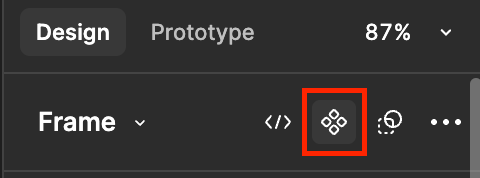
    In UI3, you can create new components from the Design panel. Select the object on the canvas and the icon to Create component will appear:


    Learn more about navigating UI3 here.

    3 replies

    djv
    Figmate
    djvAnswer
    Community Support
    February 19, 2025

    Hey ​@Rickard Zetterman, thanks for reaching out! 

    It sounds like you’re referring to the previous UI, but are now using Figma’s new UI3.

    In UI3, you can create new components from the Design panel. Select the object on the canvas and the icon to Create component will appear:


    Learn more about navigating UI3 here.

    Rickard Zetterman
    New Member
    February 20, 2025

    Yes thank you! 

    djv
    Figmate
    Community Support
    February 20, 2025

    You’re welcome! 

    Please let us know if we can help with anything else.