JAli 2000
New Member
August 23, 2026

Letter forms in Persian fonts

Attention all Persian and Arabic designers!

While using the "Peyda" font, I noticed that it offers specific default styles for the letters *Kaf* (ک) and *Gaf* (گ).

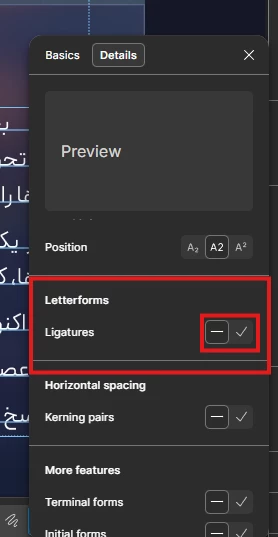
If you wish to disable these styles—so that the letters *Kaf* and *Gaf* do not appear in their elongated forms—follow the steps below.
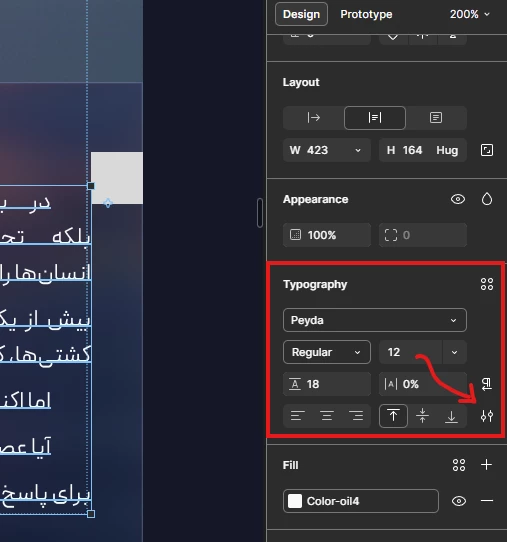
 

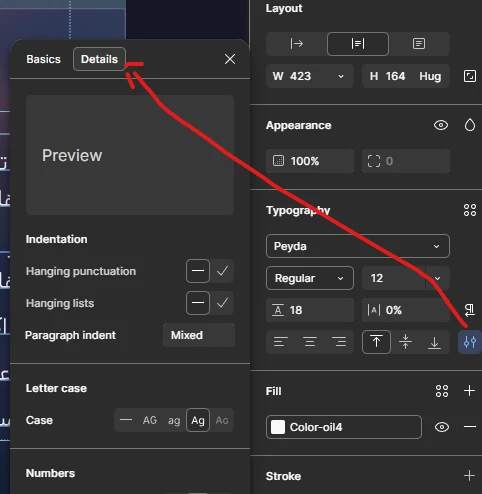
Go to the typography settings from the Design tab.
At the top of the menu that opens, select Details.
Toggle this option to review the desired change.


I hope you find it useful.

    2 replies

    Jaycee Lewis
    Figmate
    Figmate
    August 24, 2026

    Awesome tip ​@JAli 2000 🤩 Thanks so much! — Jaycee

    Justin Young
    New Member
    October 14, 2026

    Thanks for sharing this tip! Persian typography can be tricky when certain letters have different stylistic forms. Knowing how to adjust the Kaf and Gaf styles in Peyda is really helpful for designers who want more control over the appearance and consistency of their text.