

I have designed a UI for a device we are developing. Having selected a specific LCD with an active area of 49mm x 74mm (approx.) and a display resolution of 320 x 480 I set up a frame in Figma at 480 x 320 (LCD is portrait and we are using it in landscape mode). We are investigating using a native landscape display which has a screen resolution of 320 x 240 and an active area of 71mm x 53mm however when I adjust my 480 x 320 screens down to 320 x 240 the active area decreases.
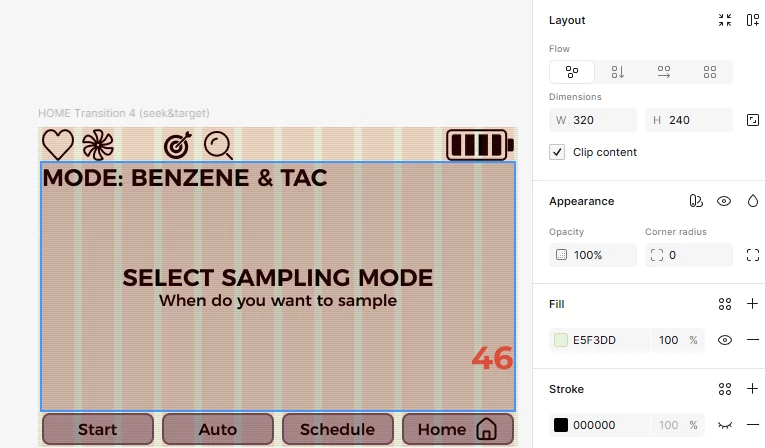
Â
Is there a way to define the display resolution without altering the active area size? IÂ set the original 480 x 320Â screen up as a 32px x 12 column grid when changing to 320 x 240 I get a 32px x 8 column grid:
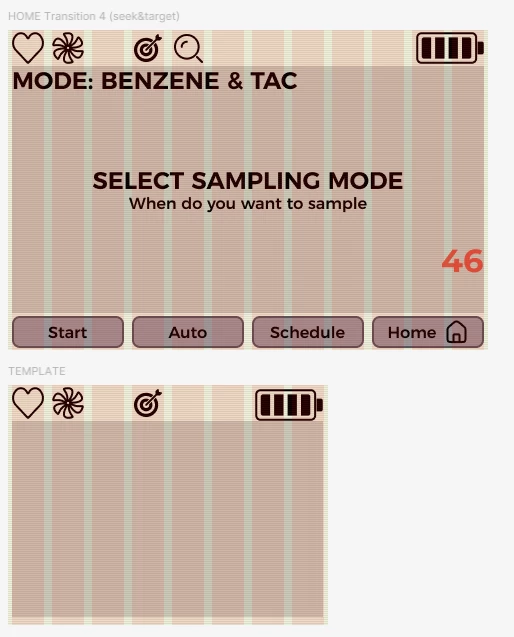
Basically I want to set the active area size in mm and set the resolution:
Active Area = 71mm x 53mm - resolution 320 x 240. I have north of 150 screens (frames) invested in the design and prototyped and don't really want to re do the whole thing.

Any help is much appreciated!

Best answer by djv
Hey ​@clive.kennard, thanks for reaching out!
Thanks for sharing all these details. It makes complete sense that you'd want to preserve the physical screen size while simply changing the resolution. To clarify what's happening, Figma's frame dimensions are in logical pixels, so when you reduce from 480×320 to 320×240, the frame gets physically smaller in the canvas. It doesn't have a native concept of "physical mm size" that's separate from pixel count.
That said, here are a couple of approaches that might save you from rebuilding:
Keep your frames at 480×320 and use the "Scale" tool (K) to scale down all content proportionally when adapting individual screens. This lets you preserve layout relationships.
Consider using Figma's built-in scale factor: design at a 2× or custom multiplier so your pixel dimensions map intentionally to your physical display's PPI.
Â
For the grid collapse, you can redefine the grid on your existing frames manually (without rebuilding screens) by selecting all frames and updating the grid settings in the Design panel. Hope this helps!
Thanks for sharing all these details. It makes complete sense that you'd want to preserve the physical screen size while simply changing the resolution. To clarify what's happening, Figma's frame dimensions are in logical pixels, so when you reduce from 480×320 to 320×240, the frame gets physically smaller in the canvas. It doesn't have a native concept of "physical mm size" that's separate from pixel count.
That said, here are a couple of approaches that might save you from rebuilding:
Keep your frames at 480×320 and use the "Scale" tool (K) to scale down all content proportionally when adapting individual screens. This lets you preserve layout relationships.
Consider using Figma's built-in scale factor: design at a 2× or custom multiplier so your pixel dimensions map intentionally to your physical display's PPI.
Â
For the grid collapse, you can redefine the grid on your existing frames manually (without rebuilding screens) by selecting all frames and updating the grid settings in the Design panel. Hope this helps!