

Question

Issue with Transparent Dropdown in Figma + Request for Learning Resources

  • May 22, 2026
  • 1 reply
  • 15 views

J-L

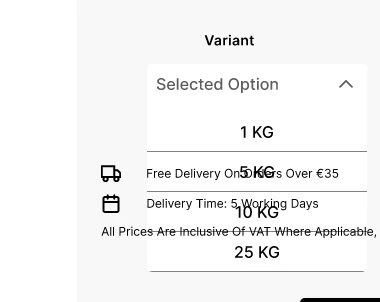
In Figma, my dropdown component is set up as a frame with a white fill at 100% opacity and normal blend mode. However, underlying layers are still visible through it, even though the dropdown is positioned above other elements in the layer hierarchy. I also tried toggling “Clip content” on and off, but nothing changed. What could be causing this issue?

Additionally, could anyone recommend videos or online courses that explain how to create a proper dropdown menu in Figma? I’m really struggling with building one and getting a bit frustrated with it. Thanks a lot.
 

1 reply

adamsmasher
Figmate
  • Figmate
  • May 23, 2026

Hi, ​@J-L

Thank you for your post. That’s surprising to see text showing if it’s in a lower layer and the higher layer has a fill set. Could you provide a screenshot or more information about the layout structure of your component and layer properties? As an example, are you using auto-layout, and if so, on which layers? I tried doing some basic replications myself and couldn’t replicate, though these were very basic tests where I just had one layer on top of another to see if it covered up text from the lower layer.


Regarding online courses, you might want to check out community tutorials; I did a quick search for “create a drop down menu” and it looks like there’s more than one showing different ways to do this. Might be worth checking those out to see if one will get you results you like!