

Cyril_hzx
September 2, 2023
Question

Is there a way to set different spacing in Auto layout?

  • September 2, 2023
  • 5 replies
  • 3995 views

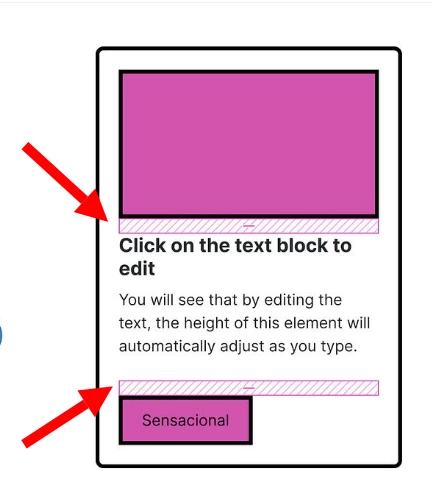
in the image, it shows two spacing with the arrows, I’d like to set different numbers for the two spacings, but it seems like when the numbers are changing, the two spacings will change together and they always stay in the same width/length, can I set them individually?
iShot_2023-09-02_04.30.44

This topic has been closed for replies.

5 replies

Pavel_Kiselev
Power Member
September 2, 2023

Nope, you cannot

IraX
Power Member
September 2, 2023

This should become possible, because we’re currently wrapping elements in additional auto layout containers to apply the appropriate spacing between two child elements and that is just wrong. I’ve seen this mentioned quite a few times previously.

Cyril_hzx
Cyril_hzxAuthor
September 2, 2023

😭thanks, i thought there are ways

Cyril_hzx
Cyril_hzxAuthor
September 2, 2023

yep, i also hope this can be realistic

Pavel_Kiselev
Power Member
September 3, 2023

Or you can make a spacer component and stick it in between other elements.