
Trevor_Howard
October 11, 2023
Question

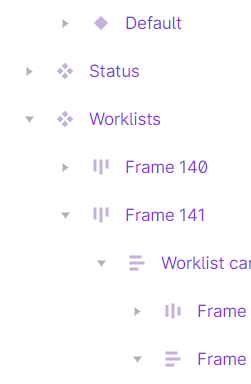
Is there a legend for layer icons?

  • October 11, 2023
  • 4 replies
  • 3847 views

Is there a legend for layer icons. Sometimes I run across one where I’m not sure what it means.
image

This topic has been closed for replies.

4 replies

tank666
October 12, 2023
UX/UI designer. Figma expert. Creator and developer of plugins and widgets for Figma and FigJam. Check out my resources in Figma Community: figma.com/@tank
Trevor_Howard
October 12, 2023

@tank666 Thanks, that’s helpful. The info linked to that is a little out of date and doesn’t list all of the icons but it does help.

I really wish Figma had an up-to-date legend that they maintained.

Matty_Williams
Figmate
Figmate
October 11, 2024

Thanks for the question!

Layer icons are now documented in these articles in Figma Learn, our help center:
View layers and pages in the left sidebar

Explore design files

Joe_Lakey
New Participant
March 7, 2025

@Matty_Williams - This is an odd one that I haven’t seen before. In every other context that I’ve come across, the outside corners on the layer symbol indicate that the layer is absolutely positioned within an autolayout. However, you can see in the screenshot that both images are nested in non-autolayout frames. I haven’t been able to determine any difference between the top image that has the symbol with the outside corners and the the bottom image with the normal image symbol. The fill properties are the same. The constraints are the same. Other than the layer symbols, they appear identical.

I inherited this file, so I don’t have any idea about how it got to this state.

I’d also like to echo what others have said: it would be really helpful if there was a *comprehensive* reference for layer symbols.
