

Solved

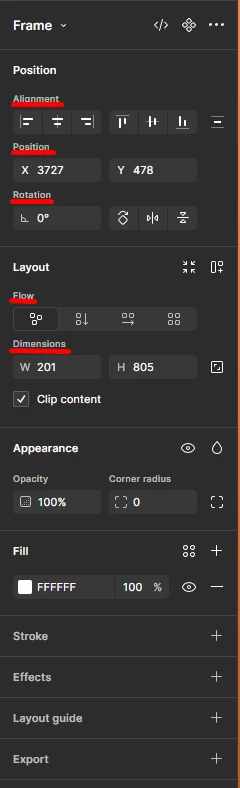
is it possible to remove/hide the names of the buttons on the right sidebar?
  • June 25, 2026
  • 5 replies
  • 123 views

salvi

Anyway to declutter the right side panel by just removing the little titles before each button? Was looking for a setting in the Preferences Tab and wasn’t able to find anything.

Best answer by Nellya

View → Additional labels

5 replies

Nellya
  • Power Member
  • Answer
  • June 26, 2026

View → Additional labels


Karin1
  • New Participant
  • June 26, 2026

View → Additional labels

Wow, so simple, I just gained a lot of screen space, thanks for sharing this trick :D


Sofie
  • New Participant
  • July 31, 2026

Uhm, is this a Windows feature? Can’t find that option on my Mac. 🙃


Nellya
  • Power Member
  • July 31, 2026

Uhm, is this a Windows feature? Can’t find that option on my Mac

You need to open the Main menu (Figma logo) first, it’s there


Sofie
  • New Participant
  • July 31, 2026

Ah, ok! I haven’t thought of it as a menu 😅 It has a lot in common with the Figma application menu on the top edge on Mac, but not all options are there.

So for other people who might need some guidance:

  • Open a Figma design file
  • Press the Figma logo in the sidebar on the left
  • Select view in the
  • Select additional labels to tick/untick the labels