
New Member
January 22, 2024
Question

Instant swap property distorts nested component aspect ratio when the two instances aren't the same size

  • January 22, 2024
  • 12 replies
  • 1836 views

Hi all! I searched Figma forums all over for an answer but couldn’t find one. The issue I’m having is with icons becoming distorted when using instance swap in a nested component. Here’s the context:

I am working on a design system that utilizes 4 different icon sizes that are all square (14x14px, 24x24px, and so on).

We are using Font Awesome icons, and the vectors of these icons vary in size, meaning that two icons with the same height may vary in width.

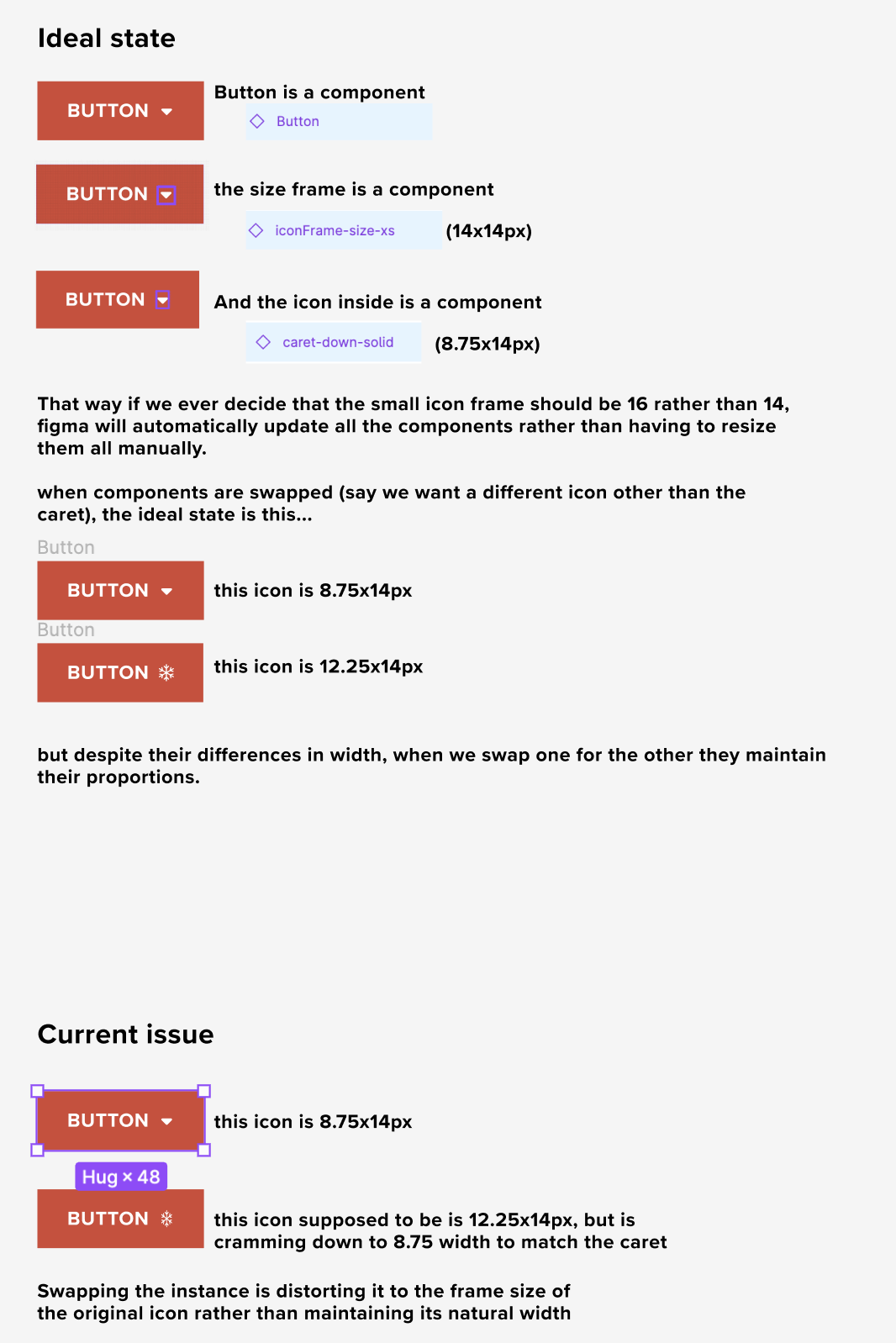
My ideal vision is that we make the icon frame sizes components, then place the icons (also components) inside of the square frame and set them to scale. This is so that if we ever decide to do a global icon resize (say we decide 14x14 is to small and want to move to 16x16) that we can do that on the master component level and avoid manually updating all the affected components.

However, the issue I am having is that when I swap one icon for another in a child component, rather than maintaining its proportions, it takes on the size of the icon it is replacing. this only happens on my nested component icons.

I want to know if there is a solution other than having to put all my icons in perfectly square frames so to fit the icon frame standards. I tried using the auto-layout trick, but because the master component icons are sized at 36px height, they aren’t scaling down to our smaller icon frame sizes (14px and 24px). trying to also avoid creating 3 different size variants for every icon if possible.

I hope that makes sense. heres some screenshots for context.
This topic has been closed for replies.

12 replies

tank666
January 22, 2024

Auto layout should solve your problem. I don’t know what the structure of your icon components is, but you might need to add an additional wrapper.

https://forum.figma.com/t/issue-keep-the-scaling-of-a-nested-component-when-swapping-it/1009/23

UX/UI designer. Figma expert. Creator and developer of plugins and widgets for Figma and FigJam. Check out my resources in Figma Community: figma.com/@tank
New Member
January 22, 2024

Hi there! thanks so much for taking the time to respond.

In your file, notice how all your icons are the same size? they are all 16x16px. my icons all have the same height, but varying widths. so when I swap instances, it distorts the width of the icon to match the one in the parent component. I added another screenshot that also includes my button structure.

New Member
January 22, 2024

specifically wondering if there is another solution other than wrapping all the icons in the same size frame. We have a ton so it’ll take a long time so wanted to ask the community before I did it.

mo_hamwi
Active Member
January 23, 2024

you can do that if the button is not a component

See this example


Check the Structure
Figma – 23 Jan 24

tank666
January 23, 2024

Thanks for the clarifications. That is, all your icon component containers are different sizes. So, I think you need to bring the containers down to the same size (eg 14x14) and I’m afraid that’s the only way to solve your problem.

You can use plugins for faster work. Try searching for suitable plugins here: Figma Community.

UX/UI designer. Figma expert. Creator and developer of plugins and widgets for Figma and FigJam. Check out my resources in Figma Community: figma.com/@tank
Janina2
May 27, 2024

Hi! Sorry I’m late to the conversation. You can also select the icon component and add autolayout (Shift-A). This worked for me. I had exactly the same issue as you did and saw this thread, and saw this simple solution on youtube 🙂

Jess_Bellatti
October 29, 2024

Hey Figma Community! Has there been an update regarding this topic?

I am having the same issue where I want to be able to swap out different logos inside of a component and am not able to find a solution in which the logos maintain the height of the original while the width is responsive to maintain the aspect ratio.

Herza
New Member
January 21, 2025

I am encountering same issue. The child instance should be allowed to keep its aspect ratio. This is crutial (please)!

Bruno_Biagioni_Neto
New Member
February 4, 2025

I have the same problem. This occurs when you use too many nested elements. The bug does not occur at the first or second level, but from the third level onwards it does.


jo1
New Participant
February 17, 2025

I would love this resolved, working with logos that have different aspect ratios. There should be some switch or something, so you can maintain the aspect ratio along the longest length.