

Tascha
Active Member
September 18, 2023
Question

Instance text not editable

  • September 18, 2023
  • 19 replies
  • 1753 views

So I’ve come across a few instance-override-issues in the forum but I believe this one is new 😅

So, I’ve got a instance for my headlines and for some reason it doesn’t let me change it’s text. This worked until recently tho!

Take a look, I believe it’s easier to understand that way:
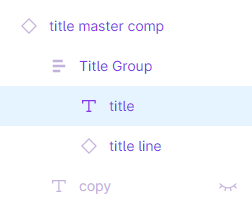
Figma_6wcEii4vuE

If I go to the master comp and copy and paste it it works just fine!
Just when I copy the/one instance again it stops working…

So I’ve got a work-around, but still it’s a bit annoying not being able to just copy the instance again but having to go to the master comp and copy it instead…

Any suggestions why that is? 🙃 Thanks in advance to anyone 👍

This topic has been closed for replies.

19 replies

Ryan_52
Figmate
Technical Quality Specialist
September 19, 2023

Hi @Tascha that sounds odd. Would you mind reaching out to the support team directly via this form for help: https://help.figma.com/hc/en-us/requests/new

Be sure to use your Figma account email, share a short video detailing the issue, include the links to the file, and share it with support-share@figma.com so they can take a closer look.

Tascha
TaschaAuthor
Active Member
October 7, 2023

Did just that right now.

It started working again for no apparent reason but funnily enough a button instance now has the same issue - so at least I can now provide the support with a Figma file to inspect the issue.

Will post the outcome of this as soon as something new arises.

Luca_Ferris_Kettler
June 11, 2024

I still have the same issue very often. Please fix this!

Gayani_S
Figmate
Community Support
June 12, 2024

Hey @Luca_Ferris_Kettler, thank you for reaching out! I wasn’t able to reproduce this on my end. Could you give me more information on your issue? Are you seeing this in the desktop app, browser or both?
Is this happening to a specific file or on all the files?

Can you clear out the cache. Here are some information to troubleshoot: https://help.figma.com/hc/en-us/articles/360040523973-Troubleshooting-checklist 1

Also please try to force-quit and open Figma in a new browser window (or force-quit the Figma Desktop app and restart it.)

Please let me know if clearing the cache resolved the issue, happy to help out further!

Luca_Ferris_Kettler
June 13, 2024

Hey @Gayani_S,
I See it in the desktop app (newest version, restarted a few times, etc.) It happens when creating components, which have many instances within instances.

Luca_Ferris_Kettler
June 13, 2024

@Gayani_S Figma seams to have problems with too complex components with many instances. It also happens, that instances are loosing its content, which you can solve by detaching some previous instances and pressing cmd+z. I would really appreciate a call where we could look at the issues together.

Tascha
TaschaAuthor
Active Member
June 13, 2024

@Gayani_S I did reach out to the Figma support with this and did everything you suggested.
Also, it did start to happen again / older instances kept the issue.

Good to know I’m not alone with this tho.

I also provided a file with the instance for the support but have to check if it’s still available, which I can’t right now. But I’ll try to get back to it as soon as possible 🙃

Gayani_S
Figmate
Community Support
June 13, 2024

Yikes! Thanks for confirming this! Unfortunately, I can’t offer a call to look into this issue. However, I can create a support ticket on your behalf, so our technical quality team can assist you in finding out what’s causing this.
They’d need to see your Figma desktop app debug logs to investigate more.

Please let me know if that works for you?

Gayani_S
Figmate
Community Support
June 13, 2024

Sorry to hear this issue is happening to you again. Please open up your ticket once you are available. The team cam follow up and see what needs to be done to resolve the issue.

Please let me know if there is anything I can help with!

Tascha
TaschaAuthor
Active Member
June 21, 2024

Sorry for the wait but I’ve just had the time to go through my e-mails with the support again and re-evaluate what my exact issue was/is.

So here’s a file to inspect for anyone curious.

I just copied and pasted the affected instances; then copied and pasted the source components and re-linked the instances again (which didn’t have any effects on the issue btw).

Here’s a picture:

So I have this button which has a property for the text but it doesn’t matter if I try to change the text directly or via the property on the right it just won’t budge…

The support said something about a variable being attatched to this at some point (which is correct, but I believe I removed it again?) which might be causing the issue - and that was that. They said “we are still investigating the issue where the variable got applied to the instance.” and that they couldn’t give me an ETA - I didn’t hear from them since 😅

But then again, in my case I was able to do a workaround by simply not copy and pasting the “faulty” instances anymore but taking “fresh” ones either from the assets panel on the left or via copy and pasting directly from the component.

Idk if that is similar to what others are experiencing but I hope it helps nonetheless 🙏