Hi @Neon, Celyn from the Figma Community Support team here. Thanks for reaching out!
I understand you’d like to know when your MCP allowance resets and how many calls you’ve used.
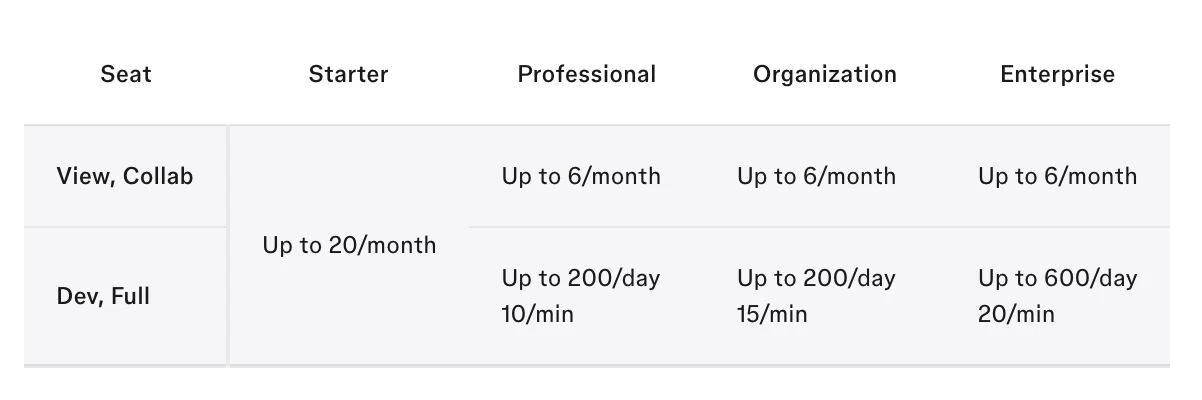
On the Starter plan, you have up to 20 MCP tool calls per month. The allowance resets on your plan’s monthly cycle. You can find the current limits in our MCP rate limits and access documentation.
There isn’t currently a dedicated dashboard or usage counter showing the exact number of MCP tool calls used or remaining during the current allowance period. I’m sorry we cannot provide these details at this time.
Hi @Neon, Celyn from the Figma Community Support team here. Thanks for reaching out!
I understand you’d like to know when your MCP allowance resets and how many calls you’ve used.
On the Starter plan, you have up to 20 MCP tool calls per month. The allowance resets on your plan’s monthly cycle. You can find the current limits in our MCP rate limits and access documentation.
There isn’t currently a dedicated dashboard or usage counter showing the exact number of MCP tool calls used or remaining during the current allowance period. I’m sorry we cannot provide these details at this time.
Think of the MCP allowance like 6 tickets you get every month. If you're on the Starter plan with a View seat, you get 6 MCP tool calls per month. Each time you use MCP, one call is used. Once all 6 are used, you have to wait for the monthly reset to get 6 more.
As far as I know, Figma doesn't currently show a counter telling you exactly how many MCP calls you've used or how many are left. If you're already seeing a message saying you've reached the MCP limit, it means you've used all 6 calls for the current allowance.
That explains why the error popped up out of nowhere. Since Figma doesn't track it visually yet, does anyone know if running a local MCP server through a plugin bypasses this cloud-based Starter plan allowance, or is it strictly tied to the account seat?