

Remorhaz
New Member
Oct 18, 2026 1:49 PM UTC
Solved

I don't understand why I keep getting the "Not used within component" error

Thanks everyone,

Here is my setup visual.
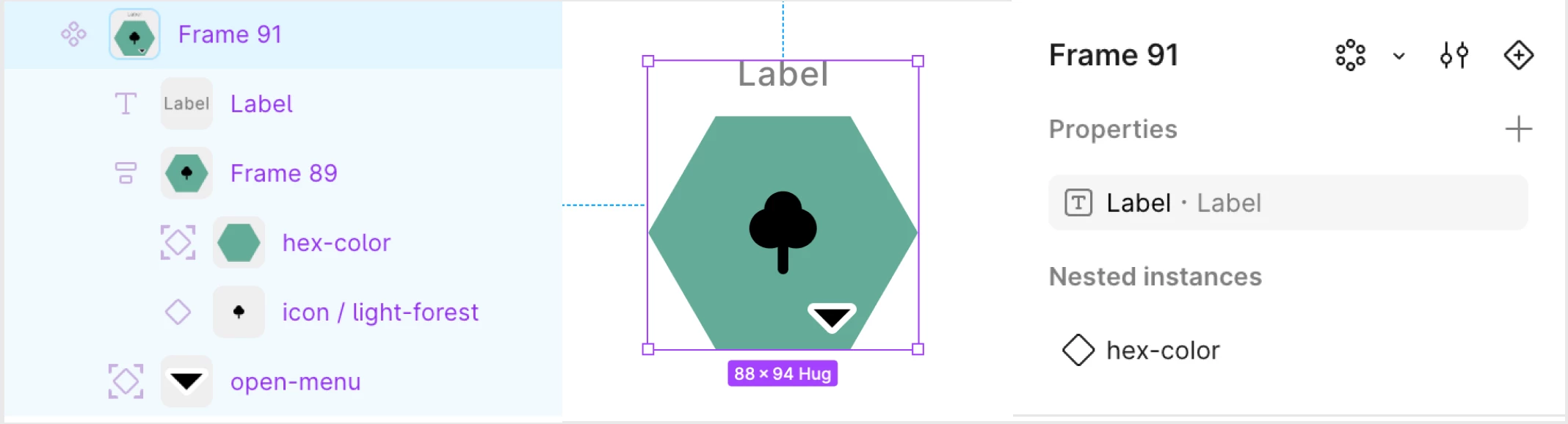
 

I wish to set up this component with 3 properties. I can successfully set up 2, but the third continues to not work. The problem property is the icon/light-forest layer. I want that to be another Nested instance, just like the hex-color layer. Every time I try, I get the “Not used within component” error, and it doesn’t show up as a Nested instance when I try to link it. I don’t understand what I’m doing incorrectly.

-Chris

Lucas West-
Lucas West-Solution
New Participant
Oct 22, 2026 3:39 PM UTC

Oh, looking at our interfaces side-by-side again, I just realized that you are totally in “draw” mode. Switch back to “design” mode, it’s the second mode.. When you are in draw mode, it doesn’t show the button you need to click to bind the instance to the component property. Despite it being the second in the list for some reason, “design” mode is the like main default mode you should be using 99.999% of the time, it exposes all of the component and layout and interaction related controls.

5 replies

Sitsiilia
New Participant
Oct 20, 2026 6:42 AM UTC

Are you trying to expose the icon’s own properties, or make the icon itself swappable? Those are two different things in Figma. If you want it to be swappable, select icon/light-forest inside your component and look for the instance swap property option in the right sidebar. This lets you expose a property (e.g. icon) so you can swap the icon from the parent component instance.

Remorhaz
RemorhazAuthor
New Member
Oct 20, 2026 10:23 PM UTC

Thank you for your response.

This is what I see on the right when I select icon/light-forest (the lower two images). I’m wondering if this is happening because I want to be able to swap in different icons that are all their own components. Perhaps what I should be doing instead is making a single icon component that has multiple variants, each of those variants being an icon that I want to be able to switch out. Is that true?


Lucas West-
New Participant
Oct 22, 2026 1:24 AM UTC

That should completely be possible, either way in fact.

I was going to reply with specific instructions on how to, but if you really are selecting the same exact layer in the bottom left image and the bottom right image, then there must be a bug with your file, most likely a naming mishap as often happens. Could you send your file, or copy the relevant components/instances into a fresh project so it can be inspected?

PS, when you go to copy things to a different project, you must select all your component definitions and instances that you want to copy over all at once and do just a single copy/paste, because otherwise if you copy over an instance first and then copy over it’s definition, the instance will stay linked to and point back to the copy of it’s definition still located in the original file even though there’s another copy of that component’s definition in the new file, and other similar messiness will ensue.

Lucas West-
New Participant
Oct 22, 2026 3:33 PM UTC

Image insertion is being completely broken for me annoyingly, when I click the “insert image” button and add my file it just throws “Something went wrong, please check your link and try again.” I tried putting my images into a google doc and then copy/pasting them into this input field, which worked a little more, actually showing in the field instead of throwing the error, but doing so grayed out the send button for some reason. Instead, below is the raw text of my response, and here is a link to a publicly viewable google doc of my response with the images included, sorry for the inconvenience: https://docs.google.com/document/d/1YWYP6ocSfXNhSDdrafMNG4mw1x9_tOs1Ai471RCzfcA/edit?usp=sharing If this solved your issue, please remember to mark it so.

Are you able to re-create this screenshot? This is a copy of the copy you sent me, so that I would be able to edit it, but I am able to see the button that was missing in your bottom right screenshot. Does that button I circled not show in your interface when you make an identical selection?

[image 1]

If you actually can see that button, then you just accidentally missed a step. It looks like you did create the component property correctly, I see where you were seeing that error- but that error is just because although you created that property and set it’s default value, you didn’t actually set up any instances to use the property, that’s the real meaning of that error. Just because you told it to default to the “forest” component, doesn’t mean it looks for an instance of “forest” in your component automatically, because consider what would happen if you had multiple instances of “forest,” which one would it change? What if you wanted it to change both? Instead, you have to go to the instance you want the property to effect, and tell it to bind to the property you made.

[image 2]

You need to go to the instance of that forest component (the instance inside your new outer component’s definition) that you want that property to actually control, and do this to actually bind the instance to swap according to the property you made:

[image 3]

Alternatively, instead of creating the component property first and then going to the instance you want and binding it, you can just start from the instance and click the button below the one pointed to, “Create property…,” to just create and bind the property in one click.

Lucas West-
Lucas West-Solution
New Participant
Oct 22, 2026 3:39 PM UTC

Oh, looking at our interfaces side-by-side again, I just realized that you are totally in “draw” mode. Switch back to “design” mode, it’s the second mode.. When you are in draw mode, it doesn’t show the button you need to click to bind the instance to the component property. Despite it being the second in the list for some reason, “design” mode is the like main default mode you should be using 99.999% of the time, it exposes all of the component and layout and interaction related controls.