July 13, 2024
Solved

I can't go back to UI2 from UI3

  • July 13, 2024
  • 22 replies
  • 1691 views

For some reason, I’m not able to switch to UI2 from UI3. The option is completely missing for me.

This topic has been closed for replies.
Best answer by stanhuan

Hi Fred,

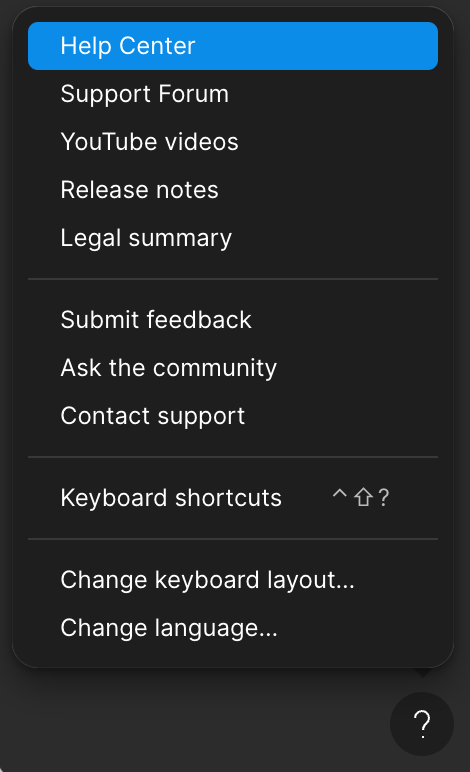
Can you double check you’re accessing this menu from a design file? It looks like you may be looking at this menu in the file browser

22 replies

Fred_Tinsel
Active Member
August 2, 2024

Pro member since 2020
I can’t go back to UI2


and that’s really a problem… 😨

— Edit :
I don’t know how and why, but this morning (after the week-end)
the help button has displayed the link to “Go back to previous UI”

stanhuan
Figmate
stanhuanAnswer
Figmate
August 7, 2024

Hi Fred,

Can you double check you’re accessing this menu from a design file? It looks like you may be looking at this menu in the file browser

Fred_Tinsel
Active Member
August 8, 2024

Yeap @stanhuan you’re right
and I perfectly remenber why…
The help button wasn’t displayed in my files 🧐
———
But as you see my edit, everything is back to normal

Gleb
Power Member
August 9, 2024

You can enable it in the settings:

Jasmine_Shiree
September 30, 2024

I would like to know if this option will be here even after it’s out of Beta. Because it would be great to keep the old UI as an option…

Celine_
Figmate
Community Support
September 30, 2024

Hey there! Unfortunately not. To support the transition to UI3, everyone has the ability to toggle between UI2 and UI3 so you can get accustomed to the redesign for now, but not forever. (For your information, everyone will have UI3 on October 10)

We will eventually retire UI2 in late 2024 or early 2025. Admins will be notified in advance when there is a set date for UI2’s deprecation.

Thanks for your understanding!

More information in this article:

Figma Learn - Help Center
Rebecca5
October 10, 2024

I think there’s some funky glitches in the system still, I don’t see the “Go back to previous UI” option under the Help menu. I’m on a paid plan and the file was created today. Or, perhaps this forum’s documentation is just outdated.

For folks looking for a solution, I had luck switching back to UI2 using search:

  1. Hit command/ctrl + /
  2. Search for “UI2”
  3. Uncheck “Use new UI (in beta)”
  4. Happy UI2-ing!
    search UI2
Maddy_Jeffery
October 10, 2024

I also don’t have the option to switch back to UI2. I dislike how many changes were made in UI3 which makes things very hard to find. Editing Figma files is so slow now.

I’m accessing the menu from a design file and in the tutorial it said there would be an option to switch back to UI2.

djv
Figmate
Community Support
October 10, 2024

A post was merged into an existing topic: UI3 Feedback

djv
Figmate
Community Support
October 10, 2024

Hey @Maddy_Jeffery,

Be sure to access the Help menu from within a Figma design file. It looks like you’re in the file browser.