
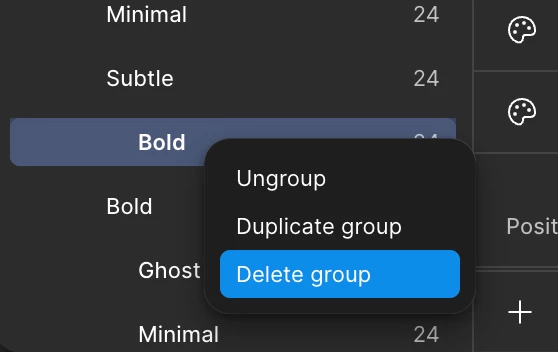
I am not able to delete variable group in collection in figma.

  • December 22, 2025
  • 2 replies
  • 100 views

Shivam_Gera

I am not able to delete the groups in figma collection table ?
 

2 replies

Robin_Lopez
  • New Member
  • December 23, 2025

Hi,

I’m experiencing the exact same issue. I’m unable to delete groups in a Figma collection table as well.

The problem persists even after trying common workarounds (refreshing the file, duplicating it, checking edit permissions).

Any update or solution from the Figma team would be appreciated.


djv
Figmate
  • Community Support
  • December 26, 2025

Hey All, thanks for flagging this issue! 

We were able to reproduce this issue and have filed a bug report with our team to investigate and fix. To be transparent, due to our company-wide holiday break through January 4th, it may take longer than usual for the team to complete their investigation. But please be assured that the report will remain active, and the timing will not affect its priority or how it is handled. We will reach out as soon as the team provides any updates. 
 
In the interim, as a temporary solution, you may want to delete a group by deleting all the variables (CMD/CTRL + A to select all and then right click > Delete variables) in the group or selecting and moving all the variables in the group into another group or the "All" group. We apologize again for the inconvenience.
 
If anything changes on your side, or if you have any questions or concerns, please reply here and I will be happy to assist. I know this type of issue can be disruptive, so I appreciate your patience while we work to get this resolved for you.
