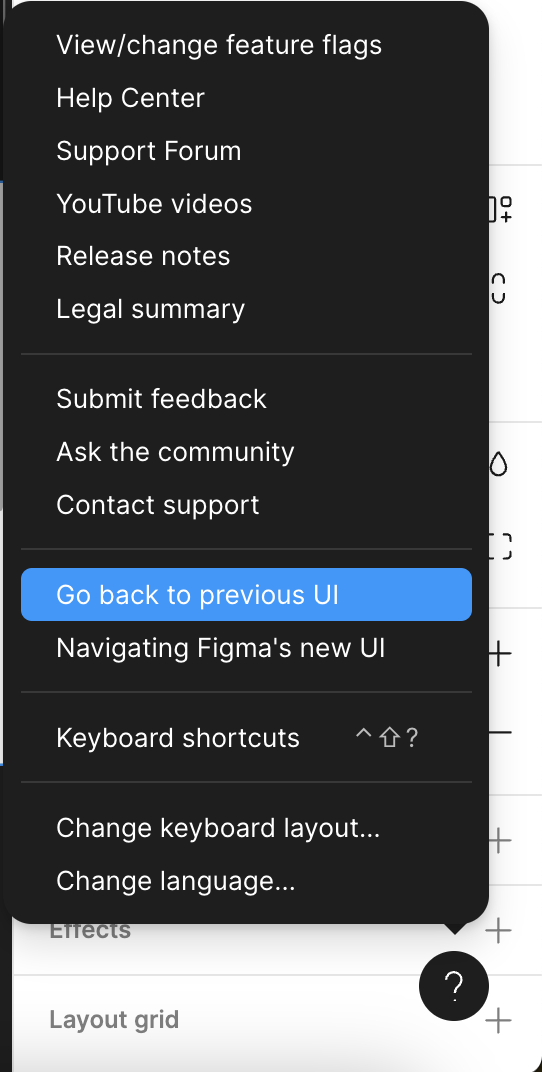
Answer

How to roll back a version?

  • October 10, 2024
  • 5 replies
  • 95 views

Yauheni

Current version with RE-DE-SI-GN … it’s a joke

Does anyone know how to roll back a version? thanks!

Best answer by djv

Hey All, sorry for the confusion!

From within a Figma file, click the ? Help icon in the lower, right-hand corner > Go back to previous UI.

This topic has been closed for replies.

5 replies

Yauheni
  • Author
  • October 10, 2024

WOW! I find it! Thanks!


BlackGold
  • New Participant
  • October 10, 2024

Absolutely. It’s really annoying me. It was just perfect untill UI3. They have to give people freedom and let them work thier imagination. New “redesign” is absolute joke.


mpowers
  • New Member
  • October 10, 2024

Yeah–DO NOT force me to have a toolbar at the bottom of the screen. Immediate negative visceral reaction to that. Horrible user experience, Figma!!!


sandbox_mockups

Where did you go to roll back a version? This new update is unusable.


djv
Figmate
  • Community Support
  • Answer
  • October 10, 2024

Hey All, sorry for the confusion!

From within a Figma file, click the ? Help icon in the lower, right-hand corner > Go back to previous UI.