Hey there! Celine from the Community Support team at Figma here.
I checked internally and can confirm that we've received your support request. I've escalated your case, and the team is currently reviewing it. For reference, your support case is #212537. Please continue the conversation directly via your support case as they’re best equipped to review your case.
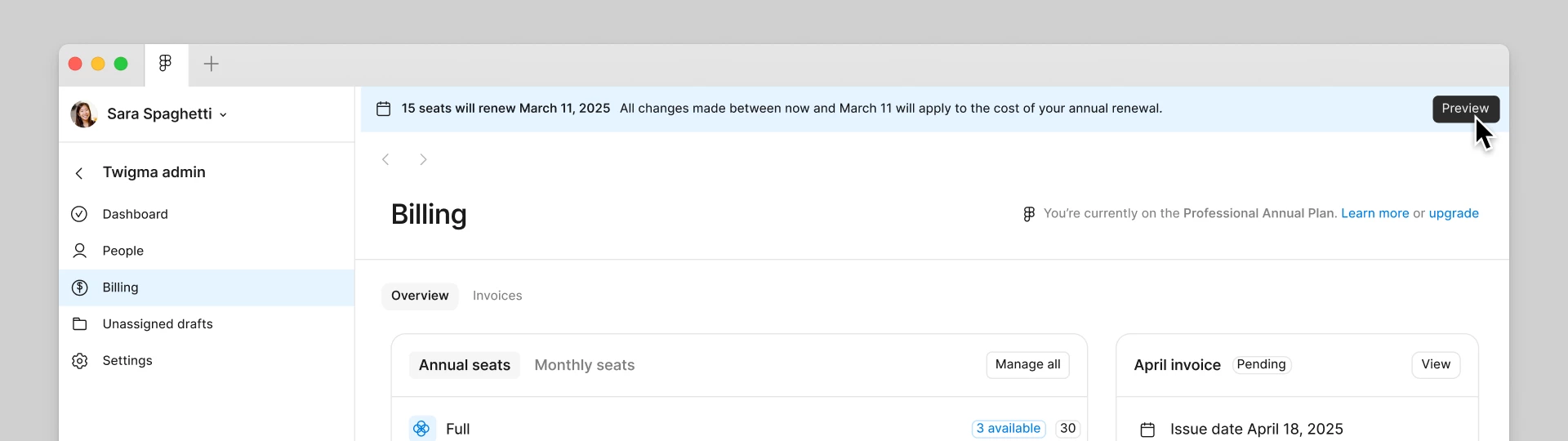
For anyone else running into a similar situation: for annual Professional plans, seat adjustments can only be made during the 30-day window before your renewal date. Thirty days before your plan renews, you'll see a banner at the top of your Figma admin (clicking it opens a modal where you can adjust the number of seats for your next renewal.)
If your renewal has already been processed, you'll need to reach out to our Support team directly so they can review the specific circumstances of your case.
Thanks for your patience while the team looks into your request! (I'll go ahead and mark this as the best answer, since your case is now being handled and this thread addresses the general question for anyone else running into the same situation.)
Hey there! Celine from the Community Support team at Figma here.
I checked internally and can confirm that we've received your support request. I've escalated your case, and the team is currently reviewing it. For reference, your support case is #212537. Please continue the conversation directly via your support case as they’re best equipped to review your case.
For anyone else running into a similar situation: for annual Professional plans, seat adjustments can only be made during the 30-day window before your renewal date. Thirty days before your plan renews, you'll see a banner at the top of your Figma admin (clicking it opens a modal where you can adjust the number of seats for your next renewal.)
If your renewal has already been processed, you'll need to reach out to our Support team directly so they can review the specific circumstances of your case.
Thanks for your patience while the team looks into your request! (I'll go ahead and mark this as the best answer, since your case is now being handled and this thread addresses the general question for anyone else running into the same situation.)
but I didn't see any banners, and there were no email notifications either. It's obvious that Figma's notification reach method is insufficient. Please help me solve the problem I'm currently facing. Thank you
Hey again, thank you for the follow up here. Good news! I see in the backend that the support agent has resolved your issue. They have updated the renewal to better reflect the seat count your team needs.They also sent you a link for the adjusted invoice . Please check directly your inbox for the full details. If anything on the adjusted invoice looks different from what you expected, or if there’s anything else, please continue directly the conversation via the secure form, so our team can take a closer look at it, thank you! I’ll go ahead and close the topic here.