

Question

How to make components same height while hug the highest one?

  • February 22, 2026
  • 2 replies
  • 19 views

mengxi zhang

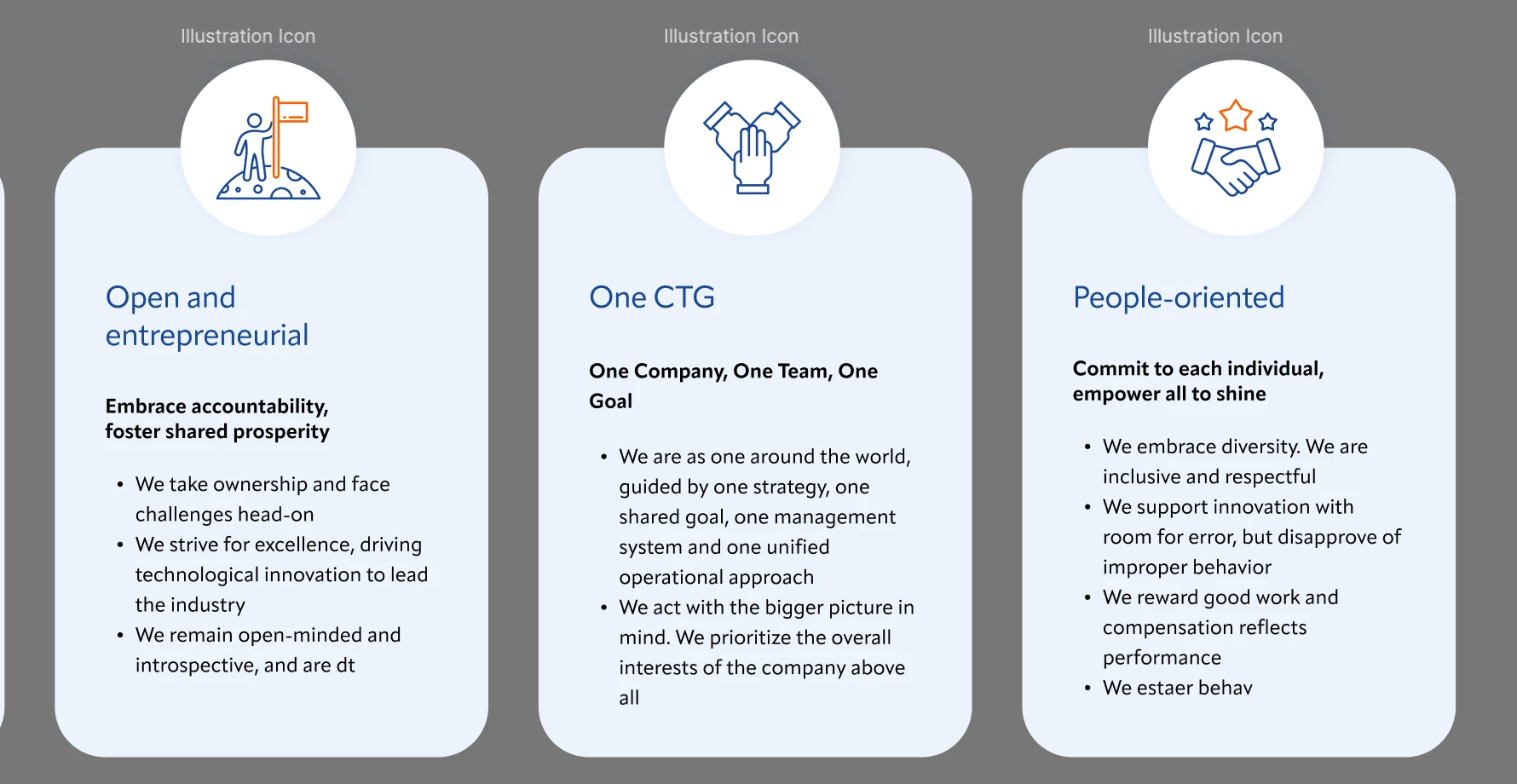
I have iconA fixed size, and frame B with text in it, A&B together should be made into componentsC to change contents. lets say C1 C2 C3 are its instance. I need to make C1 C2C3 the same height. So should be the highest of the 3 with 40 padding. How to do it?


2 replies

zachshea
  • Active Member
  • February 22, 2026

This is not really an option in auto layout. Obviously you could set the tallest one to hug and the others to fill height, but you would have to switch those if one gets longer than the other.

One thing you could hack together is separating your backgrounds from the text layers, and them both live inside the same auto layout parent. The backgrounds would have absolute positioning and pinned top and bottom so they stretch. Text layers would be in their own hugging container, with the parent hugging as well.


DustinSmith
  • New Member
  • February 23, 2026

icône de taille fixe, un cadre de texte qui peut prendre différentes hauteurs selon le contenu, et vous voulez que toutes vos instances du composant aient exactement la même hauteur, celle du plus grand texte, avec une marge intérieure de 40. La solution la plus simple dans votre outil de design (Figma, Sketch ou autre) est de ne pas lier la hauteur du composant parent au contenu de chaque instance.