

Chaitanya_Rajguru
August 19, 2024
Solved

How to make async call to the figma.getNodeByIdAsync() function?

  • August 19, 2024
  • 11 replies
  • 464 views

Greetings from a newbie!

I cannot get a call to Figma.getNodeByIdAsync() to work. Could anyone please tell me what I am doing wrong? I have searched this forum and referred to a sample plugin go-to that uses this function, but I am still stuck.

Below is my simplified code just for checking this functionality. When I run it as part of the plugin, console logs #1 and #2 are generated but not #3, and the console returns to the ‘>’ prompt.

Thank you!
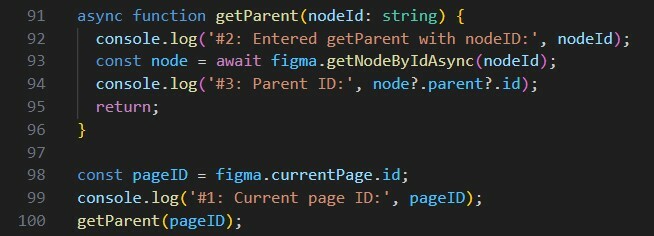
Figma_plugin_issue

This topic has been closed for replies.
Best answer by Pavel_Kiselev

To make it work you need to run it async way. Just wrap your code into another asynchronous function and run getParent with await keyword

(async ()=> {
    //…
    await getParen(id);
    figma.closePlugin();
})()

11 replies

tank666
August 19, 2024

Is there a call to figma.closePlugin() after the 100th line?

UX/UI designer. Figma expert. Creator and developer of plugins and widgets for Figma and FigJam. Check out my resources in Figma Community: figma.com/@tank
Chaitanya_Rajguru
August 19, 2024

Thanks, yes, there is. (I have some commented-out code sitting around, so I didn’t post the full program.)

tank666
August 19, 2024

The commented lines should not affect further execution of the code. Make sure that figma.closePlugin() is called only after the promise is completed or try deleting/commenting everything except what is in the screenshot and compiling the code.

UX/UI designer. Figma expert. Creator and developer of plugins and widgets for Figma and FigJam. Check out my resources in Figma Community: figma.com/@tank
Chaitanya_Rajguru
August 20, 2024

Thank you, @tank666. I cleaned up the file so it contains only the below code. I added one console.log to be doubly sure. I still have the same issue: I get console logs #1, #2, #3, but #4 is skipped. (I can get the demo plugin to work, though that does not have any async calls. I am trying to get the go-to plugin to work now.)

Figma_plugin_issue2

Pavel_Kiselev
Power Member
August 20, 2024

To make it work you need to run it async way. Just wrap your code into another asynchronous function and run getParent with await keyword

(async ()=> {
    //…
    await getParen(id);
    figma.closePlugin();
})()
Chaitanya_Rajguru
August 20, 2024

Thank you, @Pavel_Kiselev . I tried this and added some null checks with a renamed function that does the same thing. However, still no luck, I get only console logs #1, #2, #3 but not #4. What else could be the reason?

Pavel_Kiselev
Power Member
August 20, 2024

No idea. There is something not very obvious. Debugging to the rescue.

Chaitanya_Rajguru
August 20, 2024

Yes, surely. Thank you for looking into it.

tank666
August 20, 2024

The code from this screenshot should work correctly, and you should see 1, 2, 3 and 4a in the console. And 4b will never appear because the else block will never be executed. Check the compiled js file to make sure it matches your ts file.

UX/UI designer. Figma expert. Creator and developer of plugins and widgets for Figma and FigJam. Check out my resources in Figma Community: figma.com/@tank
Chaitanya_Rajguru
August 21, 2024

Ok, thank you @tank666. The JavaScript code looks ok to me, but I need to debug deeper.
