

Chica
New Member
February 26, 2025
Solved

how to make a shape show layers underneath selected layers like its applying a transparent/inverted mask?
  • February 26, 2025
  • 2 replies
  • 549 views
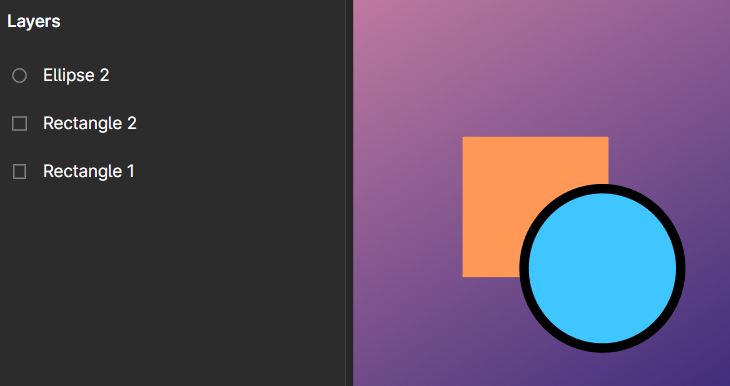
example image, ill apply the technique to a private design
​​​​

im pretty new to figma and graphic design in general so, i wanted to know what kind of solution can make what i want with this, i want the black outline of the circle to “mask out” the square there, for solid backgrounds i just made it the same color but for gradients like this well, it looks like an out of place ring

i experimented with masks but got nowhere, i know its basic but its getting frustrating, applying the same gradient to the outline in a seperate layer feels like patching it with some tape i want a more sophisticated solution if possible

This topic has been closed for replies.
Best answer by Nate_G

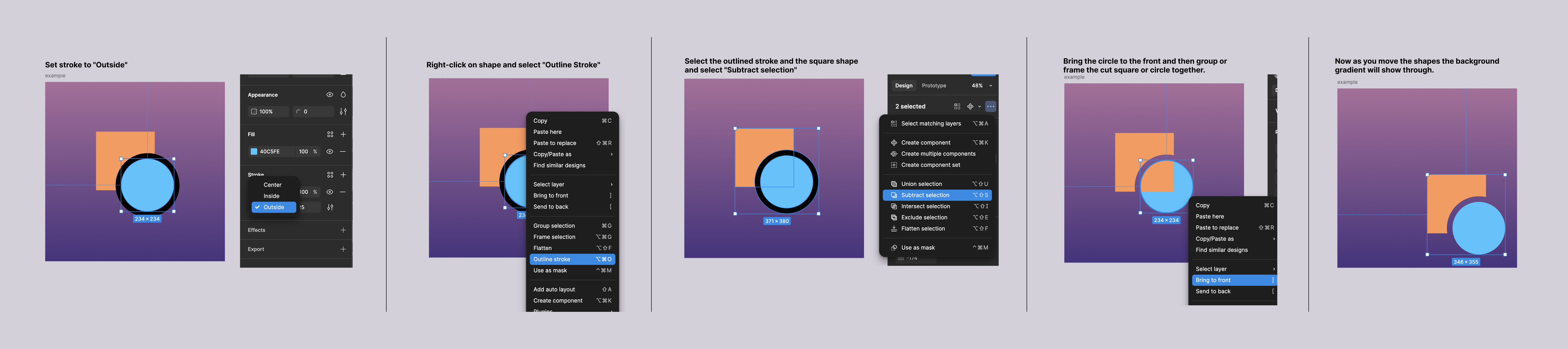
@Chica There are likely multiple ways you could do this, but here is one approach using “outline stroke” and “subtract selection” (see below example).


2 replies

Nate_G
Nate_GAnswer
Power Member
February 26, 2025

@Chica There are likely multiple ways you could do this, but here is one approach using “outline stroke” and “subtract selection” (see below example).


Nate G
Chica
ChicaAuthor
New Member
February 26, 2025

@Chica There are likely multiple ways you could do this, but here is one approach using “outline stroke” and “subtract selection” (see below example).


thank you so much! i found a solution with substract but it was messy and couldnt get shapes to have their own color so this is alot better