
Solved

How to edit multiple objects as one

  • January 11, 2026
  • 5 replies
  • 93 views

Rool

Hi, I have a collection of objects like:
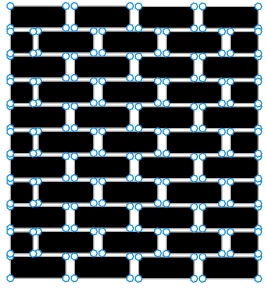
collection of objects


how can I edit multiple objects as one so I get the following:
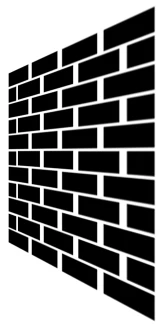
desired result

I still want these objects to stay editable individually later after doing that.

Best answer by Nellya

Hi. I’m not sure there is a way to warp it like that without a plugin, therefore it should be single vector. You can flatten image (Ctrl+E), warp it using this plugin and split it with another plugin after that.

5 replies

Nellya
  • Power Member
  • Answer
  • January 11, 2026

Hi. I’m not sure there is a way to warp it like that without a plugin, therefore it should be single vector. You can flatten image (Ctrl+E), warp it using this plugin and split it with another plugin after that.


Rool
  • Author
  • New Member
  • January 24, 2026

Hi. I’m not sure there is a way to warp it like that without a plugin, therefore it should be single vector. You can flatten image (Ctrl+E), warp it using this plugin and split it with another plugin after that.

thanks buddy


Pixelz
  • New Member
  • January 25, 2026

@Nellya nailed it


Pixelz
  • New Member
  • January 25, 2026

Hi. I’m not sure there is a way to warp it like that without a plugin, therefore it should be single vector. You can flatten image (Ctrl+E), warp it using this plugin and split it with another plugin after that.

thanks buddy

🙌


Pixelz
  • New Member
  • January 26, 2026

Is there any other solution to this