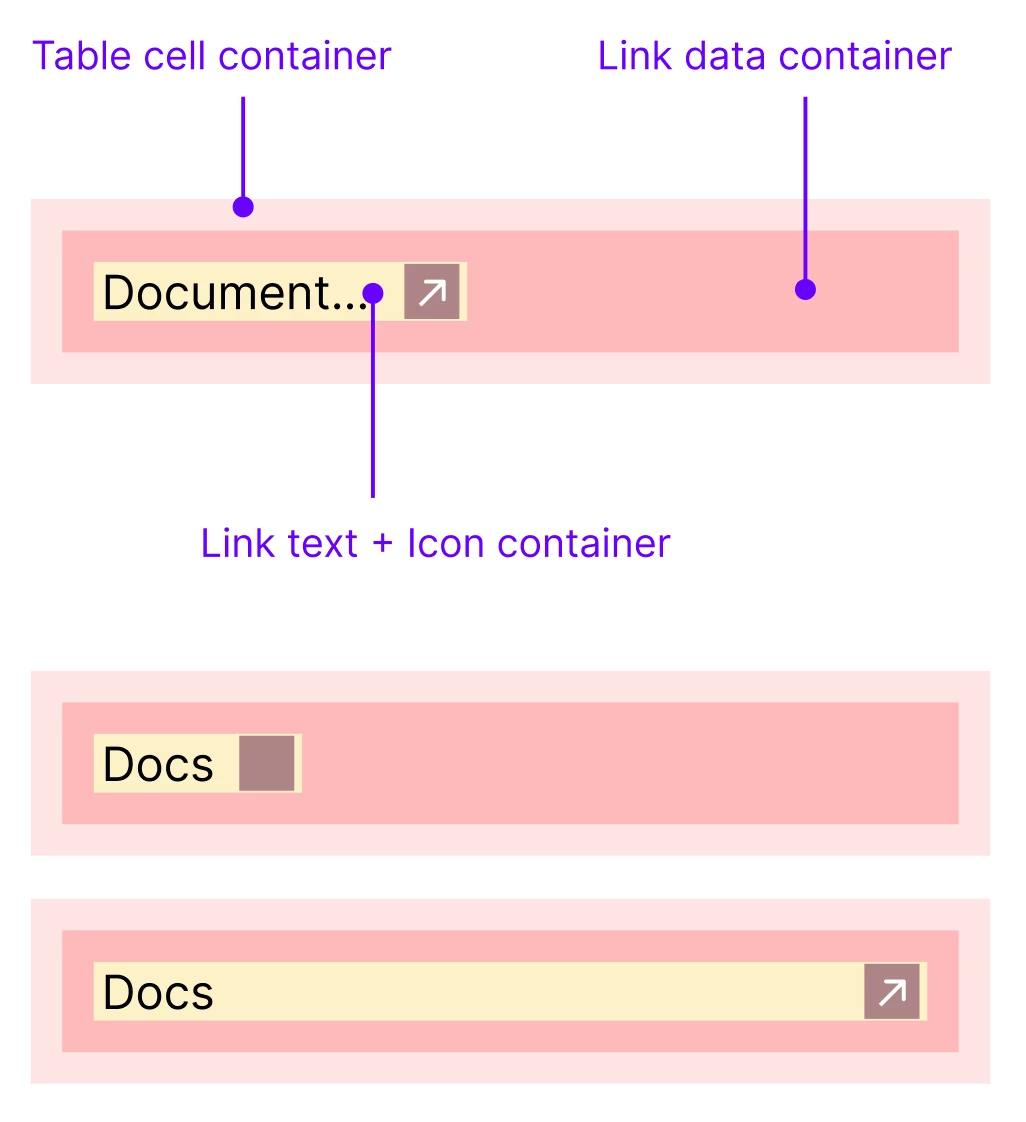
How to achieve ... Truncation text + Trailing icon
Scenario: "Link Text + Open New Window Icon" Component Inside a Table Cell
-
Initial State
-
The link component sits inside a table cell.
-
It consists of two grouped elements:
-
Text (dynamic width, labeled “Link Text”)
-
Trailing Icon (fixed size, representing “Open in new window”).
-
-
The text box and icon are set to Auto layout (Hug contents), so their total width expands or contracts based on text length.
-
-
User Interaction in the Properties Panel
-
The user begins typing the link text (e.g., “Docs”, “Documentation Page”, etc.).
-
As each character is added, the text field width increases dynamically, and the icon shifts right, maintaining consistent spacing due to the “Hug” behavior.
-
The entire link component grows horizontally within the table cell.
-
-
Reaching Width Limit / Cell Edge
-
When the growing component nears the maximum cell width (or a predefined layout constraint), auto-layout can no longer expand.
-
A truncation behavior activates:
-
The text shortens visually with an ellipsis (e.g., “Documentati…”).
-
The icon remains visible at the end, aligned to the cell’s edge.
-
-
The text and icon preserve spacing, but no overflow occurs beyond the cell boundary.
-
-
Final Display Behavior
-
The component shows a neatly truncated link label followed by the trailing “open new window” icon.
-