

Mustafa Wahab
New Participant
Nov 2, 2026 8:07 AM UTC
Question

How is this generating drop shadow?

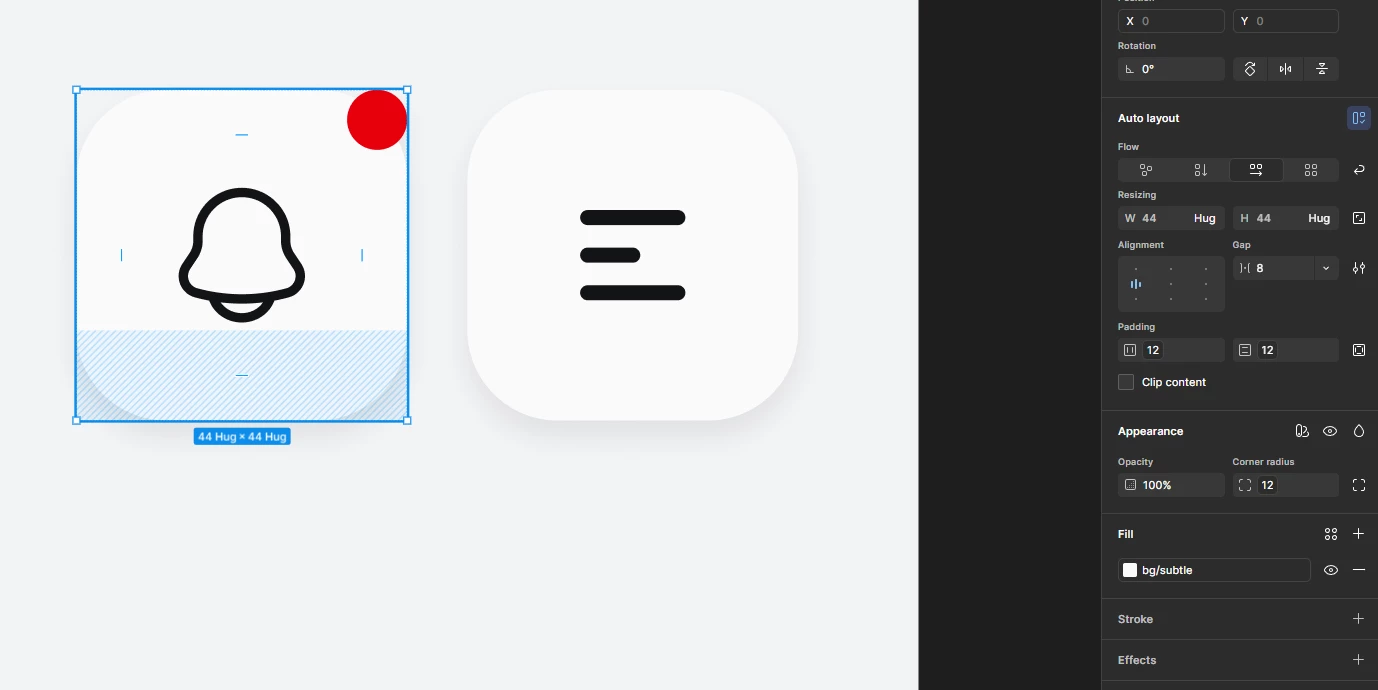
I noticed that one of my frames is auto-generating a drop shadow effect, but you can clearly see in the image that the effect is not even applied. I also tried to ungroup the auto layout, yet this generates automatically.


I am doing something wrong. Is this issue a bug, or what? I am so confused.


4 replies

Ondrej_Pavlicek
Figma Ambassador
Figma Ambassador
Nov 2, 2026 8:36 AM UTC

Hi there! 👋

Thanks for sharing the screenshot, it really helps to see what is going on.

I think the drop shadow is probably added to one of the nested layers inside your frame, not the main frame itself. Since Clip content is unchecked on the right, the shadow from an inner layer can show outside the frame. Try looking at the layers under this frame in the left Layers panel, and you might find the shadow there.

Hopefully, you will find it! 😊 If not, feel free to share what layers the icon has, and we can find the problem together.

Product designer @ NETWORG | Designing Model-driven Power Apps in Figma | Power Apps DesignKit (Model-driven) | Disclosure: I’m part of Figma’s Forum Ambassador program.
Mustafa Wahab
New Participant
Nov 2, 2026 8:39 AM UTC

I just checked all my layers thoroughly, and I can confirm that none of them have any effects applied to them. Clipping content has nothing to do with it because there’s no effect applied.

This definitely seems like a bug to me.

Mustafa Wahab
New Participant
Nov 2, 2026 8:42 AM UTC