How do I reset a button to it's default instance in the preview? I want it to go to it's default instance by clicking outside it, but I don't know how to do it.
How do I reset a button to it's default instance in the preview? I want it to go to it's default instance by clicking outside it, but I don't know how to do it.
I hope I’m phrasing my question correctly. How do I reset a button to it's default instance in the preview? I want it to go to it's default instance by clicking outside it, but I don't know how to do it. Like when you click a search bar & the cursor blinks & the bar stays highlighted until you click anywhere else beside it. Any suggestions would be very helpful, thank you.
Hey @Shivam Jaiswal and @Lucas Wall, thanks for raising this!
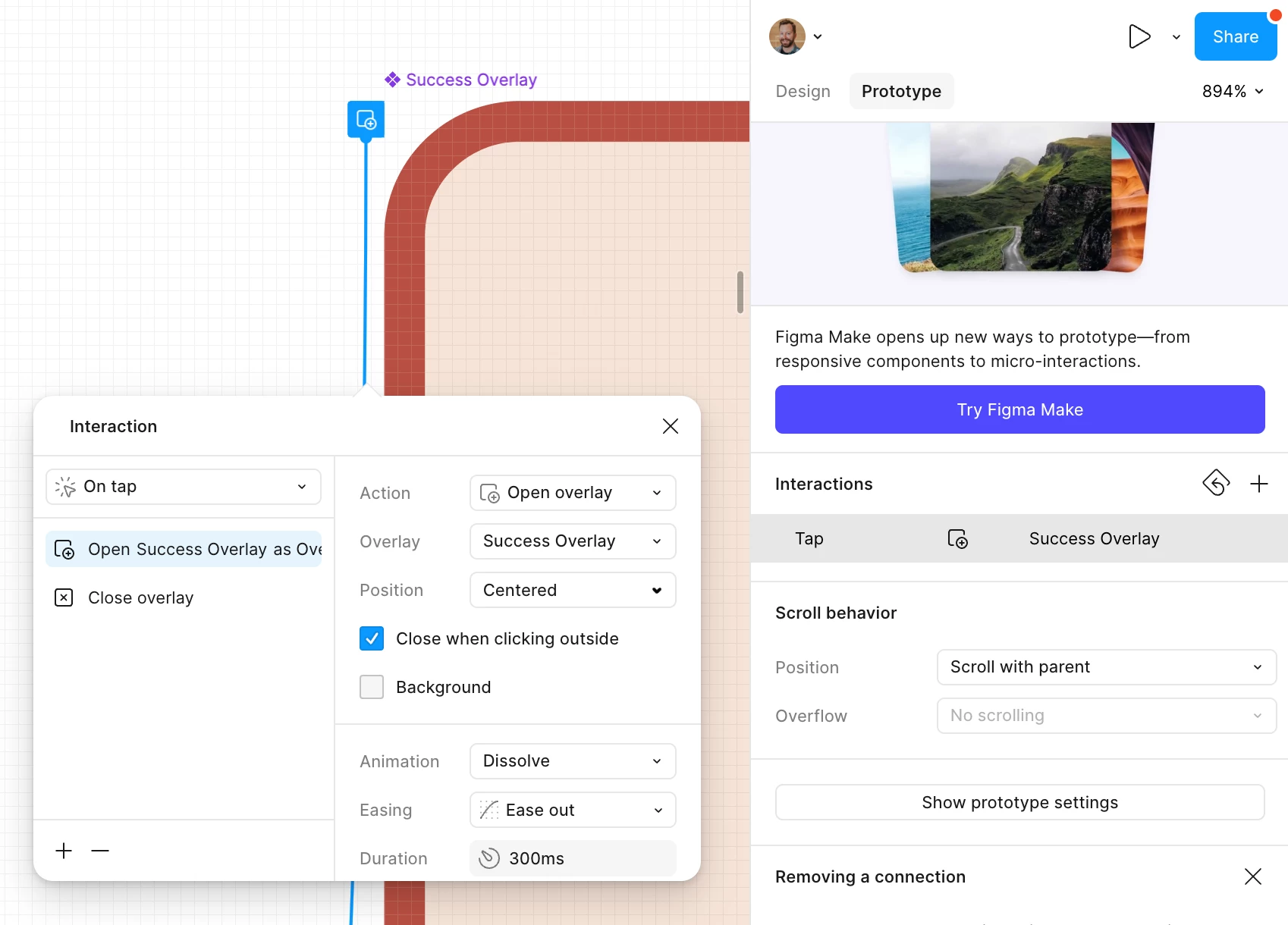
I think I know what you mean. In one of my test files, I use the Close when clicking outside setting to get this behavior. The trick is to build the highlighted/focused state as an overlay that opens on tap — so the button underneath never actually changes, and closing the overlay reveals the original default state again.
Here's how I set it up:
Create a frame for the highlighted state (e.g. your button/search bar in its focused look). This becomes the overlay.
Select the trigger element (the default button or icon) in your design.
Switch to the Prototype tab in the right sidebar.
Drag the blue arrow (the "noodle") from the trigger to your highlighted-state frame.
In the Interaction panel, set the action to Open overlay.
In the overlay settings, check Close when clicking outside. (For Position, consider trying Manual so the overlay sits right on top of the original element rather than centering on screen.) "Close on click outside" in prototype Interaction.
Note: This works because the overlay holds the focused state. If you instead change the button's own state on press and then open an overlay, clicking outside won't reset that state — it's a known limitation we're tracking here: Interactive state doesn't reset after overlay is closed.
For more, have a look at this guide: Create overlays in your prototypes. There may be a few different ways to do this depending on your design goals, but does this achieve what you're looking for? Keep us posted!
Hey @Shivam Jaiswal and @Lucas Wall, thanks for raising this!
I think I know what you mean. In one of my test files, I use the Close when clicking outside setting to get this behavior. The trick is to build the highlighted/focused state as an overlay that opens on tap — so the button underneath never actually changes, and closing the overlay reveals the original default state again.
Here's how I set it up:
Create a frame for the highlighted state (e.g. your button/search bar in its focused look). This becomes the overlay.
Select the trigger element (the default button or icon) in your design.
Switch to the Prototype tab in the right sidebar.
Drag the blue arrow (the "noodle") from the trigger to your highlighted-state frame.
In the Interaction panel, set the action to Open overlay.
In the overlay settings, check Close when clicking outside. (For Position, consider trying Manual so the overlay sits right on top of the original element rather than centering on screen.) "Close on click outside" in prototype Interaction.
Note: This works because the overlay holds the focused state. If you instead change the button's own state on press and then open an overlay, clicking outside won't reset that state — it's a known limitation we're tracking here: Interactive state doesn't reset after overlay is closed.
For more, have a look at this guide: Create overlays in your prototypes. There may be a few different ways to do this depending on your design goals, but does this achieve what you're looking for? Keep us posted!