March 23, 2023
Solved

How do I border a shape in FigJam?

  • March 23, 2023
  • 15 replies
  • 18631 views

How do I add a border to a shape? Or Change the colour of the border on a shape? (NOT an image)

This topic has been closed for replies.
Best answer by Haroll

Oh my bad, I read to quick @Franco5
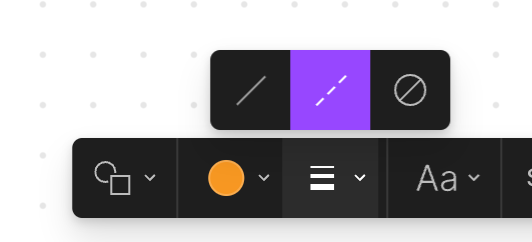
You can add/change/remove the line (which is different than a border) of a shape on Figjam by clicking on your shape and then selecting Line style option (as shown bellow). Other than that you won’t be able to do anything else (cannot choose its width nor its color)
image

15 replies

Diana_Fernandez
January 17, 2024

I’d like to choose another width for the borderline 😦

Cameron7
January 30, 2024

Please add changing border color, thanks!

MichelleBarnes
New Member
June 20, 2024

To add a border color:
Line style, select “Solid”.
Shape fill color, select “no fill”.
Then go back to shape fill color and select the color you want.
The color will only affect the border.
Hope this helps!

July 24, 2024

This works!! Thank you so much!

Mahbub
October 27, 2024

You can follow this video tutorial to add shape border and change border color in FigJam: https://youtu.be/PELM17xyawk