Myra Selune
New Member
Apr 22, 2025 11:34 AM UTC
Solved

How can I change the profile with which a file is opened?

Hello,

I use several profiles on Figma, one dedicated to a work team, the other personal to work on files and make feedback.

When the figma file has been opened with one of the two profiles, I can't find any way to swap profiles to leave comments or make changes with the right one.

The only solution seems to be to disconnect the account you don't want to use? Which means reconnecting several times a day.

Thanks in advance

    This topic has been closed for replies.
    Celine_
    Celine_Solution
    Community Support
    Apr 22, 2025 1:52 PM UTC

    Hey Myra,
    Figma currently doesn’t support easy switching between multiple profiles within the same browser session for a specific file. Once you're logged into one account, you’re basically locked into that session until you log out and back in.
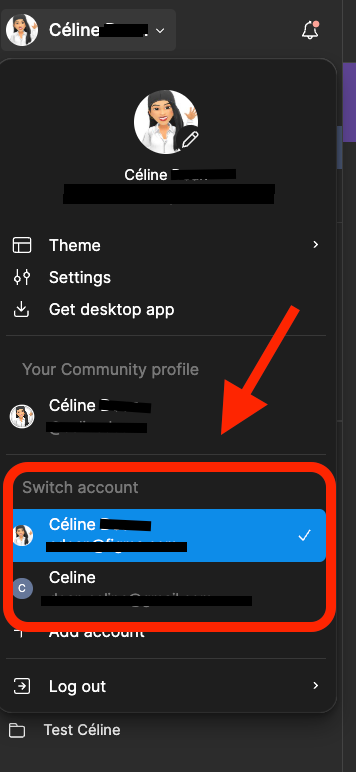
    You can only switch your account in the Figma menu here:


    At this time, I’d suggest using a different browser for each Figma account (e.g. in Chrome, Edge, or Firefox). This way, you can stay logged into both accounts at the same time. Each in its own window!

    Another option, you can also log into one account using the Figma desktop app and the other in your browser. That lets you, for example, leave comments from one profile and edit with the other—without needing to switch back and forth.
    Hope this helps!

    1 reply

    Celine_
    Figmate
    Celine_Solution
    Community Support
    Apr 22, 2025 1:52 PM UTC

    Hey Myra,
    Figma currently doesn’t support easy switching between multiple profiles within the same browser session for a specific file. Once you're logged into one account, you’re basically locked into that session until you log out and back in.
    You can only switch your account in the Figma menu here:


    At this time, I’d suggest using a different browser for each Figma account (e.g. in Chrome, Edge, or Firefox). This way, you can stay logged into both accounts at the same time. Each in its own window!

    Another option, you can also log into one account using the Figma desktop app and the other in your browser. That lets you, for example, leave comments from one profile and edit with the other—without needing to switch back and forth.
    Hope this helps!