

Solved

hide preview box in layers ui tab

  • April 2, 2026
  • 1 reply
  • 25 views

Jstagg

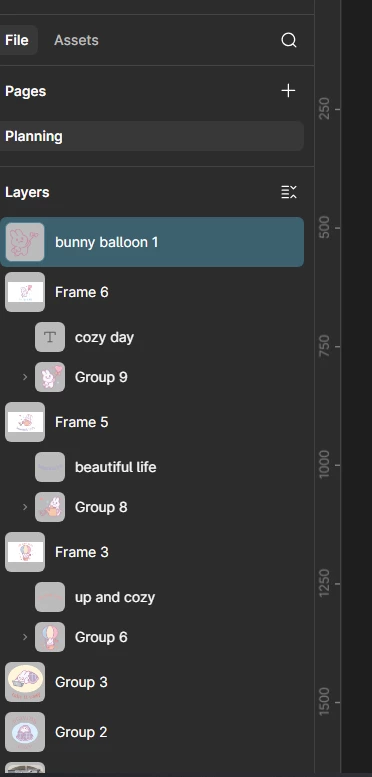
one day i was working and idk what happened but in the middle of me working the layers tab layout completely changed and its horrible. idk how to make it go back to what it used to look like. can someone help? now instead of saying what the layer is, everything just shows up in these preview boxes. even if its a text layer. it is impossible to navigate. how do i go back to default? 
 

Best answer by djv

Hi ​@Jstagg, thanks for reaching out and providing this screenshot! 

I understand how confusing this must be. From you screenshot, it looks like you’ve accidentally toggled into Figma Draw. In Figma Draw, the Layers section in the left sidebar displays an enlarged visual preview of the layer’s contents.

You can toggle back into Figma Design from your toolbar.


Hope this helps clarify, but please let me know if you have any further questions.

1 reply

djv
Figmate
  • Community Support
  • Answer
  • April 2, 2026

Hi ​@Jstagg, thanks for reaching out and providing this screenshot! 

I understand how confusing this must be. From you screenshot, it looks like you’ve accidentally toggled into Figma Draw. In Figma Draw, the Layers section in the left sidebar displays an enlarged visual preview of the layer’s contents.

You can toggle back into Figma Design from your toolbar.


Hope this helps clarify, but please let me know if you have any further questions.
