

Iksan Hafidho
New Member
August 27, 2026
Solved

Figma Variables / Component Property Reset Issue
  • August 27, 2026
  • 1 reply
  • 69 views

Hi everyone, I’m running into a strange issue with Figma Variables and component instances, and I’d really appreciate some help understanding whether this is expected behavior or a bug.

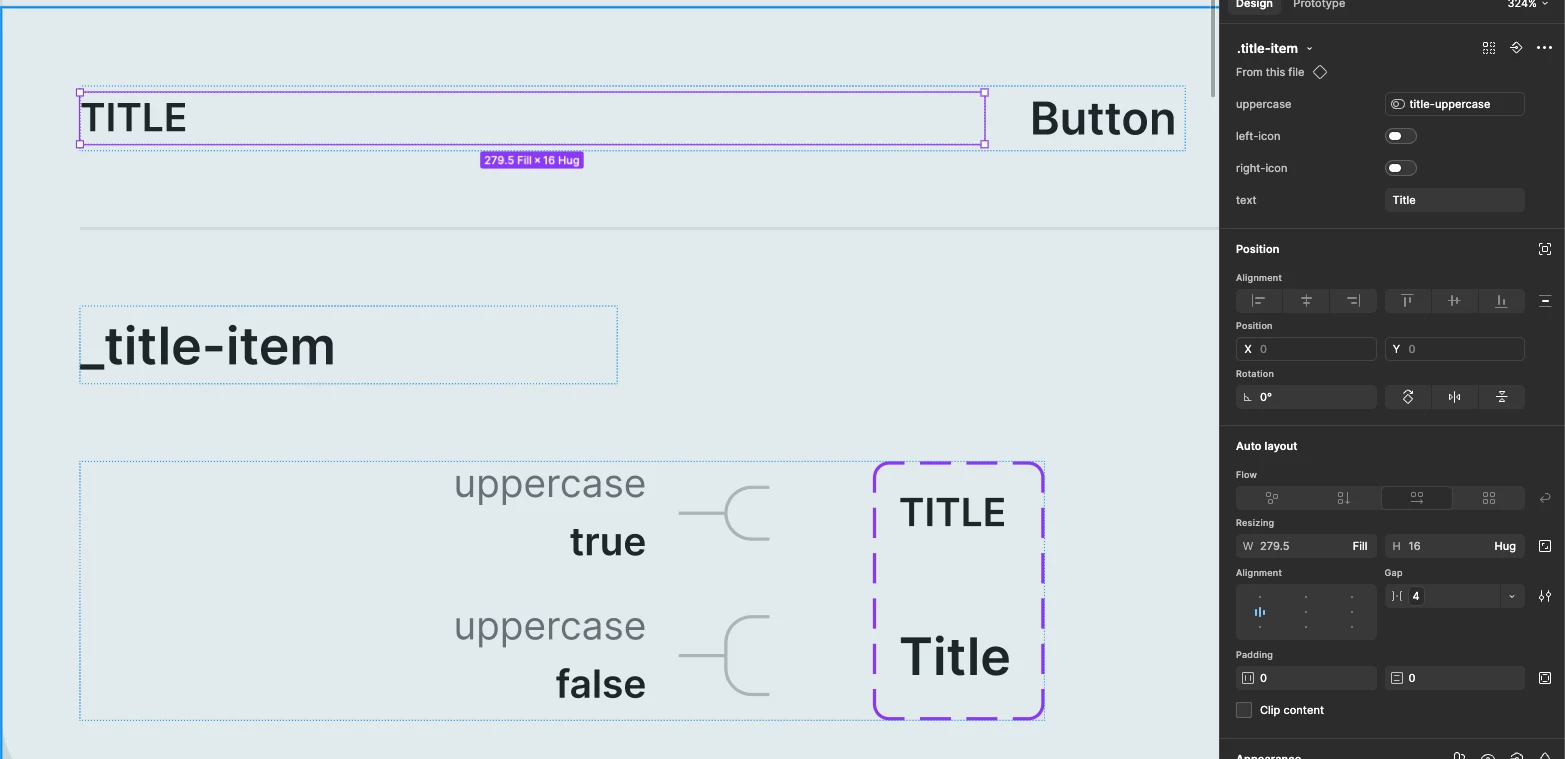
I have a component called Title with a text property that is connected to a Boolean variable called uppercase. The variable controls whether the text is displayed in uppercase or normal case. I then publish this component as part of a design system.

The problem happens when I update the variable/mode in the design system and republish it.

For example:

  1. I create a Title component and connect its uppercase property to a variable.
  2. I use this component in another design and customize the text values for each instance.
  3. I update the variable mode in the design system, for example from uppercase = true to uppercase = false, and publish the update.
  4. After updating the library, the customized text values in existing instances are reset back to the default Title text.
  5. This happens even if I change the font or make other content changes. The instance loses the text values I previously defined.

Interestingly, if I stay in the same file and switch the component directly between the two modes, everything works correctly. The issue seems to happen specifically when the component is published, updated, and then consumed in another file, or when I copy the component/instance into another file.

So I’m wondering:

Is this expected behavior with Variables + component properties, or is this a bug?

The main concern is that we have many existing instances with custom text content. If every library update causes those values to reset, we would have to manually re-enter a large amount of content every time the design system changes.

Has anyone experienced something similar or knows how to prevent the instance content from resetting when updating the published component/library?

I’ve attached a screenshot showing the component setup and the uppercase variable configuration.

Best answer by adamsmasher

Hi ​@Iksan Hafidho! Thanks for posting and providing a really good description of your component and how you’re using it. Very helpful!


The short answer is what you're seeing is expected behavior, not a bug: it's due to how we handle nested instance variant binding. When a variable change (mode or value) causes a nested instance's variant to swap - in your case, uppercase toggling the Title component to a different state - Figma doesn't carry over overrides on that instance, including custom text content. That's also why it works fine when you switch modes directly within the same file (no publish/consume step involved): the reset specifically happens on the swap that's triggered by the variable resolving to a new value.


I understand the impact that can have, though - especially with a lot of existing content to manage. A couple of options that might help:

  • Restructure so the property isn't tied to the variable-driven swap. For example, if uppercase doesn't strictly need to be a full variant swap, consider handling the casing with a text-transform-style boolean prop instead of a nested variant swap. With that, the text override lives independently of the state that's changing.
  • Keep the variable binding at the top level rather than nested, if your structure allows it. This limitation specifically affects nested instances, not primary ones.


Let me know if this doesn’t make sense or if you want to work through this specific component. Happy to help!

1 reply

adamsmasher
Figmate
Figmate
August 27, 2026

Hi ​@Iksan Hafidho! Thanks for posting and providing a really good description of your component and how you’re using it. Very helpful!


The short answer is what you're seeing is expected behavior, not a bug: it's due to how we handle nested instance variant binding. When a variable change (mode or value) causes a nested instance's variant to swap - in your case, uppercase toggling the Title component to a different state - Figma doesn't carry over overrides on that instance, including custom text content. That's also why it works fine when you switch modes directly within the same file (no publish/consume step involved): the reset specifically happens on the swap that's triggered by the variable resolving to a new value.


I understand the impact that can have, though - especially with a lot of existing content to manage. A couple of options that might help:

  • Restructure so the property isn't tied to the variable-driven swap. For example, if uppercase doesn't strictly need to be a full variant swap, consider handling the casing with a text-transform-style boolean prop instead of a nested variant swap. With that, the text override lives independently of the state that's changing.
  • Keep the variable binding at the top level rather than nested, if your structure allows it. This limitation specifically affects nested instances, not primary ones.


Let me know if this doesn’t make sense or if you want to work through this specific component. Happy to help!