

Prathamesh05
New Member
August 26, 2026
Question

Figma MCP Server stopped working with Antigravity – Token / Authentication issues

  • August 26, 2026
  • 5 replies
  • 159 views

Hi everyone,

I'm using the Figma MCP integration (`@modelcontextprotocol/server-figma`) with Google Antigravity to read design files and components into my development environment.

Everything was working properly initially, but recently it started failing and throwing authentication/token-related errors when attempting to query files or nodes.

Setup details:

Client: Google Antigravity (configured via `mcp_config.json`)

Token Type: Personal Access Token (PAT) with file read permissions

Environment:Token passed as `FIGMA_ACCESS_TOKEN` under server `env`

Current Situation:

- The integration was working previously without any issues, but suddenly started failing.

- I am experiencing this issue in Antigravity (though I haven't tested it with other MCP clients yet).

- I've verified the token is present in the configuration, but the connection/auth still fails.

Questions:

1. Have there been any recent changes to Figma PAT formats, expiration policies, or REST API authentication endpoints?

2. Has anyone experienced intermittent token rejection or sudden scope invalidation with MCP servers?

3. Are there known compatibility issues or extra environment variables needed for MCP clients running on Windows/Antigravity?

Thanks in advance for any insights or fixes!
 

5 replies

Jaycee Lewis
Figmate
Figmate
August 26, 2026

Hey, ​@Prathamesh05 👋 Sorry to hear about this. Did the issue resolve for you? If not, drop a line here and we’ll work on it together. — Jaycee

Prathamesh05
New Member
August 27, 2026

No, its not resolve i’m trying again and again. and when i’m trying to authenticate 

OAuth app with client id WPjiIBOlI6Snc0EeAjsit7 doesn't exist this is showing in browser.Please tell me how to pls this.
Prathamesh05
New Member
August 28, 2026

Hey, ​@Prathamesh05 👋 Sorry to hear about this. Did the issue resolve for you? If not, drop a line here and we’ll work on it together. — Jaycee

No, its not resolve i’m trying again and again. and when i’m trying to authenticate 

OAuth app with client id WPjiIBOlI6Snc0EeAjsit7 doesn't exist this is showing in browser.Please tell me how to pls this.
Jaycee Lewis
Figmate
Figmate
August 28, 2026

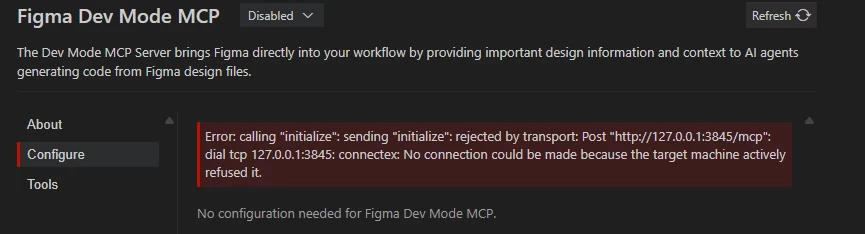
Hi ​@Prathamesh05 I opened a support ticket for this. The ID is 2099527 and the email subject line is Figma MCP desktop server refuses connection from Antigravity on 127.0.0.1:3845. Please keep an eye on your email (and spam folder if necessary) for the email and any replies from our team. Thank you! — Jaycee

Studio Designs
New Member
September 13, 2026

Open dev mode in figma -> Press Ctrl+K -> enable mcp