Mads_Maarup
June 28, 2022
Question

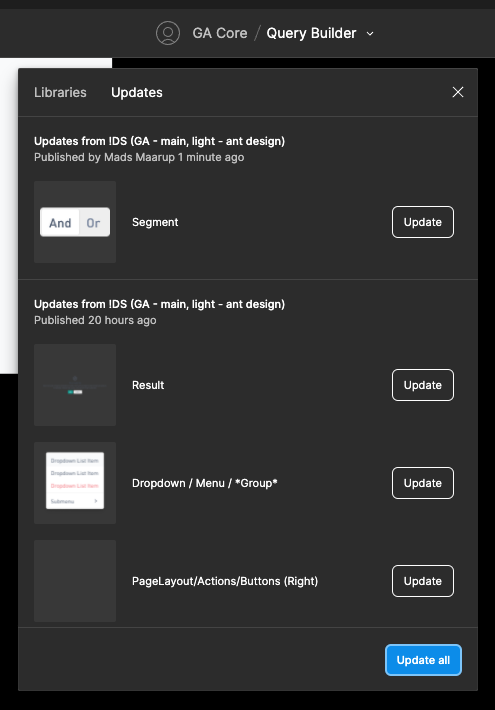
Figma library doesn't update

When i click Update all, nothing happens.
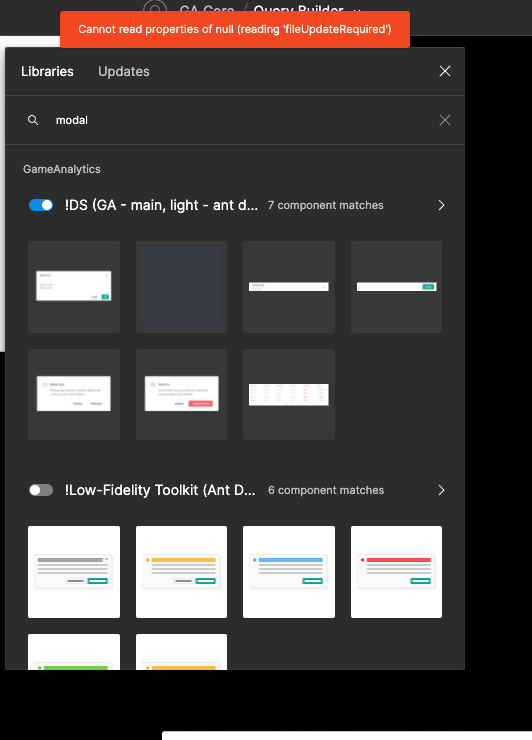
I cant use the component either, then it gives me an error with "Cannot read properties of bull (reading ‘fileUpdateRequired’)

Anyone knows how to fix this?
This topic has been closed for replies.

13 replies

Corey_Korhan
New Member
June 28, 2022

Can you give it another go through browser? Specifically with chrome - if you have.

Mads_Maarup
June 28, 2022

Already did 😦

Gabriel_Champeix
New Member
June 29, 2022

I have a similar issue. I have a Library file, and when I pull some components from it on another file, it also says “Cannot read properties of null (reading ‘fileUpdateRequired’”. I have pushed all the necessary updates from the Library, there’s nothing left to update. I use the desktop app, my Internet connection is stable. I reproduced the same problem on a colleague’s computer.

Anyone can help us fix this?

Mads_Maarup
June 30, 2022

I figured out if you open the Library Figma file and just use CMD+C and the CMD+V in the file where you want to use the component it fixes the issue. But only for that specific component. I have 300 components… Sooo, this is more like a quickfix… I guess the error happened after the last update

James_Mitchell
June 30, 2022

I had the same issue but I think one of the following fixed it:

  • Making an arbitrary change in the library file and publishing/accepting updates again
  • Removing a component with a duplicate name from the library file

My guess is the first one that fixed it.

Rachel_Iczkovits1
July 28, 2022

I just had the exact same error showing up.
After making some more random changes to the problematic component - it now works again.

So thanks @James_Mitchell and I’ll just confirm that your first suggestion worked for me too

Achille_Perrin
September 1, 2022

Same bug happened to me.
The change i did in my file was to add a variant to a component that had none initially.
I removed the variant from the set and placed it back in, updated and published and that did the trick.
Really weird bug

Venky
October 11, 2022

This one worked for me. I just did cut, paste the same variant in same place. Thanks @Achille_Perrin

Drew_Bollinger
October 11, 2022

Just commenting to +1 this issue (don’t see any other way to do that)

Thierry_Vilaysith
November 29, 2022

FileUpdateRequired: Can’t put instances on the canvas
2022-11-29 3.25.00 PM