Ashu_Tiwari
New Member
April 2, 2023
Solved

Figma file import failed?

There is a two-week-old local Figma file I’m trying to import but I’m getting this error again and again “Image import failed”. Why Figma is not able to import its own file extension?


This topic has been closed for replies.
Paulo_Ricardo_Manuel_Cabral
April 3, 2023

I think I had the same problem, ai don’t understand why.
Here’s something worked for me:

1 - Create e new Figma file
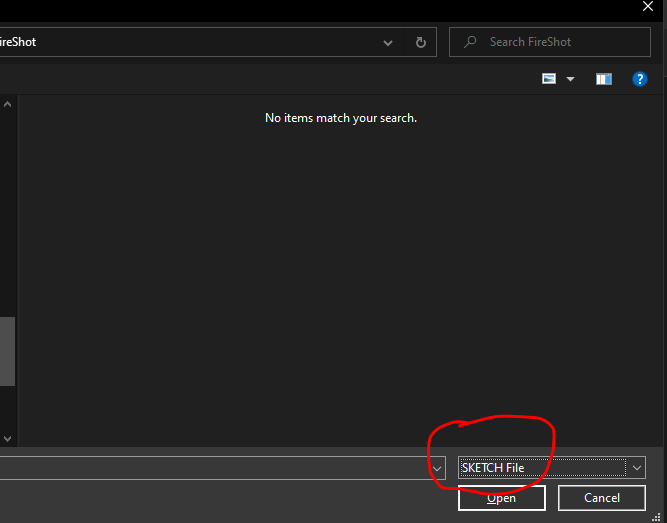
2 - Go to File > New from sketch file
3 - In the “select box” choose “All files”


4 - Grab your Figma file

It should open this way.

5 replies

Paulo_Ricardo_Manuel_Cabral
April 3, 2023

I think I had the same problem, ai don’t understand why.
Here’s something worked for me:

1 - Create e new Figma file
2 - Go to File > New from sketch file
3 - In the “select box” choose “All files”


4 - Grab your Figma file

It should open this way.

Ashu_Tiwari
New Member
April 3, 2023

@Paulo_Ricardo_Manuel_Cabral Thanks, It worked.

Abrar_alhadi
New Member
August 1, 2023

I have the same issue and didn’t work with me

August 29, 2023

you can not open the files directly into the canvas/ open project , go back to files and drop the .fig file there in the files menu.

September 25, 2023

Worked for me, cheers.