

Shikhar Agarwal
New Member
June 20, 2025
Question

Figma Dev More MCP get_code getting stuck on loading even on very small components

  • June 20, 2025
  • 6 replies
  • 1297 views

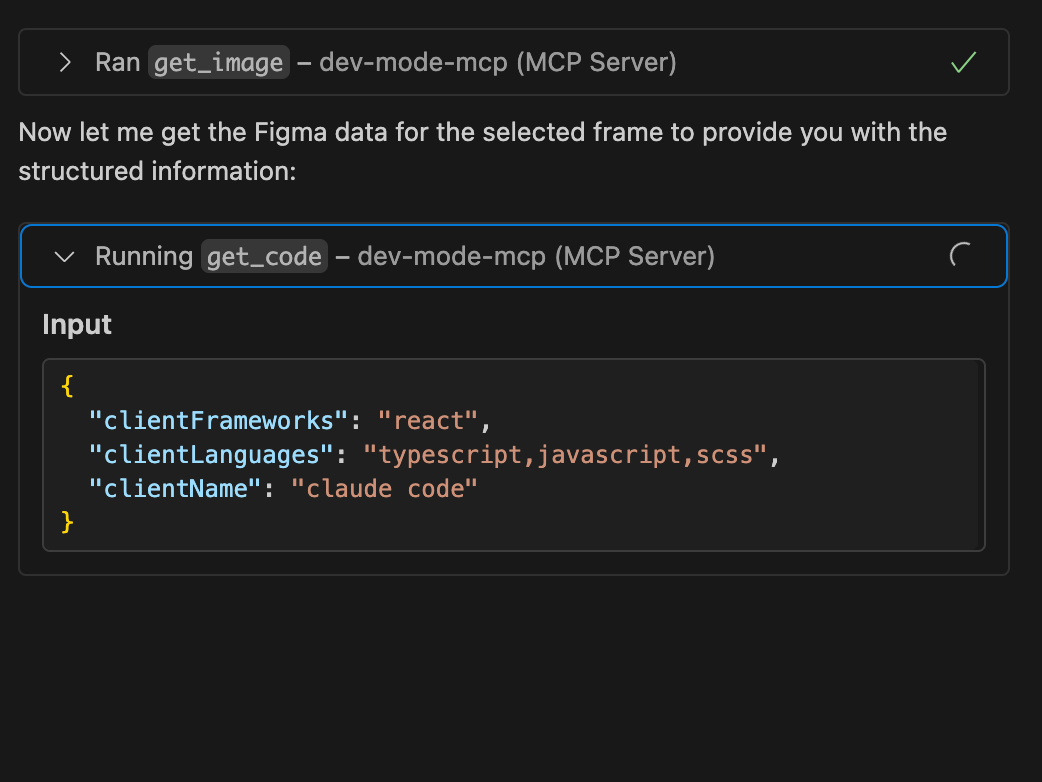
The get_code just gets stuck on this even if I select the smallest of frames.


I am using a local proxy setting so is it because of that and if yes, how can I configure it figma to detect the proxy and get this working?
 

    This topic has been closed for replies.

    6 replies

    Celine_
    Figmate
    Community Support
    June 20, 2025

    Hi ​@Shikhar Agarwal ,

    Thanks for flagging this! As a temporary solution, please try the following steps:
    1. Wait a moment and try again — it may just be a temporary connection issue.
    2. Make sure you're running the latest version of the Figma desktop app. You can check by clicking ‘Figma’ in the top-left corner and selecting ‘Check for Updates…’.


    3. If the issue continues, try restarting both your Figma desktop app and your code editor.

    4.Also, restart the server in VS Code. Some users have seen similar issues when multiple VS Code windows are open, so try closing any extras windows if that applies.

    5.For your reference, here’s our guide with some MCP best practices that can be helpful for you.

    If none of these steps resolve the issue, I recommend reaching out to our support team directly here: Submit a bug report

    Make sure to use your Figma email and include the steps you've tried. Also, please grant “can edit” access to support-share@figma.com so the team can take a closer look. Thank you!

    HermanZ
    New Member
    June 24, 2025

    Same problem, get_code just didn’t work. Even restart many times. 


    Figma Desktop App version 125.4.9

    Cursor v1.0.0


    Any updates? Thanks

    Celine_
    Figmate
    Community Support
    June 24, 2025

    Hi Herman Z, can you please submit a bug report ? Our team is keen to dig into this further with you.
    For others who encounter similar issues, please also reach out to our support team so they can take a closer look.

    Here are some additional insights on the MCP server from our product team: 


    1. If things are freezing or timing out, it’s often a handshake issue between Figma and your IDE. Try restarting both..😅 I know.. but it is effective..


    2. If it keeps failing, please reach out with your setup and an example, we’d love to debug it with you.


    Thank you!

    Tomita Kazuki
    New Member
    June 26, 2025

    Me too. I have tried rebooting, updating the desktop app, etc.

    This only seems to happen with get_code. get_image returns a screenshot immediately.

    DavidL
    New Member
    July 21, 2025

    Just throwing this out there, but what worked for me was restarting both. Multiple times. And my computer. One time didn’t do it for me, had to be a few times.

    Best of luck yall!

    Celine_
    Figmate
    Community Support
    July 23, 2025

    Hey ​@DavidL , glad to hear it’s working for you now!

    @Tomita Kazuki , if you're still experiencing the issue, I’d recommend reaching out directly to our support team so they can take a closer look at what might be happening on your side. They’ll be best equipped to help you troubleshoot further. You can submit a bug report here. Thanks for your patience! 🙏🏼